CHAPTER 3 FLYING THE EFD1000 PRO PFD
EFD1000 PRO MAX PFD Pilot’s Guide
Page 3-8
091-00005-002 () EFD1000 PRO MAX PFD Pilot’s Guide
Page 3-9
091-00005-002 ()
3.5 Power Override
To override the automatic power configuration, the following methods can be used
to shut off the PFD.
Switching between Battery and External Power
1. Push the MENU Button. The Main Menu displays.
2. Rotate the Right Knob until the POWER SETTINGS Menu page displays.
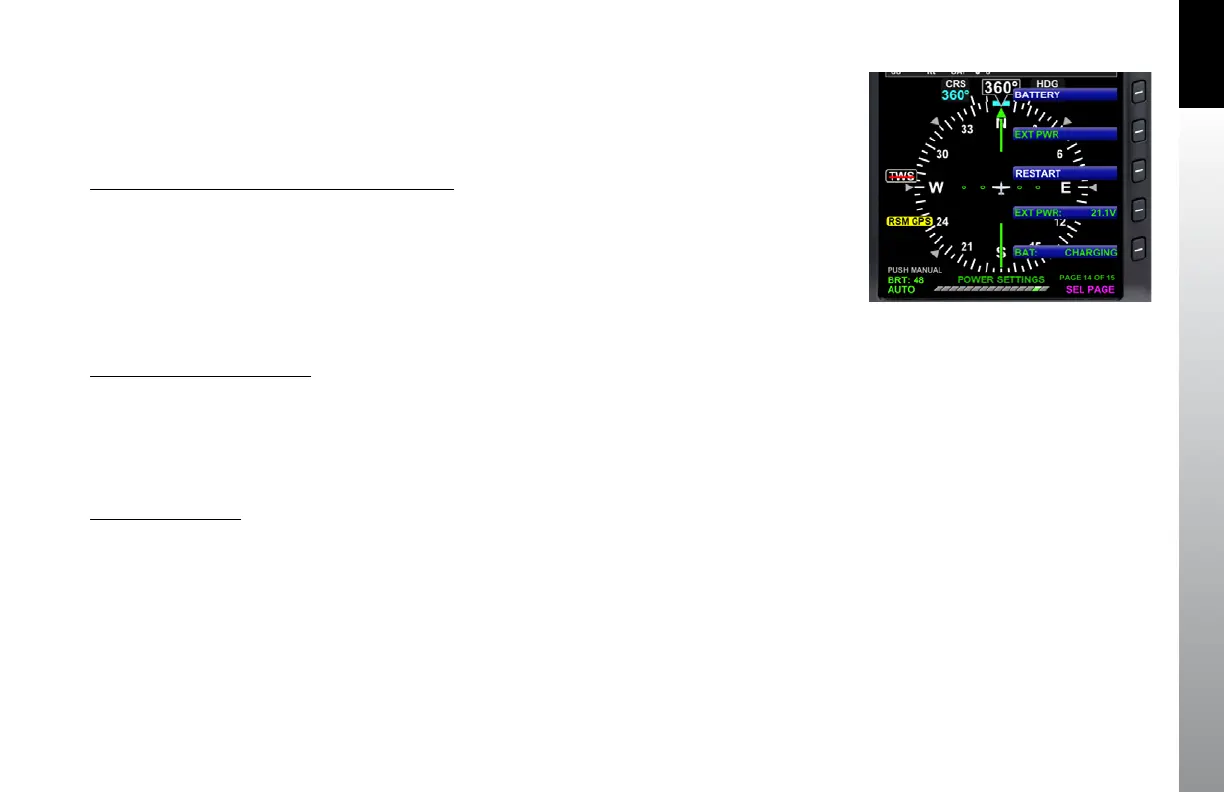
3. MENU Button 1 and 2 show the power source options of BATTERY and EXT
PWR respectively. The current power source label is green; the other label is
white (Figure 3-8). Push either button to alternately switch between external
power (EXT PWR) or the internal battery (BATTERY).
View External Voltage Status
1. Push the MENU Button. The Main Menu displays.
2. Rotate the Right Knob until the POWER SETTINGS Menu page displays.
3. The EXT PWR MENU Button, (Figure 4-31) displays the external power voltage.
4. Push the MENU Button to exit the Menu.
View Battery Status
1. Push the MENU Button. The Main Menu displays.
2. Rotate the Right Knob until the POWER SETTINGS Menu page displays.
3. The BAT MENU Button (Figure 4-31) displays the current battery status
as a percentage of charge .
4. Push the MENU Button to exit the Menu.
Figure 3-8
Power Settings Menu



 To Next Page