CHAPTER 4 REFERENCE GUIDE
EFD1000 PRO MAX PFD Pilot’s Guide
Page 4-42
091-00005-002 ()
4.5.10 Aircraft Heading Display
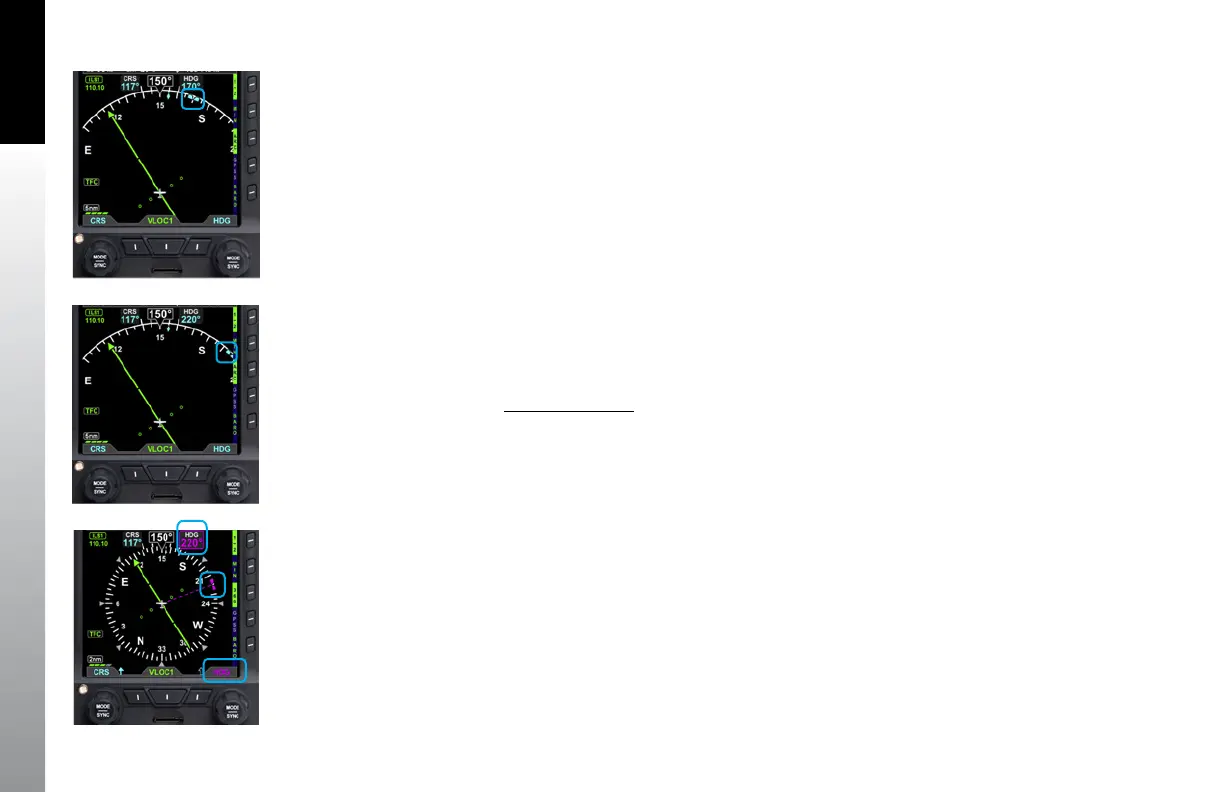
The aircraft heading is displayed in degrees magnetic (Figure 4-80). The PFD offers a
pilot-selectable Heading Bug. The Heading Bug symbol is positioned on the compass
scale according to the Selected Heading Field value (HDG) set by the pilot
(Figure 4-81).
When the Selected HDG Field value is outside the visible compass scale range in the
ARC Compass mode, only a portion of the Heading Bug is shown at the edge of the
compass arc, closest to the HDG value (Figure 4-82).
When selected for editing, the Heading Bug and the Selected HDG Field value are
shown in magenta. Additionally, a dashed magenta line extends from the Ownship
Symbol to the Heading Bug, corresponding to the HDG value. When the Heading Bug
is SYNCed, the HDG value is set to the current heading.
Set Heading Bug
1. Press the Right Knob.
The HDG label above the Right Knob and the Selected Heading Field are enabled for
editing, both rendered in magenta (Figure 4-83).
2. Rotate the Right Knob to change the value of the Selected Heading Field.
Or
1. Press and hold the Right Knob until the HDG becomes set to the current
aircraft heading.
Once the HDG value is set, and after 10 seconds of inaction, the Selected HDG Field is
disabled, and both the Right Knob State and the Selected Heading Field are displayed
in cyan.
Figure 4-81
Heading Bug and Selected
Heading Field
Figure 4-82
Selected Heading Bug Outside of
the ARC Compass Scale Range
Figure 4-83
Heading Selected to Edit



 To Next Page