CHAPTER 4 REFERENCE GUIDE
EFD1000 PRO MAX PFD Pilot’s Guide
Page 4-33
091-00005-002 ()
Localizer Back Course (BC) Operation
When flying a Back Course final approach (the aircraft heading is opposite to the localizer
front course), set the CRS value to the front course localizer or ILS approach value. The tail
of the CDI will match the back-course runway’s magnetic orientation.
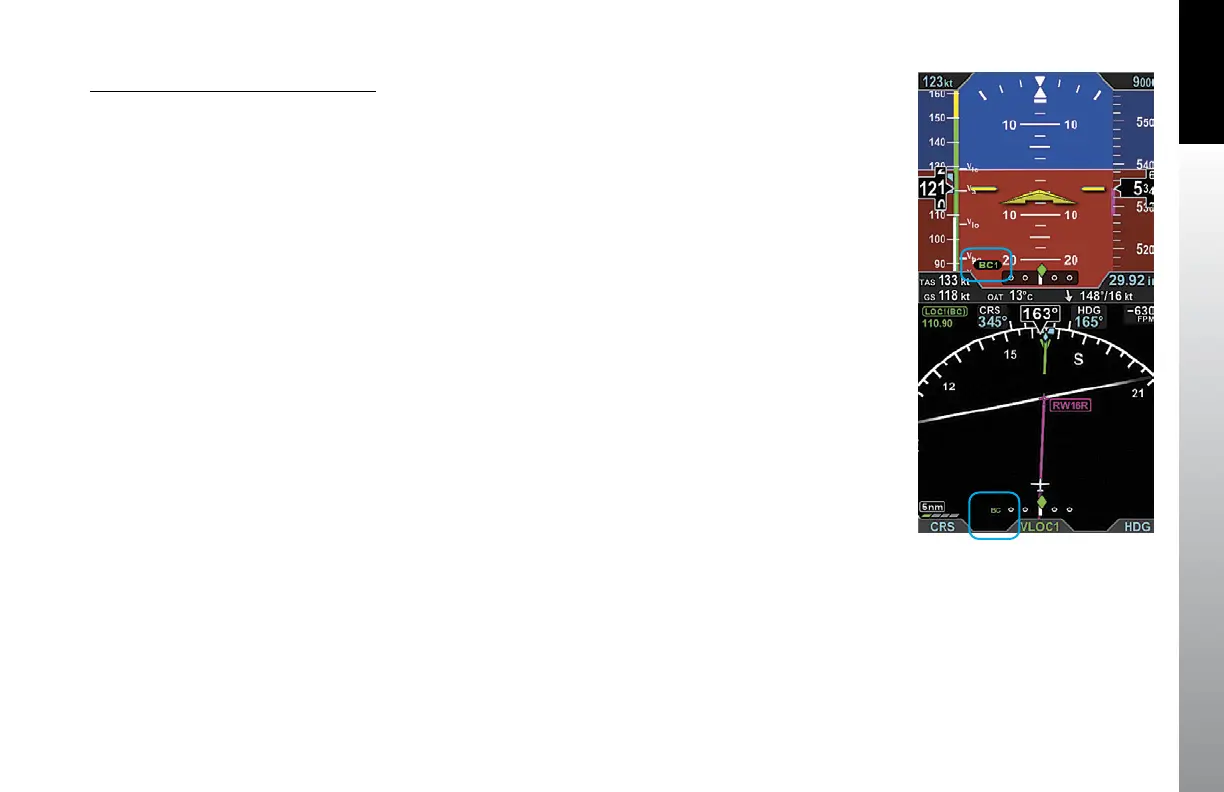
When the LOC(BC) mode is active, two “BC” annunciations are shown; on the Attitude
Display left of the Lateral Deviation Indicator (LDI) and on the ARC Compass left of the
Course Deviation Scale (Figure 4-60). The left/right deviation indications are corrected
for reverse sensing and will behave intuitively, the same as with a front course localizer.
4.5.6 CDI Navigation Source
When the PFD powers up, the default Selected CDI Navigation Source is the last
source selected. The pilot can select from any of the installed navigation sources
using the Middle Button. The PFD supports navigation information display from VHF
Omnidirectional Radio Range (VOR) Navaids, Localizers (LOC), Glide Slope receivers
(GS), and Global Positioning Systems (GPS). There can be up to four dedicated, two
integrated, or a combination of one integrated and two dedicated navigation
systems installed.
When individual GPS and VLOC devices are installed, the GPSS signal source, GPS
position, flight plan, and information for VLOC1, VLOC2, and GPS1 are provided by the
GPS1 navigation source whenever GPS1 is selected as the CDI navigation source and by
GPS2 whenever GPS2 is selected as the Selected CDI navigation source.
Figure 4-60
Back Course (BC) Annunciation Locations



 To Next Page