CHAPTER 4 REFERENCE GUIDE
EFD1000 PRO MAX PFD Pilot’s Guide
Page 4-20
091-00005-002 ()
4.3.4 Radio Altitude Display
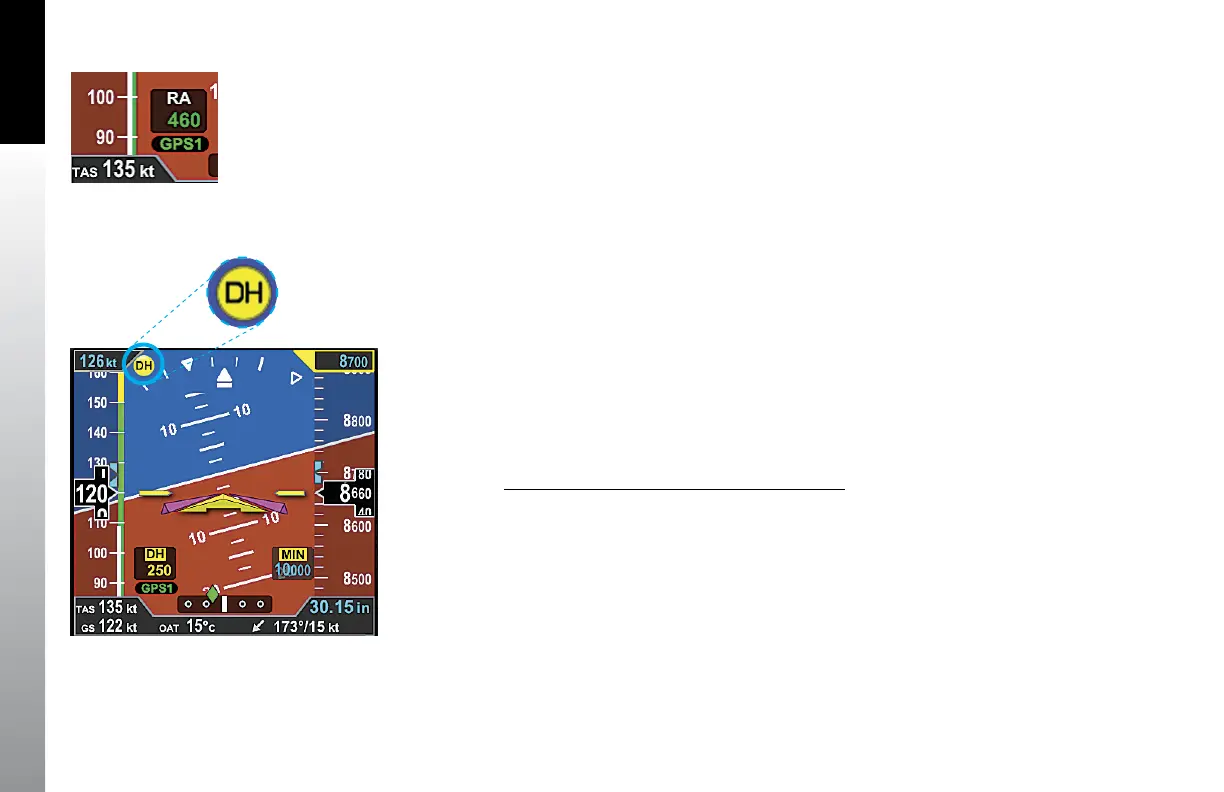
When a compatible radio altimeter is connected to the Evolution Display, radio altitude
height in feet above ground level (AGL) can be displayed at the bottom left of the
Attitude Display (Figure 4-31). When the aircraft is above the maximum range of
the radio altimeter, the Radio Altimeter display window is removed. The maximum
displayed altitude value will depend on the range of the radar altimeter equipment
installed in the aircraft.
Radio Altitudes that are greater than or equal to 500 feet AGL are displayed in 100 foot
increments (RA 500, RA 600, RA 700...) and altitudes less than 500 feet AGL are displayed
in 10 foot increments (RA 490, RA 480, RA 470...)
The digital readout in the Radio Altitude (RA) window is normally displayed in green,
however, when the aircraft is at or below the Decision Height (DH) set on the onboard
radio altimeter’s indicator (if applicable), the RA window on the PFD will show the DH
legend as inverse amber and the current RA readout in amber. An amber DH (Decision
Height annunciation is also displayed near the upper left corner of the Attitude Display
(Figure 4-32).
Enable or Disable the Radio Altitude Display
1. Press the MENU Button and rotate the Right Knob to the GENERAL SETTINGS
A page.
2. Press the RAD ALT Menu Key and rotate the Right Knob to toggle between
ENABLE or DISABLE.
3. Press the MENU Button to exit.
Figure 4-32
DH Annunciation
Figure 4-31
Radio Altitude



 To Next Page