CHAPTER 4 REFERENCE GUIDE
EFD1000 PRO MAX PFD Pilot’s Guide
Page 4-11
091-00005-002 ()
Set Textual Vspeed Labels
1. Press the MENU Button.
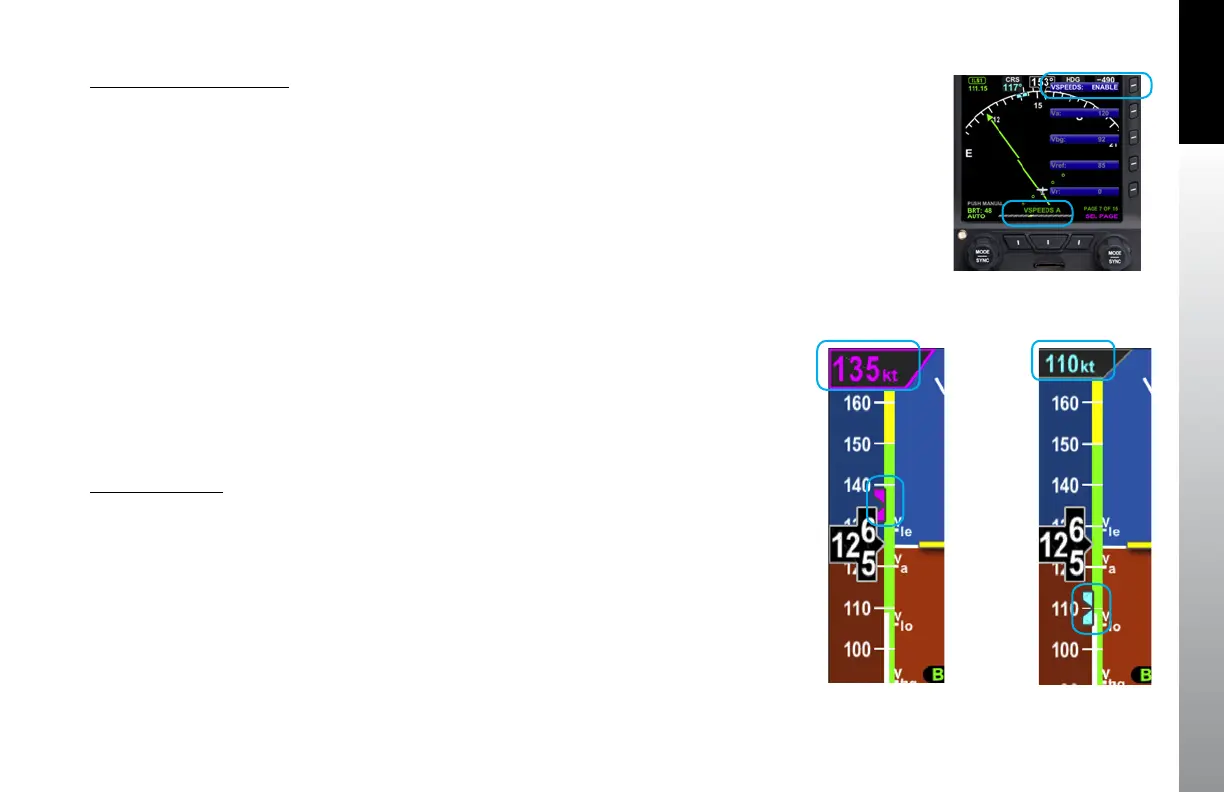
2. Rotate the Right Knob to the appropriate Vspeed Menu page (Figure 4-13).
3. Press the appropriate Vspeed Menu Key.
The Menu label turns magenta, and the EDIT VALUE label displays above
the Right Knob Rotate the Right Knob to the desired value
4.2.2 Selected Airspeed
The Selected Airspeed Field value and associated Airspeed Bug are shown on the
Airspeed Tape. The Selected Airspeed Field value is shown at the top of the Airspeed
Tape. The Airspeed Bug is displayed next to the Airspeed Tape when the Selected
Airspeed value is within the visible range of the tape. The Selected Airspeed Field’s
default value is 20 knots Indicated Airspeed (IAS), or the value previously set. SYNCing
the IAS field sets the Selected Airspeed Field value to the current indicated airspeed
Setting the Selected Airspeed Field to a value less than 20 disables the Airspeed Bug
and dashes the Selected Airspeed Field value.
Set Airspeed Bug
1. Press the Left Knob until IAS is shown above the Left Knob. The Airspeed Field
and Airspeed Bug appear in magenta - enabled for editing (Figure 4-14).
2. New Airspeed Selected. Rotate the Left Knob clockwise to increase, or
counterclockwise to decrease the airspeed value in the Selected Airspeed
Field. After 10 seconds of inactivity, label, field and bug appear in cyan
(Figure 4-15).
Figure 4-13
VSPEEDS A
Figure 4-14
Airspeed Bug Selected to Edit
Figure 4-15
New Airspeed Selected



 To Next Page