CHAPTER 2 CONTROLS AND DISPLAY
EFD1000 PRO MAX PFD Pilot’s Guide
Page 2-8
091-00005-002 () EFD1000 PRO MAX PFD Pilot’s Guide
Page 2-9
091-00005-002 ()
Left Knob
SYNC Action
IAS Set to the current indicated airspeed.
CRS
VOR navigation
Course Pointer points to the VOR. CRS value
is the reciprocal of the current VOR radial. The
deviation bar centers with a “TO” indication.
ILS navigation Current aircraft heading.
GPS
Course Pointer points to the active GPS
waypoint. The deviation bar centers with a “TO”
indication. (AUTOCRS must be disabled).
GPS
AUTOCRS enabled
No effect.
Left Knob - Current State default setting: CRS
Cyan indicates field is inactive.
Table 2-3
Left and Right Knob SYNC Description
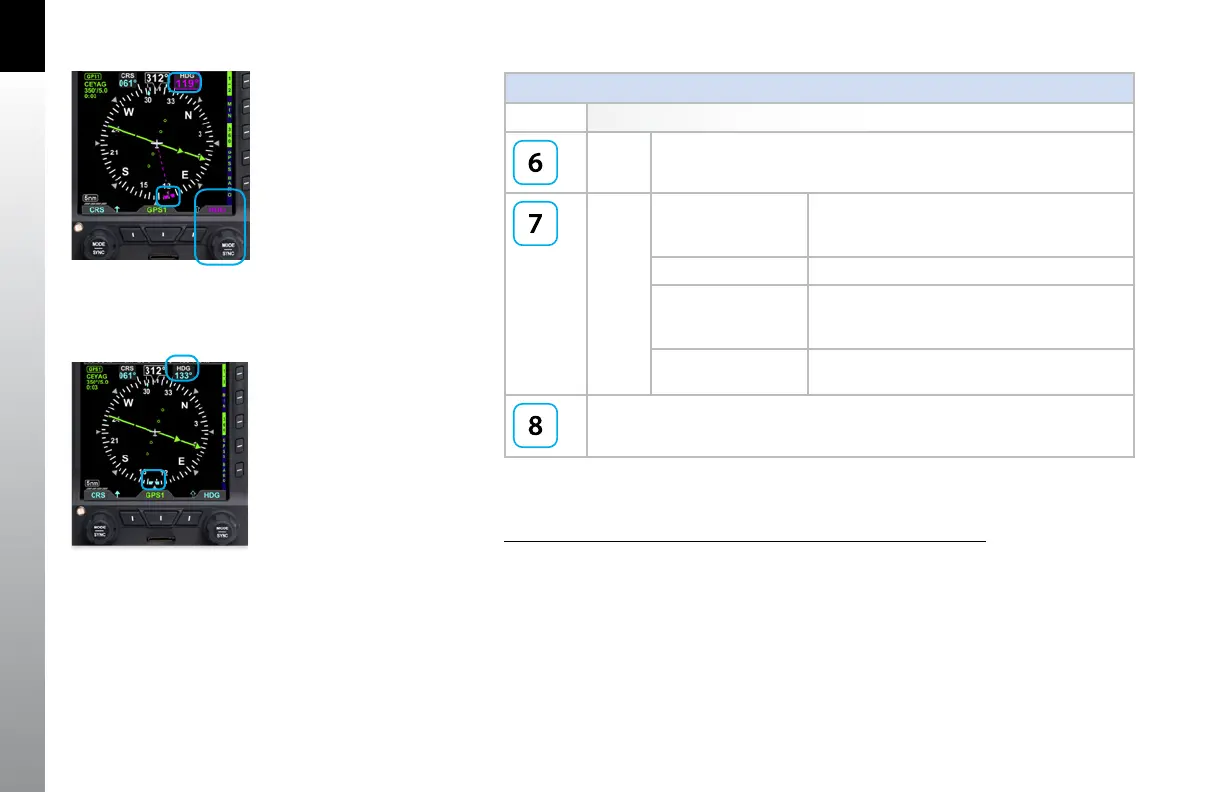
Using the Knobs (Example) How to Set the Heading Bug (HDG)
1. Rotate the Right Knob to the desired heading value, shown both by the
position of the Heading Bug and the numeric value in the Selected Heading
Field (Figure 2-4). The HDG label, Heading Bug and the Selected Heading
Field appears in magenta
2. After 10 seconds of inactivity, the knob defaults to HDG. The HDG label,
Heading Bug and Selected Heading Field value will appear in cyan
(Figure 2-5).
Figure 2-4
Editing the HDG field
Figure 2-5
HDG field updated and inactive



 To Next Page