User's Manual 6. Configuration Using the Web Interface
Version 6.6 99 MediaPack Series
6.5.2.6.5 IP Sec Associations Table
Notes:
• IP Security Associations Settings availability is in accordance with the
device's Software Upgrade Key.
• Refer to the IPSec ini file parameters in the ini file parameters section of
the Product Reference Manual.
• Refer to the IP Security sub-section in the Security chapter of the Product
Reference Manual.
To configure the IP Security Associations table:
1. Open the IP Security Associations Table page (Configuration tab > VoIP menu >
Security > IPSec Association Table).
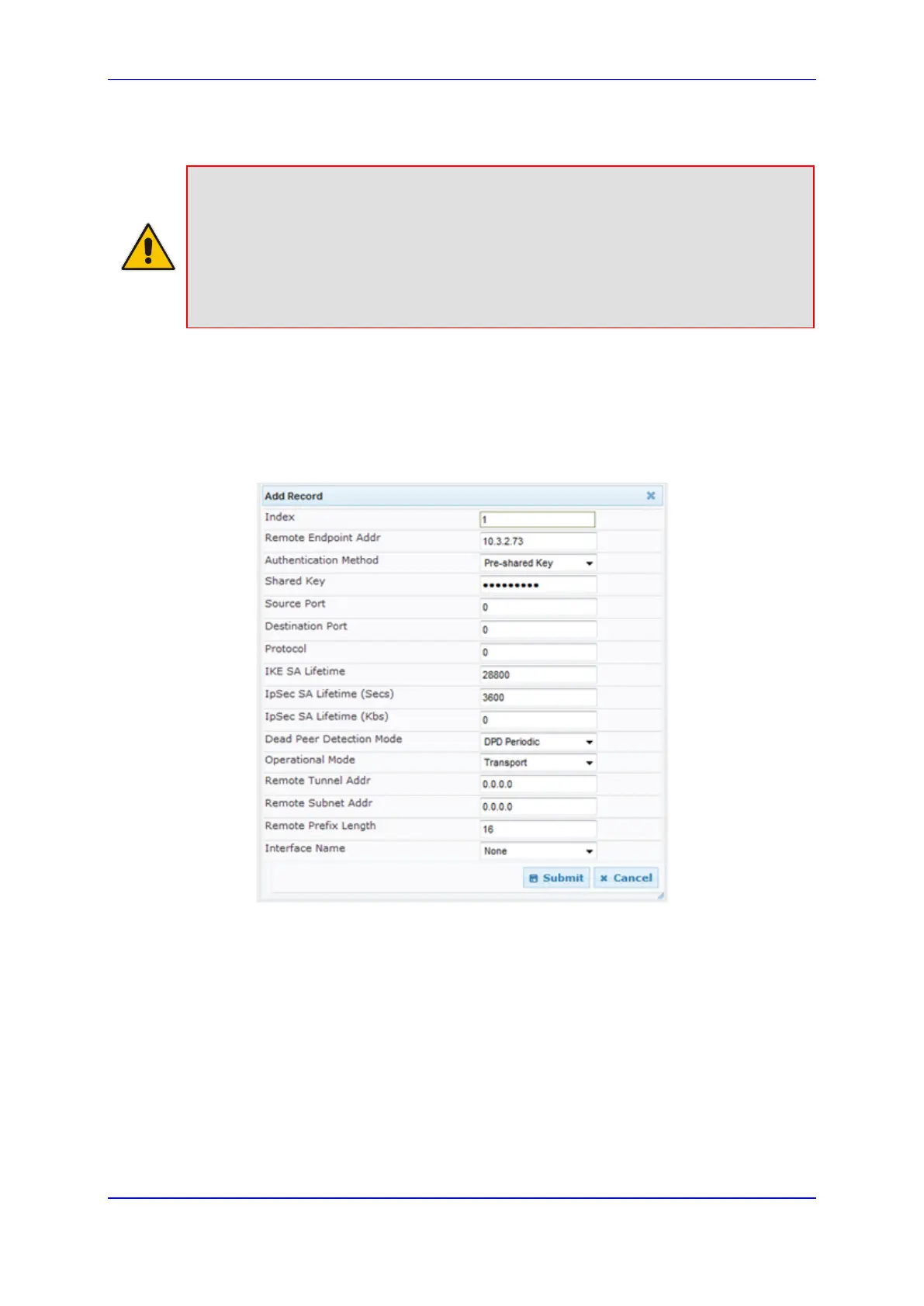
2. Click the Add button; the following dialog box appears:
Figure 61: IP Security Associations Table
3. Configure the parameters, as required. In the above figure, a single IPSec/IKE peer
(10.3.2.73) is configured. Pre-shared key authentication is selected with the pre-
shared key set to 123456789. In addition, a lifetime of 28800 seconds is set for IKE
and a lifetime of 3600 seconds is set for IPSec. For a description of the parameters,
refer to the Product Reference Manual.
4. Click Submit.
5. To save the changes to flash memory, see Saving Configuration on page 125.













 To Next Page