96
9 VCI Manager
This application pairs the tablet with the MaxiVCI V150, checks the communication
status and update the VCI firmware.
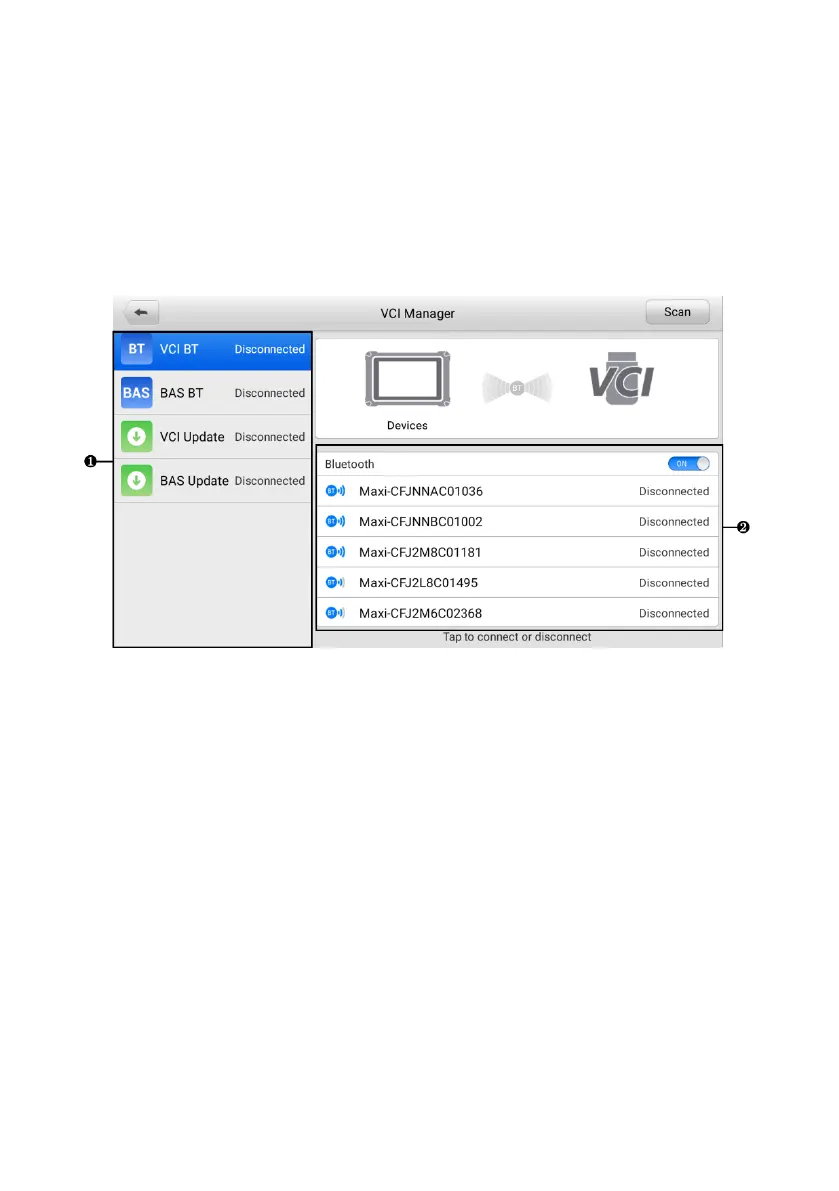
Figure 9-1 VCI Manager Screen
1. Connection Mode — there are four connection modes available for selection. The
connection status is displayed alongside.
⚫ VCI BT — when the VCI is paired to a device via Bluetooth, the connection
status displays as “Connected.” Otherwise, it displays as “Disconnected.”
⚫ BAS BT — when paired to a battery tester via Bluetooth, the connection status
displays as “Connected.” Otherwise, it displays as “Disconnected.”
⚫ VCI Update — connects the VCI to the diagnostic tablet via Bluetooth first,
then updates the VCI firmware through the tablet.
⚫ BAS Update — updates the BT506 battery tester’s firmware via the Internet
through the tablet.
2. Bluetooth Setting
Toggle the Bluetooth ON/OFF button to ON. The Bluetooth Setting screen displays
the device name for all the devices available for pairing. You can tap the needed














 To Next Page