39
➢ To auto create 1-20 sensors
1. Select the vehicle model, and select a wheel location on the screen and place
the MX-Sensor(s) near the TPMS antenna of the tablet. Tap Auto Create 1-20
Sensors to program the new MX-Sensor.
2. When the programming is complete, the programmed ID will display in the
table on the screen.
NOTE
1. A random ID will be created for the MX-Sensor. This new ID differs from the ID
stored in the TPMS ECU. Therefore, the sensor needs to be relearned.
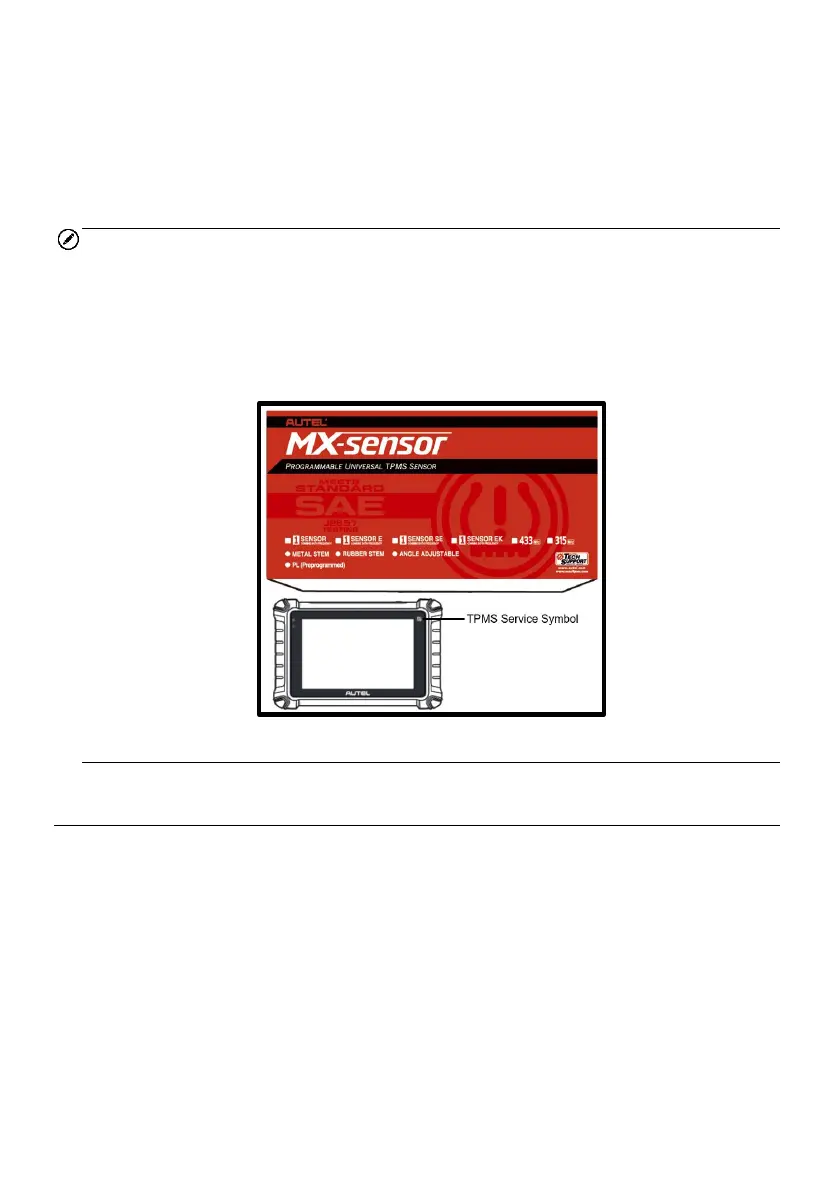
2. The tablet has the ability to program 20 MX-Sensors at once without unboxing. It is
suggested that you place the part of the tablet marked with TPMS Service Symbol
to the middle of the longer side of the packaging box, as seen in the figure below.
Figure 4-30 Auto Create 20 MX-Sensors
4.8 TPMS Relearn
This function is used to write the newly programmed sensor IDs into the vehicle ECU
for sensor recognition.
Generally speaking, relearn only needs to be performed when the newly programmed
sensor IDs are different from the original sensor IDs stored in the TPMS ECU.
There are four ways for relearn, namely OBD Relearn, Automatic Relearn, Stationary
Relearn, and Copy Relearn. The first three are relearn methods for new sensor ID,
while the Copy Relearn is a method to clone the sensor ID.














 To Next Page