69
➢ To erase codes
1. Tap Erase Codes from the Trouble Codes screen.
2. A warning message displays to inform you of data clearing when this function
is applied.
Tap Yes to continue. A Confirmation screen displays when the operation
is successfully done.
Tap No to exit.
3. Tap ESC on the Confirmation screen to exit Erase Codes.
4. Perform the Read Codes function again to check if the codes have been
erased successfully.
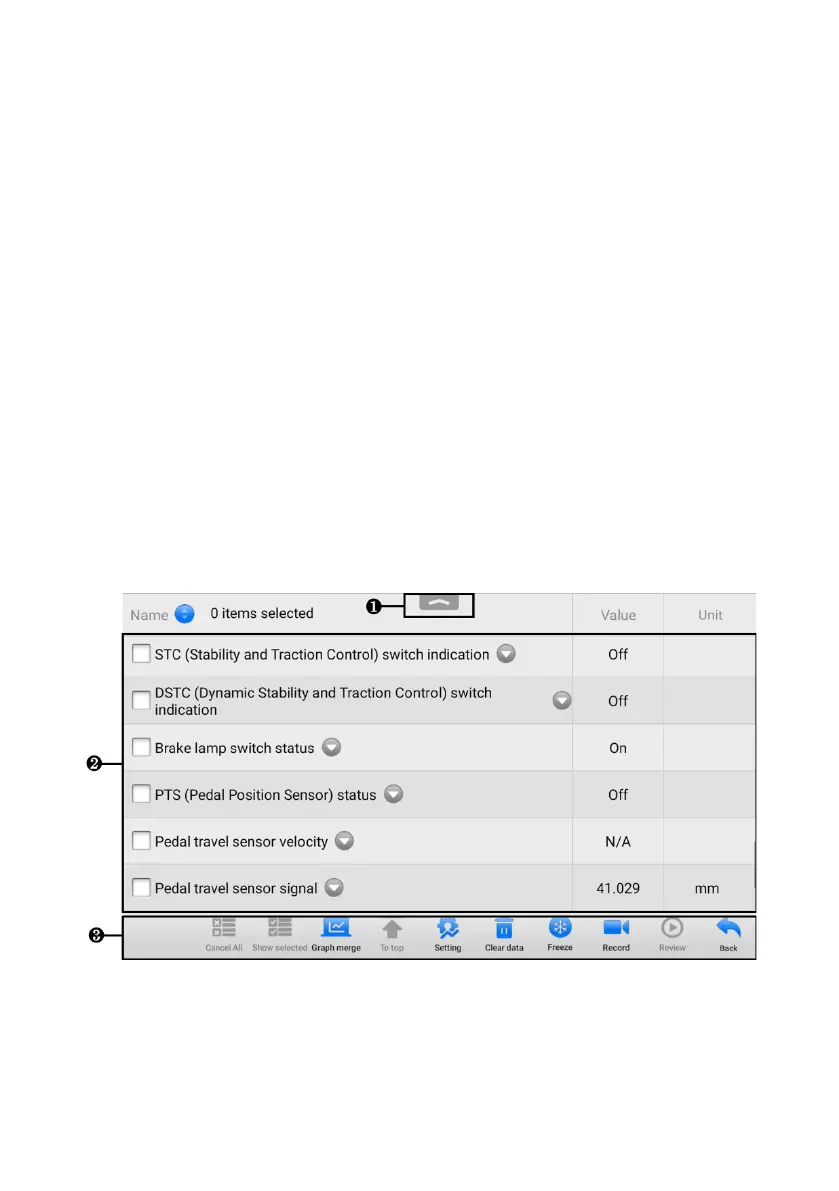
5.6.3 Live Data
When this function is selected, the screen displays the data list for the selected module.
The items available for any control module vary by vehicle. The parameters display in
the order that they are transmitted by the ECU, so expect variation among vehicles.
Gesture scrolling allows you to quickly move through the data list. Touch the screen
and drag your finger up or down to reposition the parameters being displayed if the data
occupies more than one screen. The figure below displays a typical Live Data screen.
Figure 5-16 Live Data Screen
1. Diagnostics Toolbar Buttons — tap the drop-down button at the top center of the
screen and the diagnostic toolbar buttons display. See Table 5-2 Diagnostics
Toolbar Buttons on page 61 for detailed descriptions of the operations for each
button.














 To Next Page