34
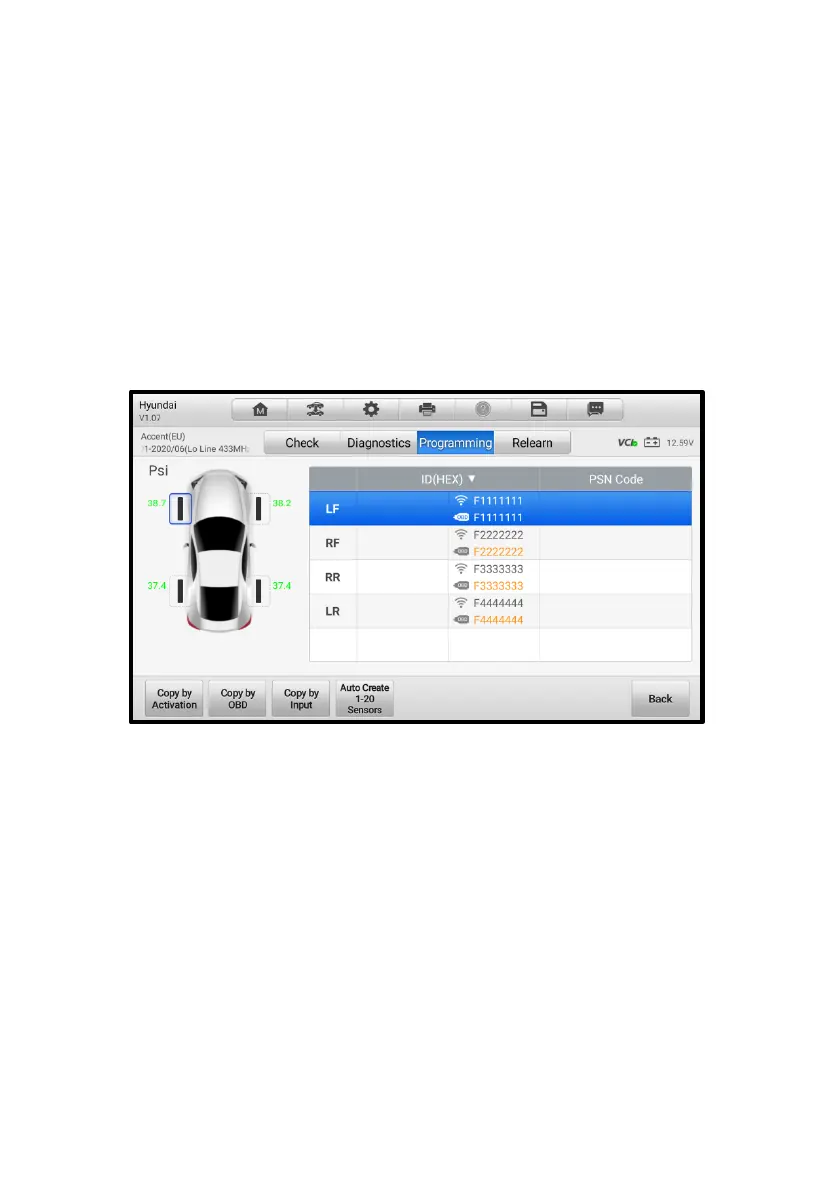
As shown in the screen above, there are four options available when programming
MX-Sensor: Copy by Activation, Copy by OBD, Copy by Input, and Auto Create 1-20
Sensors.
The main section of the screen may include:
⚫ Column 1 — displays wheel positions.
⚫ Column 2 — displays the new created sensor IDs.
⚫ Column 3 — displays the retrieved sensor IDs by activation or by OBD.
⚫ Column 4 — displays the product serial number.
The sensor IDs retrieved from sensor activation or TPMS ECU will automatically
appear on the screen with the trigger and OBD marks beside them.
Figure 4-23 Programming Screen 1
If the OBD function is not supported by the test vehicle and the sensor ID saved in the
ECU cannot be retrieved, the Programming screen appears as below.














 To Next Page