Encore Presentation System • User’s Guide 49
2. Hardware Orientation
Controller Rear Panels
`çåíêçääÉê=oÉ~ê=m~åÉäë
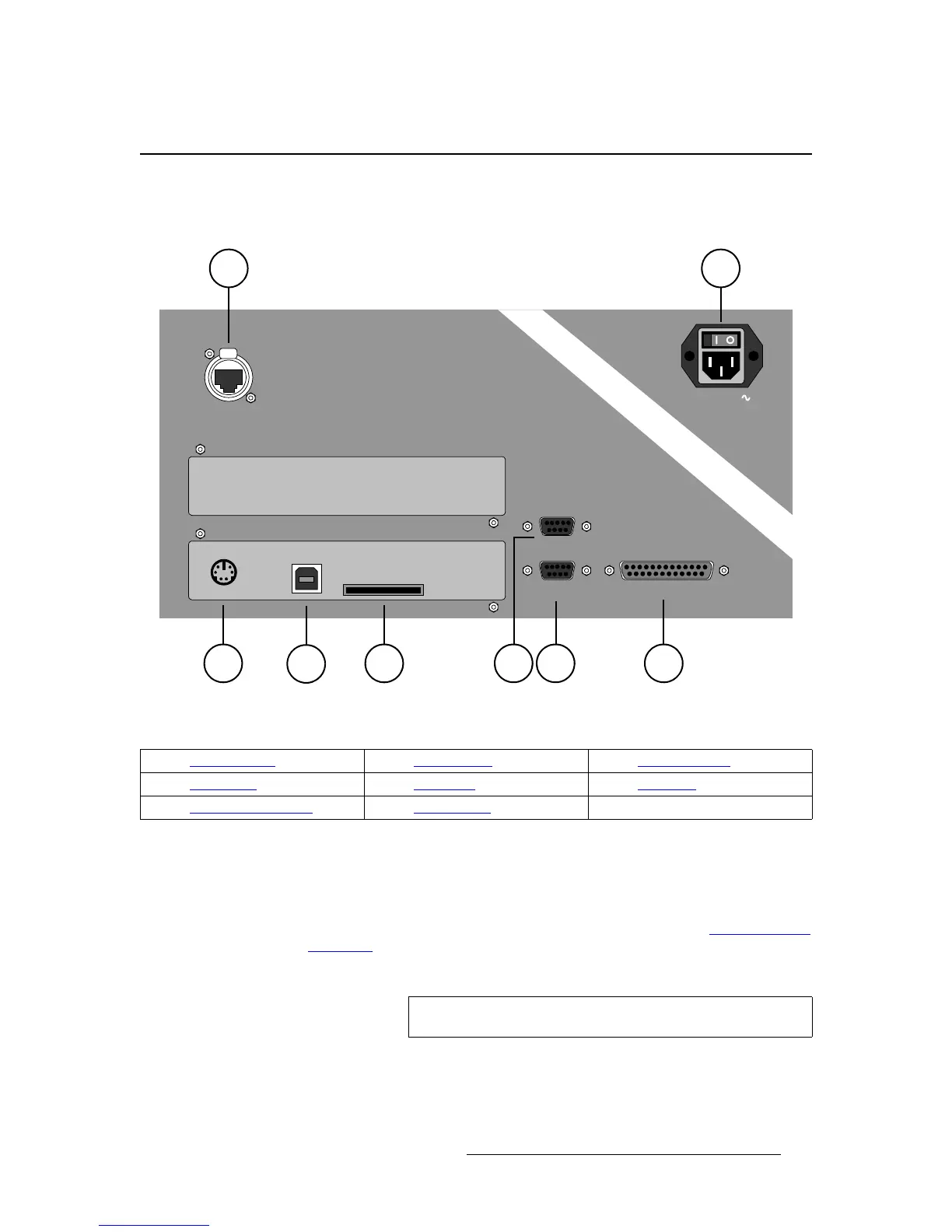
The figure below illustrates the rear panel connectors on both Controllers (SC and LC).
The panels are identical on both models.
Figure 2-4. Controller Rear Panel Connectors
Following are descriptions of each rear panel connector:
1) Keyboard Port
One standard PS/2 connector is provided for the Keyboard Port. When a
customer-supplied PS/2 style keyboard is connected, certain numeric entry and
“naming” functions can be performed. In Chapter 7, refer to the “
Using the PS/2
Keyboard” section on page 289 for details.
2) USB B Port
ETHERNET
CONSOLE TALLY
KEYBOARD USB B
MultiMedia Card
EXT COMM
100-240 V
47-63Hz, 2.75A
1
4 8
2
3 5 6 7
1) Keyboard Port 4) Ethernet Port 7) Tally Connector
2) USB B Port 5) Ext Comm 8) AC Power
3) MultiMedia Card Slot 6) Console Port
Note
This connector’s functionality is currently not implemented.



 To Next Page