62 Encore Presentation System • User’s Guide
3. Hardware Installation
Installation
táÇÉ=pÅêÉÉå=`çåÑáÖìê~íáçå
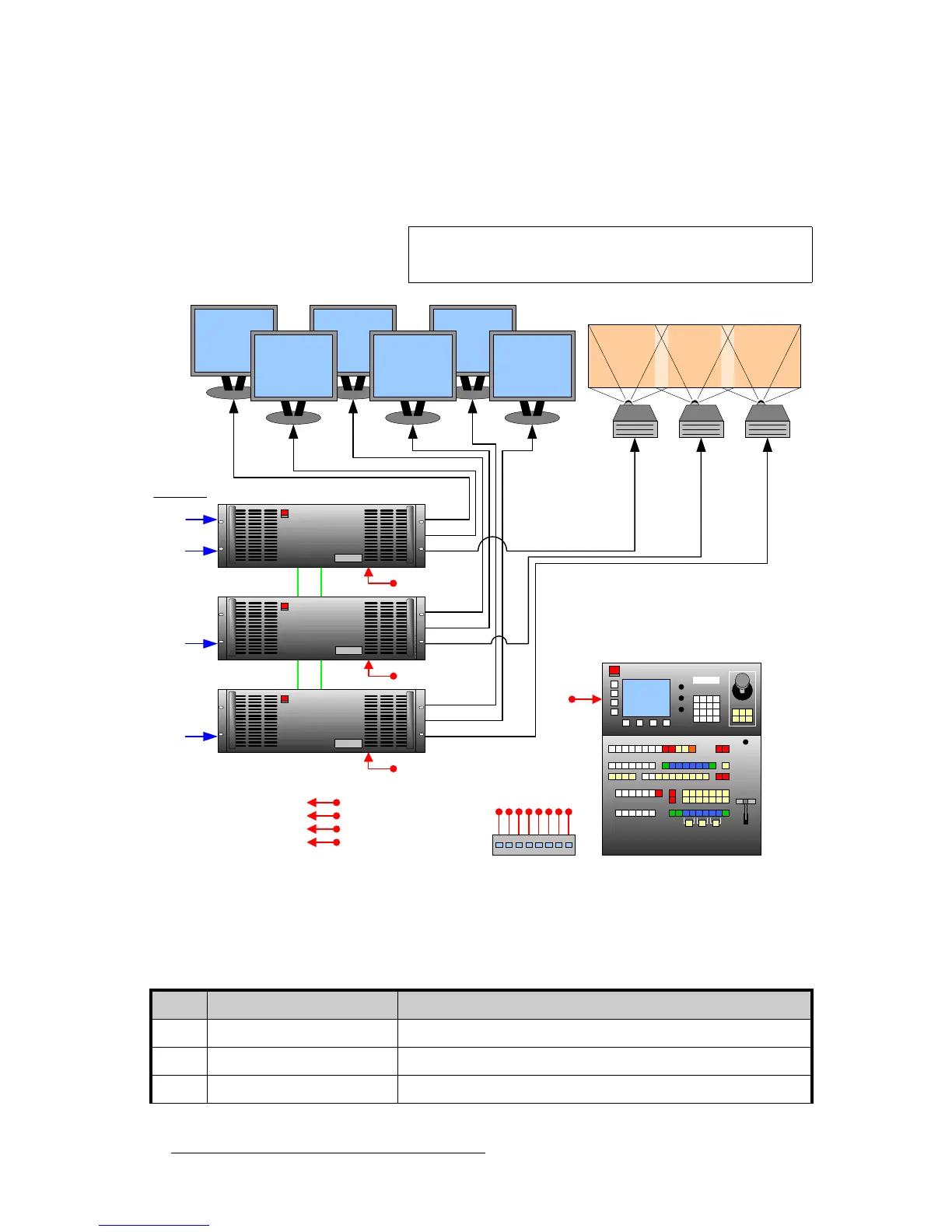
The figure below illustrates a block diagram of a “triple” wide screen configuration. Aux
destinations are not shown. Use this diagram for reference in the following procedure.
Figure 3-3. Block Diagram, Wide Screen Encore Configuration
For this procedure, you will need:
Note
This procedure can be used for Encore wide screen
configurations consisting of from 2 to 32 screens.
PG 2
PVW
PG 1
Projector #1 Projector #2 Projector #3
Program #1 Program #2 Program #3
Preview #1 Preview #2 Preview #3
Controller SC or LC
Encore Video Processor #1
VP #2
Ethernet Switch
PG 2
PVW
PG 1
PG 2
PVW
PG 1
Scaled
Sources
Unscaled
Sources
M/E Inputs
Unscaled
Sources
Unscaled
Sources
Program
Link
VP #3
Source
Link
Program
Link
Source
Link
To:
Routers
ScreenPRO-II
PresentationPRO-II
ImagePRO
Table 3-4. Equipment List, Wide Screen Encore Configuration
Qty. Item Note
3 Encore Video Processors Use 2 for a double wide screen application, 4 for a quad application, etc.
1 Encore Controller Model LC or SC
3 Video Projectors Customer supplied.



 To Next Page