R5906167 /00 ImagePRO–4K Video Processor
102
7.1 EMTS GUI: Configuration menu
Description
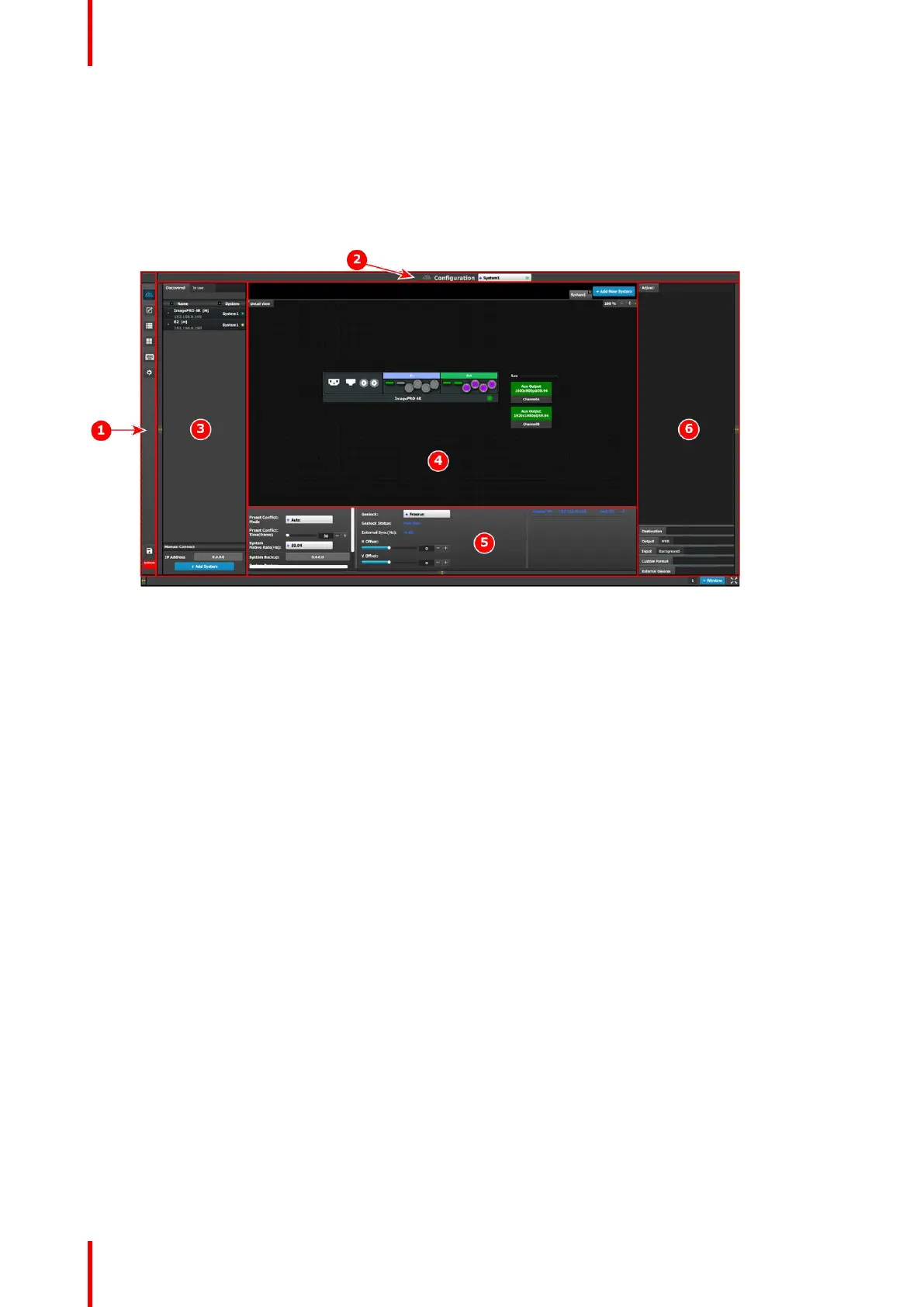
The Configuration menu, shown in the following illustration, is the first page you see when you access the
ImagePRO–4K from the EMTS GUI.
Image 7-1: EMTS GUI orientation
1. Menu navigation bar – The menu navigation
bar allows the user to choose from among the
available menus: Configuration, Programming,
Cue, Multiviewer, Controller, or Settings.
2. Title bar – The title bar shows the current menu
and the currently selected system.
3. Selection area – The selection area contains
tabs for “Discovered” systems and systems “In
use.” It also contains a field for entering IP
addresses and a button for adding systems.
4. Diagram area – The diagram area contains
graphic representations of the system in use.
5. Modifier area – The modifier area contains
system controls, such as Native Rate and
Genlock status.
6. Configuration area — The Configuration area
contains tabs and panels on which users perform
all needed adjustments. This area is largely
empty until the user selects an item from the
Diagram area.
Event Master Toolset



 To Next Page