Operation and Control System
A: R82GB0FA.PMD
B: R82DE0FA.P65
E: 080403 / T. Weiß
G: 200103 / TCS
Section 5.5
Page 21
?
Entering IF commands
In token programs it is possible to make label
jumps under certain conditions.
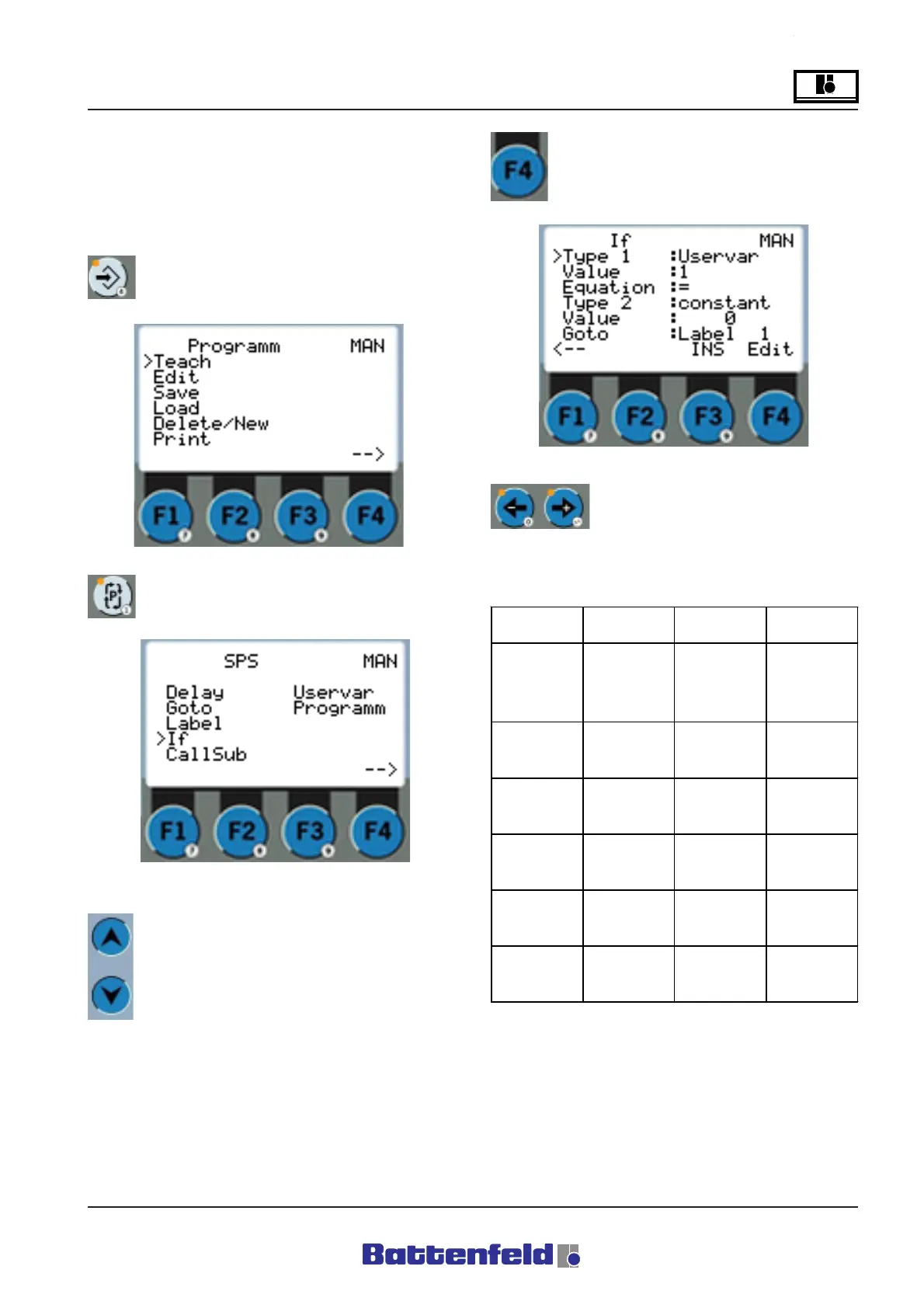
Press the PROG button.
R8B2_GB161.JPG
Press the PCS button.
Press the F4 function button.
R8B2_GB083.JPG
Use the "+" and "-" arrow keys to
adjust the individual objects.
"If" commands:
Use the cursor buttons to select ”If”.
R8B2_GB64.JPG
Type 1 Description Value1 Description
Uservar
User variable 1-10
User variable
number. Enter
actual value
under "Uservar".
Pos
Position X,Y,Z Servo axes label
Pal
Palletising
counter Total
amount
1-5
Palletising
Program No.
Palx
Palletising X-
direction
1-5
Palletising
Program No.
Paly
Palletising
counter Y-
direction
1-5
Palletising
Program No.
Palz
Palletising
counter Z-
direction
1-5
Palletising
Programm No.
R8B2_GB135.XLS



 To Next Page