Operation and Control System
A: R82GB0FA.PMD
B: R82DE0FA.P65
E: 080403 / T. Weiß
G: 200103 / TCS
Section 5.5
Page 33
?
R8B2_GB099.JPG
R8B2_GB100.JPG
R8B2_GB101.JPG
R8B2_GB098.JPG
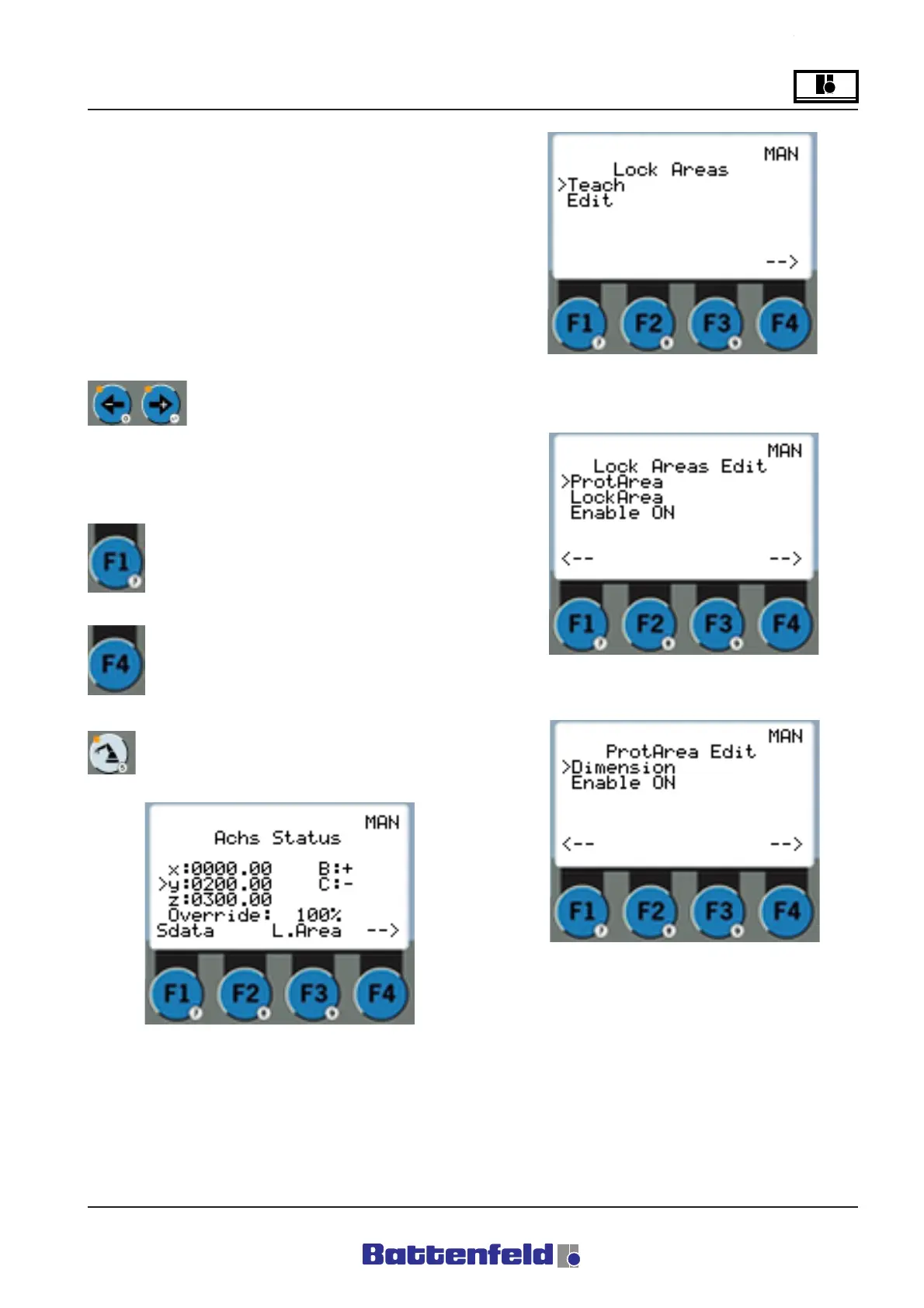
Specifying lock areas
Lock areas can only be specified at Password
levels 1 or 2. Lock areas 1- 5 are available to
users. Lock areas 6-10 are reserved for
Battenfeld service engineers.
Attention!
If TEACH enter mode is selected, the system
will automatically move to the selected value
when START is pressed.
Use the arrow buttons, with the
cursor positioned accordingly, to
activate/deactivate the Enable
function. This applies to all pages where Enable
can be selected.
Always use the F1 function button to
return to the previous display.
Always use the F4 function button to
switch displays.
Press the ROB button.
This page is used to select either TEACH or
EDIT to specify the lock areas.
Enable: All lock areas ON or OFF.
Enable: ProtArea (area to be protected) ON or
OFF.



 To Next Page