LR2000 Programming Manual V1.2
[Notes] The allowable character code range is from ASCII code <20>H to <7E>H (95
characters).
It is possible to define multiple characters for consecutive character codes. If only
one character is desired, use c1 = c2.
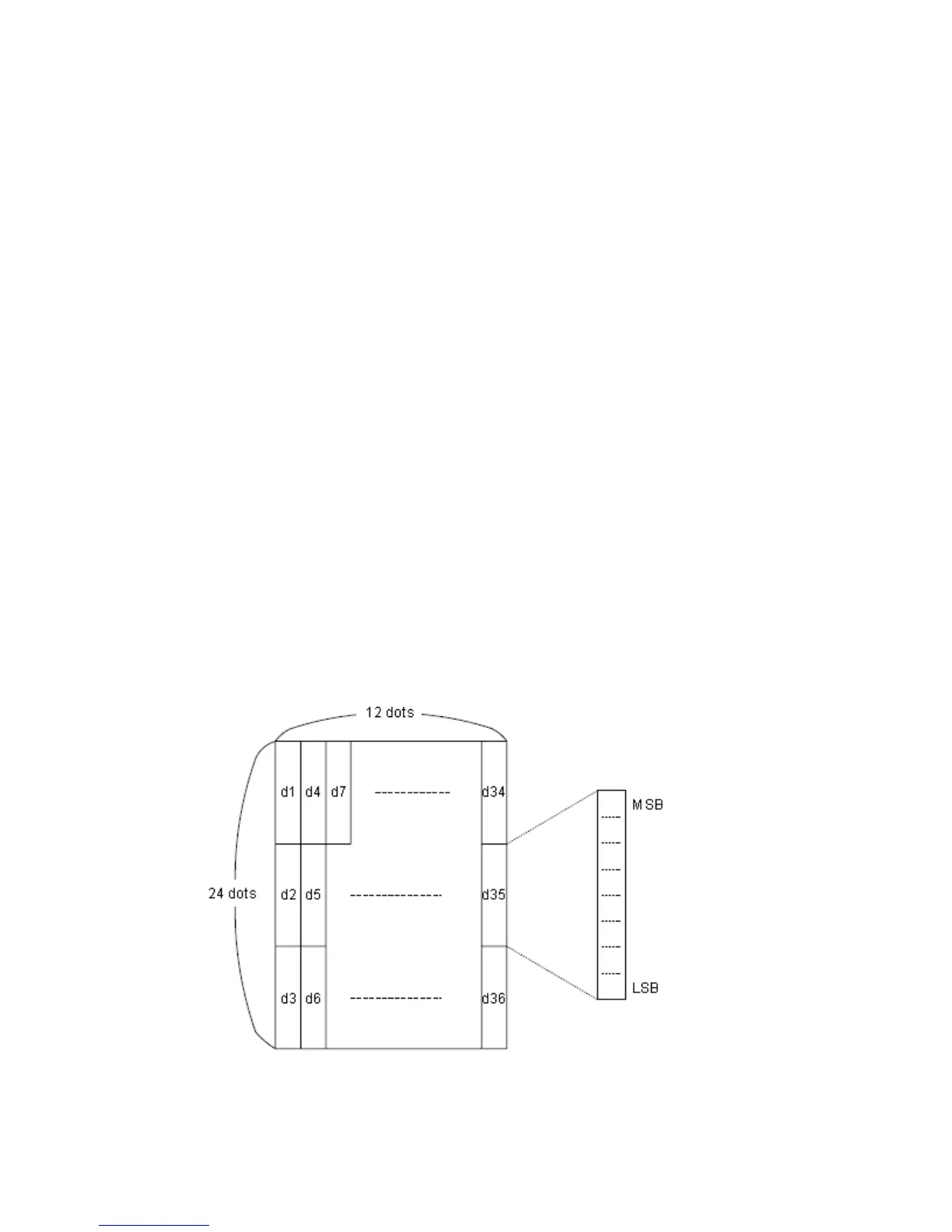
d is the dot data for the characters. The dot pattern is in the horizontal direction
from the left side. Any remaining dots on the right side are blank.
The data to define user-defined characters is (y×x) bytes.
Set a corresponding bit to 1 to print a dot or 0 not to print a dot.
This command can define different user-defined character patterns for each font.
To select a font, use ESC ! or ESC M.
User-defined characters and a downloaded bit image cannot be defined
simultaneously. When this command is executed, the downloaded bit image is
cleared.
The user-defined character definition is cleared when:
1) ESC @ is executed.
2) GS is executed.
3) ESC ? is executed.
4) The power is turned off.
When user-defined characters are defined in Font B (9 17), only the most
significant bit of the 3rd byte of data in vertical direction is effective.
[Default] The internal character set
[Reference] ESC %, ESC ?
[Example]
When Font A (12×24) is selected.



 To Next Page