LR2000 Programming Manual V1.2
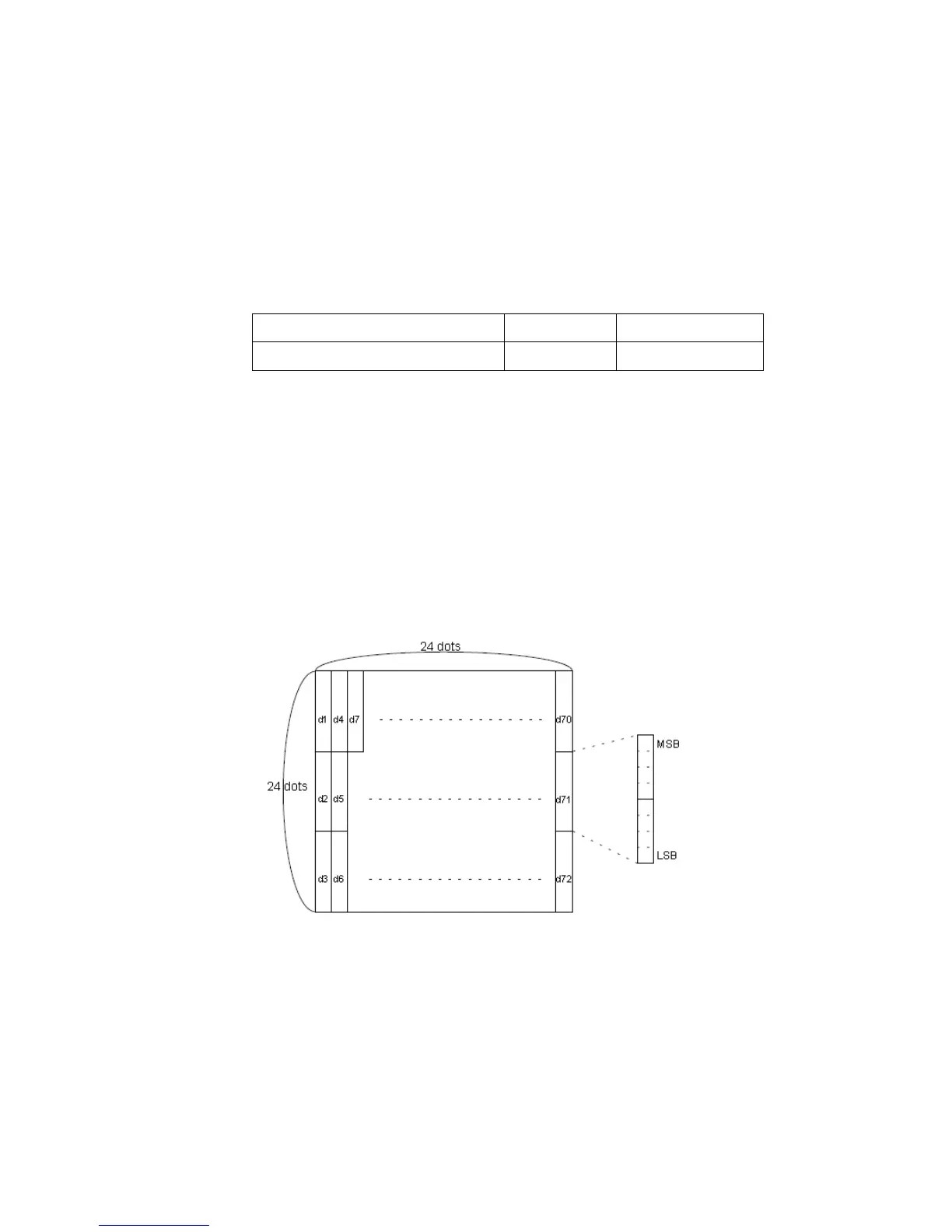
FS 2 c1 c2 d1...dk
[Name] Define user-defined Kanji characters
[Format] ASCII FS 2 c1 c2 d1...dk
Hex 1C 32 c1 c2 d1...dk
Decimal 28 50 c1 c2 d1...dk
[Range] c1 and c2 indicate character codes for the defined characters.
Chinese kanji supporting model
0 d 255
k = 32 (slip), k = 72 (paper roll)
[Description] Defines user-defined Kanji characters for the character codes specified by c1 and c2.
[Notes] c1 and c2 indicate character codes for the defined characters. c1 specifies for the
first byte, and c2 for the second byte.
d indicates the dot data. Set a corresponding bit to 1 to print a dot or to 0 to not
print a dot.
The user-defined Kanji characters is printed on the selected paper set by the ESC
c1 command.
[Default] All spaces.
[Reference] ESC c 1
FS S n1 n2
[Name] Set left- and right-side Kanji character spacing
[Format] ASCII FS S n1 n2
Hex 1C 53 n1 n2
Decimal 28 83 n1 n2



 To Next Page