LR2000 Programming Manual V1.2
When characters are enlarged with different sizes on one line, all the characters on
the line are aligned at the baseline.
The ESC ! command can also turn double-width and double-height modes on or
off. However, the setting of the last received command is effective.
[Default] n = 0
[Reference] ESC !
GS * x y d1…d(x×y×8)
[Name] Define downloaded bit image
[Format] ASCII GS x y d1...d(x×y×8)
Hex 1D 2A x y d1...d(x×y ×8)
Decimal 29 42 x y d1 ...d(x× y×8)
[Range] 1 x 255
1 y 48 (where x×y 1536)
0 d 255
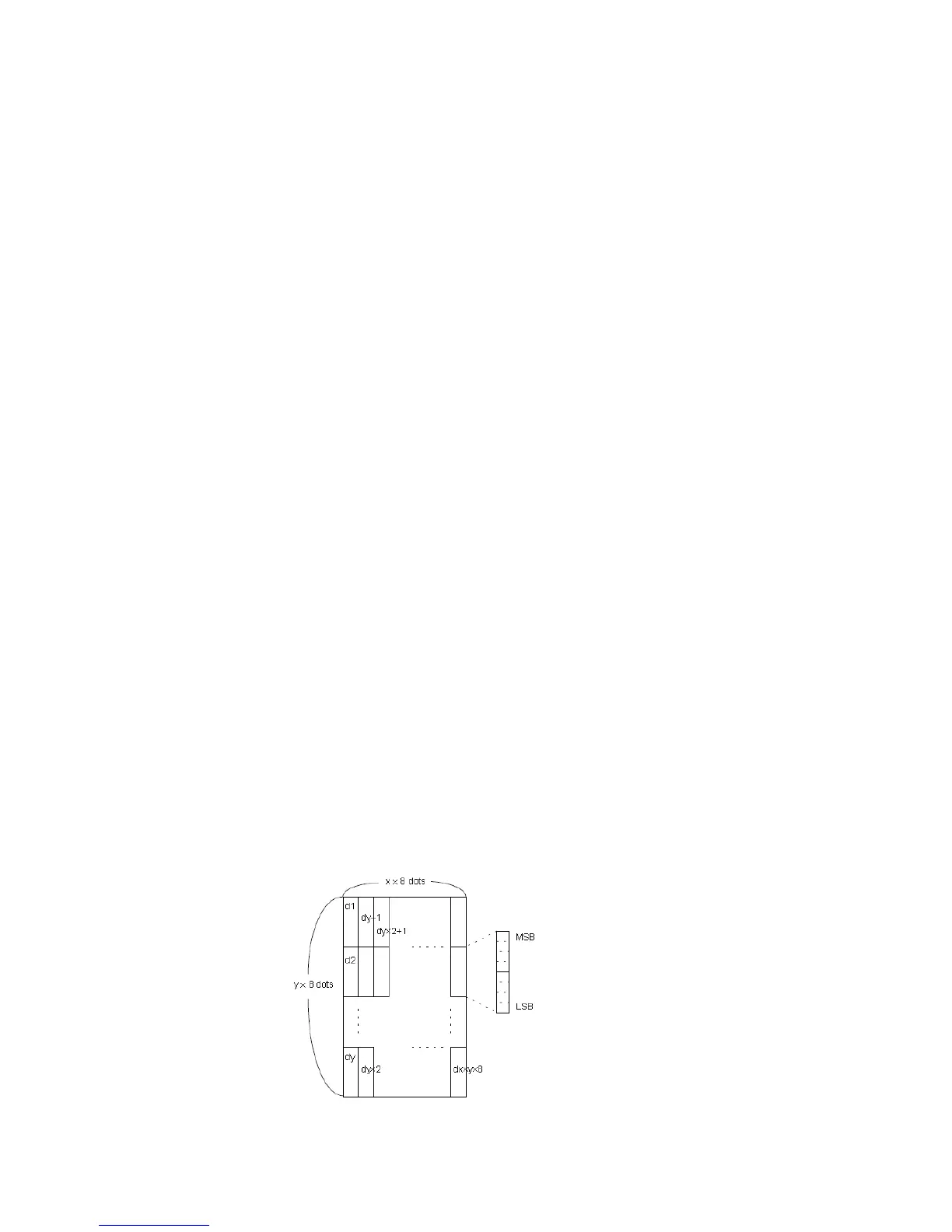
[Description] Defines a downloaded bit image using the number of dots specified by x and y.
x specifies the number of dots in the horizontal direction.
y specifies the number of dots in the vertical direction.
[Notes] The number of dots in the horizontal direction is x×8; in the vertical direction it is y×
8.
If x×y is out of the specified range, this command is disabled.
The d indicates bit-image data. Data (d) specifies a bit printed as 1 and not printed
as 0.
The downloaded bit image definition is cleared when:
1) ESC @ is executed.
2) ESC & is executed.
3) Printer is reset or the power is turned off.
The following figure shows the relationship between the downloaded bit image and
the printed data.



 To Next Page