LR2000 Programming Manual V1.2
[Format] ASC II ESC W xL xH yL yH dxL dxH dyL dyH
Hex 1B 57 xL xH yL yH dxL dxH dyL dyH
Decimal 27 87 xL xH yL yH dxL dxH dyL dyH
[Range] 0 xL, xH, yL, yH, dxL, dxH, dyL, dyH 255 (except dxL=dxH=0 or dyL=dyH=0)
[Description] The horizontal starting position, vertical starting position, printing area width,and
printing area height are defined as x0, y0, dx (inch), dy (inch), respectively.Each
setting for the printing area is calculated as follows:
x0 = [(xL + xH×256) ×0.141 mm]
y0 = [(yL + yH ×256) ×0.141 mm]
dx = [(dxL + dxH×256) ×0.141 mm]
dy = [(dyL + dyH ×256) ×0.141 mm]
[Notes] If this command is input in standard mode, the printer executes only internal flag
operation. This command does not affect printing in standard mode.
If the horizontal or vertical starting position is set outside the printable area, the
printer stops command processing and processes the following data as normal
data.
If the printing area width or height is set to 0, the printer stops command processing
and processes the following data as normal data.
This command sets the position where data is buffered to the position specified by
ESC T within the printing area.
If (horizontal starting position + printing area width) exceeds the printable area,the
printing area width is automatically set to (horizontal printable area -horizontal
starting position).
If (vertical starting position + printing area height) exceeds the printable area,the
printing area height is automatically set to (vertical printable area – vertical starting
position).
Use 0.141 mm (0.0055") pitch for setting the horizontal starting position and
printing area width, and use 0.141 mm pitch for setting the vertical starting position
and printing area height.
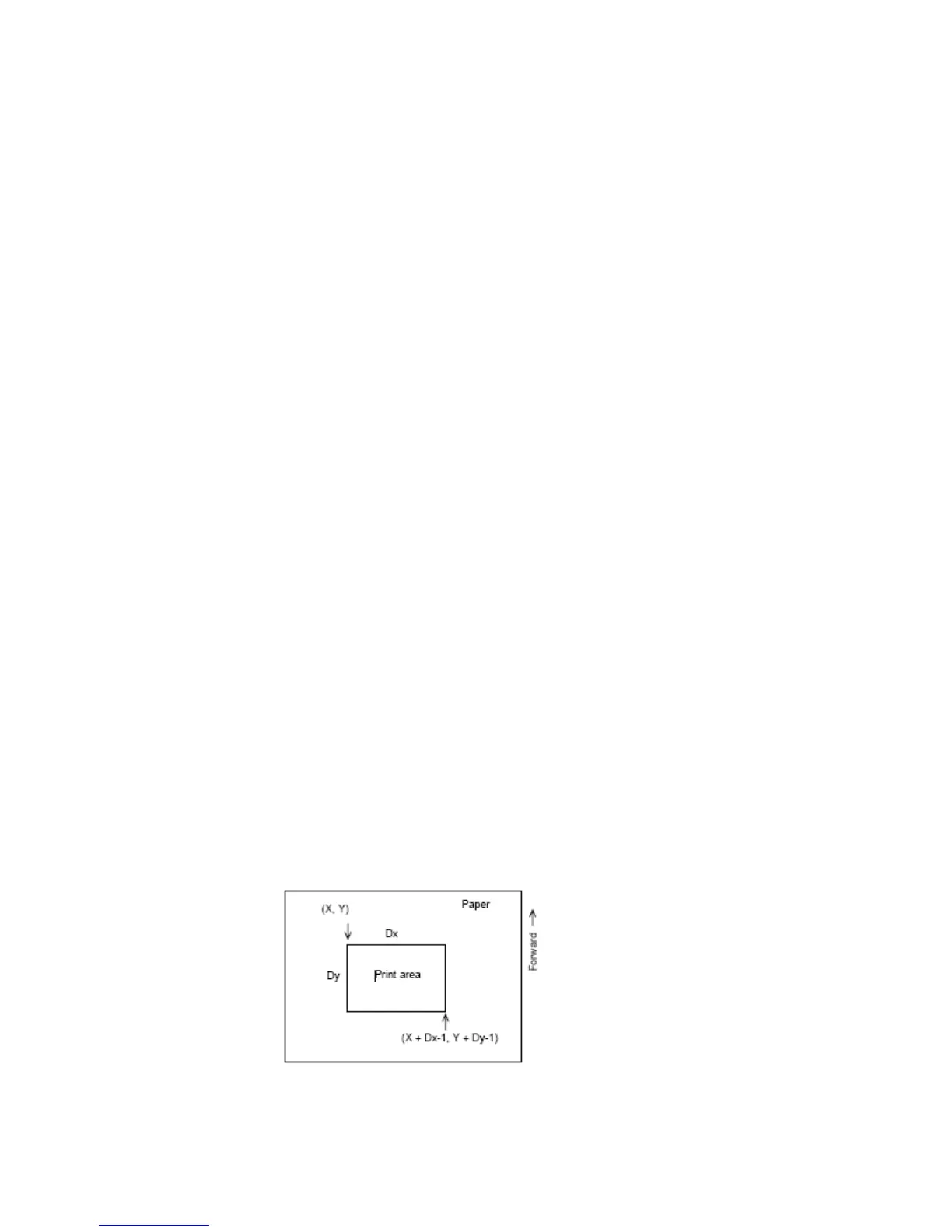
When the horizontal starting position, vertical starting position, printing area width,
and printing area height are defined as X, Y, Dx, and Dy respectively, the printing
area is set as shown in the figure below.
[Reference] CAN, ESC L, ESC T



 To Next Page