787 Flight Crew Operations Manual
DO NOT USE FOR FLIGHT
Flight Instruments, Displays -
Electronic Flight Bag - System
Operation
Copyright © The Boeing Company. See title page for details.
10.80.4 D615Z003-TBC
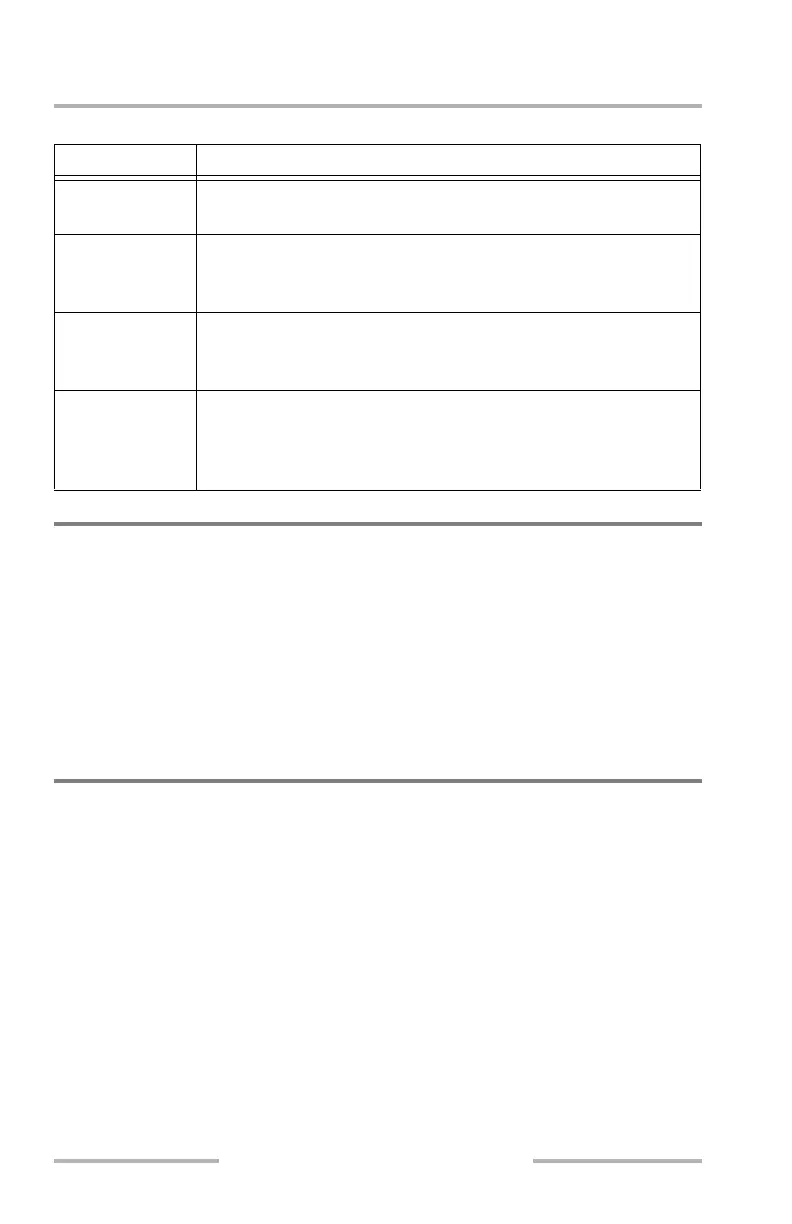
EFB Messages Table
Virtual Keypad
The virtual keypad can be used to type information, such as airport identifiers or
performance data, into the EFB applications. The keypad is automatically
activated for certain functions such as airport searches and performance data entry.
The typed selection displays in the active field and can either be in an application,
or the field in the keypad itself. The typed data, when complete, is then entered
into the appropriate field in the application, or searched for with the returned
results listed above the keypad. Refer to each individual application description in
this chapter for more information on using the keypad.
Initializing a Flight
The flight should only be initialized after verifying the effective dates of the
software and databases, actioning all appropriate messages, and completing the
CDU Pre-Flight procedure.
Note: It is recommended to have completed the CDU Pre-Flight from the Normal
Procedures before initializing the flight as the EFB retrieves as much
information as possible from other aircraft systems for use when
initializing the various other EFB applications.
After initializing the flight the following information is collected from the airplane
systems and made available to the EFB applications:
• flight deck date and time
• GPS latitude, longitude, date, and time
• true and magnetic heading
Message Description
FAULT Indicates that a fault has occurred. Navigate to the System page for
more information.
MEMO Indicates that an application requires attention. When this message
displays, navigate to the corresponding application for more
information.
MSG (Message) Indicates that one of the applications has a message. When this
message displays, navigate to the corresponding application to view
the message.
XFR (Transfer) Indicates that the system is in transfer mode and the contents of the
off-side EFB are being displayed. While in this mode, the display
cannot be manipulated. Select the XFR soft key or MAIN bezel key
to cancel the transfer mode.
August 14, 2009



 To Next Page