787 Flight Crew Operations Manual
DO NOT USE FOR FLIGHT
Communications -
Controls and Indicators
Copyright © The Boeing Company. See title page for details.
5.10.22 D615Z003-TBC
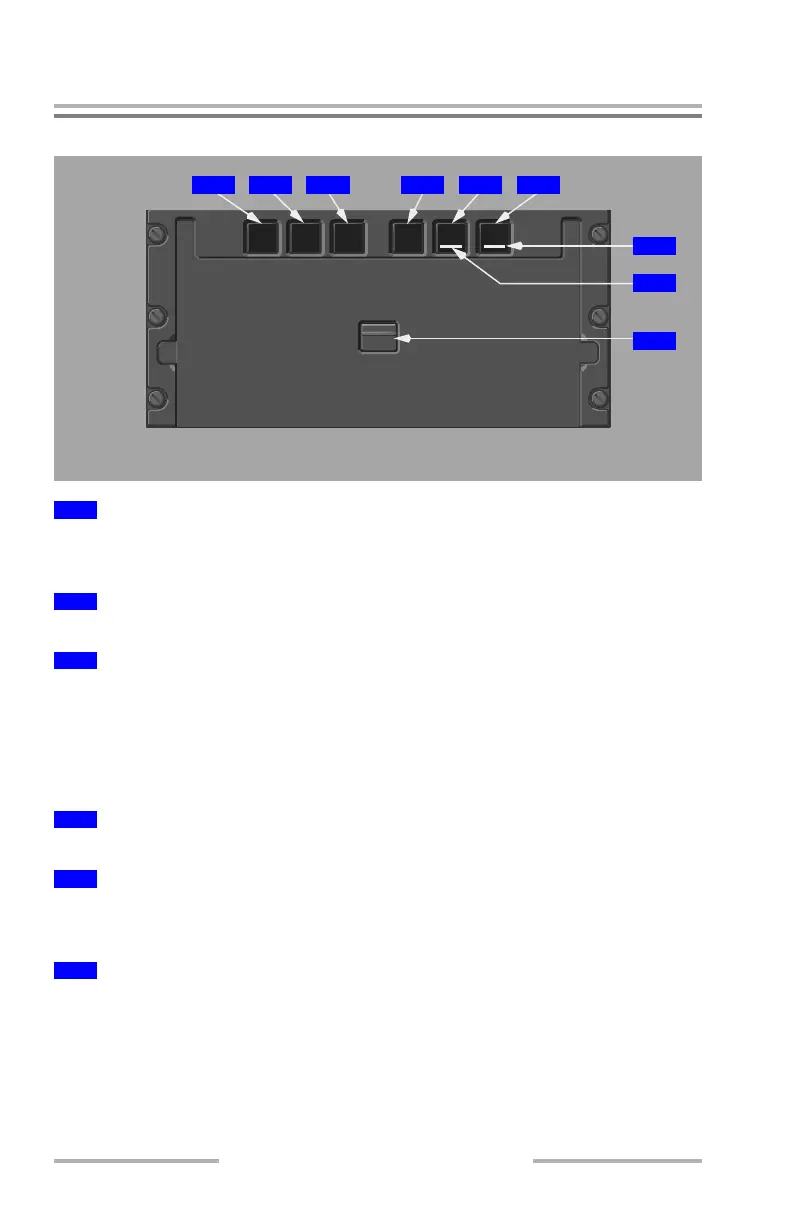
Printer Controls
Push – applies power to printer.
White band around switch – power is not applied to printer.
Illuminated (white) – the printer is failed.
Illuminated (white) –
• printer is out of paper, or
• paper loading door is open
Note: With both FAIL and PAPER lights illuminated, printer is overheated.
Push and hold – advances the printer paper.
Push – cancels current printing cycle
Push and hold – resets the printer if it stops operating
Push –
• tests the printer and printer lights
• prints a test pattern
1
Printer POWER Switch
2
Printer FAIL Light
3
Printer PAPER Light
4
Printer SLEW Switch
5
Printer CANC/RST Switch
6
Printer TEST Switch
AFT AISLE STAND PANEL
POWER FAIL PAPER SLEW
CANC/RST
TEST
1 2 4 5 63
7
8
9
June 16, 2008



 To Next Page