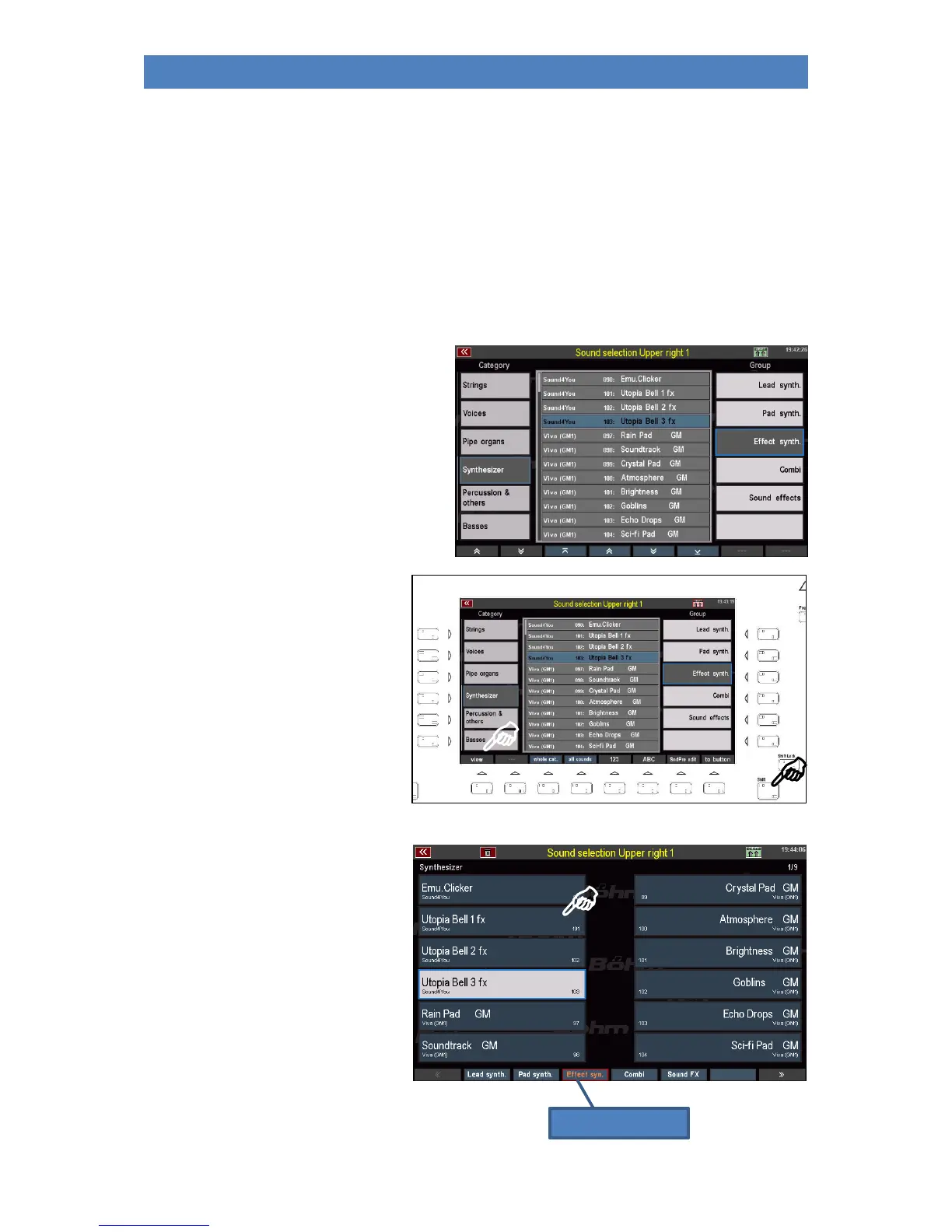
• On the right side you will find up to 6 subgroups per sound category for a better overview.
You can also select these group fields by tapping them.
• Finally, in the middle of the display you will find the list with the individual sounds of the
currently selected category/group.
In the picture above the category "Organ" is selected and in it the group "Rotary". In the
middle you see the corresponding sound list. Here the "Trad. Org. 2R-FX" from the
soundbank "Amadeus Art" is currently selected.
• The sound list can be scrolled with the arrow buttons (F-buttons) below the list or with the
data wheel. You can also jump directly to the first or last page of the list.
• To select a sound, simply tap it in the list.
Now try selecting different sounds from
different categories.
You can set an alternate view for sound
selection with larger fields:
• Press and hold the [SHIFT]
button to the right of the
display. The F-button
functions at the lower edge of
the display are thus switched
to a second level.
• Press the [F1] View key to
switch to the second view
variant:
This view focuses on the individual
sounds.
You can select the groups of the current
category using the F buttons below.
The sound categories can be selected
using the 12 sound buttons of the
SOUND SELECT group on the right of
the control panel.
Use the data wheel to quickly scroll
through the sound bar.



 To Next Page