143
Appendices
Insert effect algorithm list
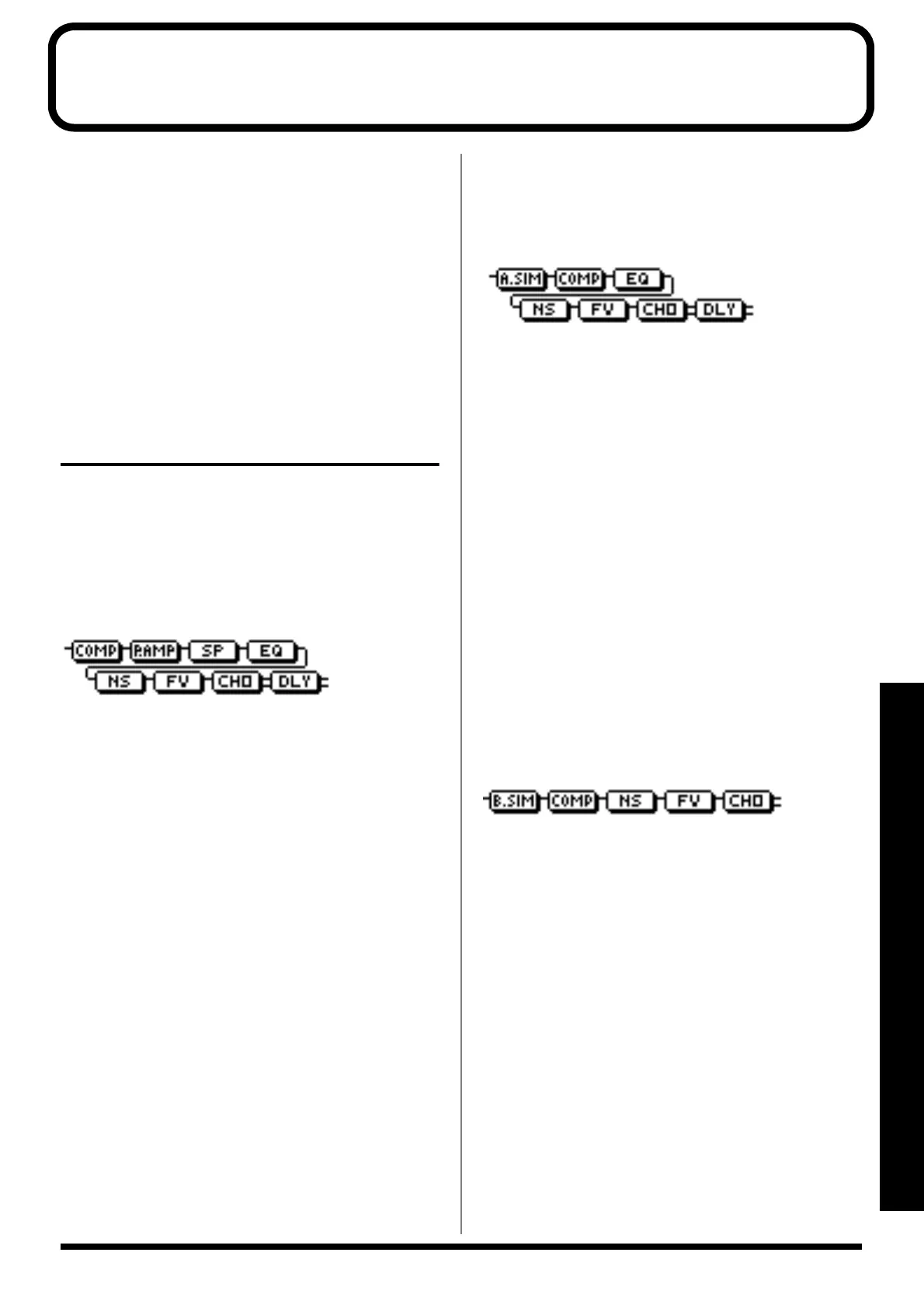
The algorithms (the available effects and their connection
order) that can be used as an insert effect are shown below.
The algorithms that can be selected will differ for each bank.
To select the algorithm that you wish to use, first select the
effect bank that includes that algorithm, and then refer to the
separate “Effect Patch List” and select a patch that uses the
desired algorithm.
* For details on selecting banks and patches, refer to “Editing
insert effect settings” (p. 52).
* If you would like to know more about each effect, refer to
“Insert effect parameter functions” (p. 148).
BANK: GUITAR
1. COSM GUITAR AMP
This is a multi-effect designed for electric guitar. This
provides an amp sound using a preamp and speaker
simulator.
* In case of “Phaser,” output will become monaural.
fig.S02-01
Compressor
PreAmp
Speaker Simulator
4 Band Equalizer/Wah
- 4Band Equalizer
- Wah
Noise Suppressor
Foot Volume
Modulation
- Flanger
- Chorus
- Phaser
- Pitch Shifter
- Doubling
- Tremolo/Pan
- Slow Attack
Delay
2. ACOUSTIC SIM
This is a multi-effect designed for electric guitar. It allows
you to use an electric guitar to produce sounds similar to
those of an acoustic guitar.
fig.S02-02
Acoustic Guitar Simulator
Compressor
4Band Equalizer
Noise Suppressor
Foot Volume
Modulation
- Flanger
- Chorus
- Phaser
- Pitch Shifter
- Doubling
- Tremolo/Pan
Delay
3. BASS SIM
Simulates the sound of a bass guitar. Obtain the sound of a
bass guitar while playing an electric guitar.
You should avoid playing chords when using the Bass
Simulator.
fig.S02-03
Bass Simulator
Compressor/Defretter
- Compressor
- Defretter
Noise Suppressor
Foot Volume
Modulation
- Flanger
- Chorus
- Phaser
- Pitch Shifter
- Doubling
- Tremolo/Pan



 To Next Page