28
Listening to the Demo Songs
Be careful that the AC adaptor does not become disconnected
during use. If the AC adaptor becomes unplugged
accidentally, the recorded data may become damaged.
(3)
Listening to the demo songs
The BR-1180/1180CD comes with demo songs recorded on
the hard disk. Follow the procedure given below to listen to a
demo song.
Use of the song data (demo song) supplied with this
product for any purpose other than private, personal
enjoyment without the permission of the copyright
holder is prohibited by law. Additionally, this data must
not be copied, nor used in a secondary copyrighted work
without the permission of the copyright holder.
* No data for the music that is played will be output from MIDI
OUT.
Selecting a song—Song Select
When the power is first turned on, Song 1 is selected automatically,
and the data required to play back the song is loaded. When loading
ends, the song name will appear in the display.
To change to a different song, follow the procedure given below.
1. Press [UTILITY].
fig.Q01-07
2. Use CURSOR [ ] [ ] to select the “SONG” icon, and
press [ENTER].
fig.Q01-08
3. Press CURSOR [ ] [ ] to select the “SELECT” icon.
fig.Q01-09
4. Press [ENTER].
fig.Q01-10
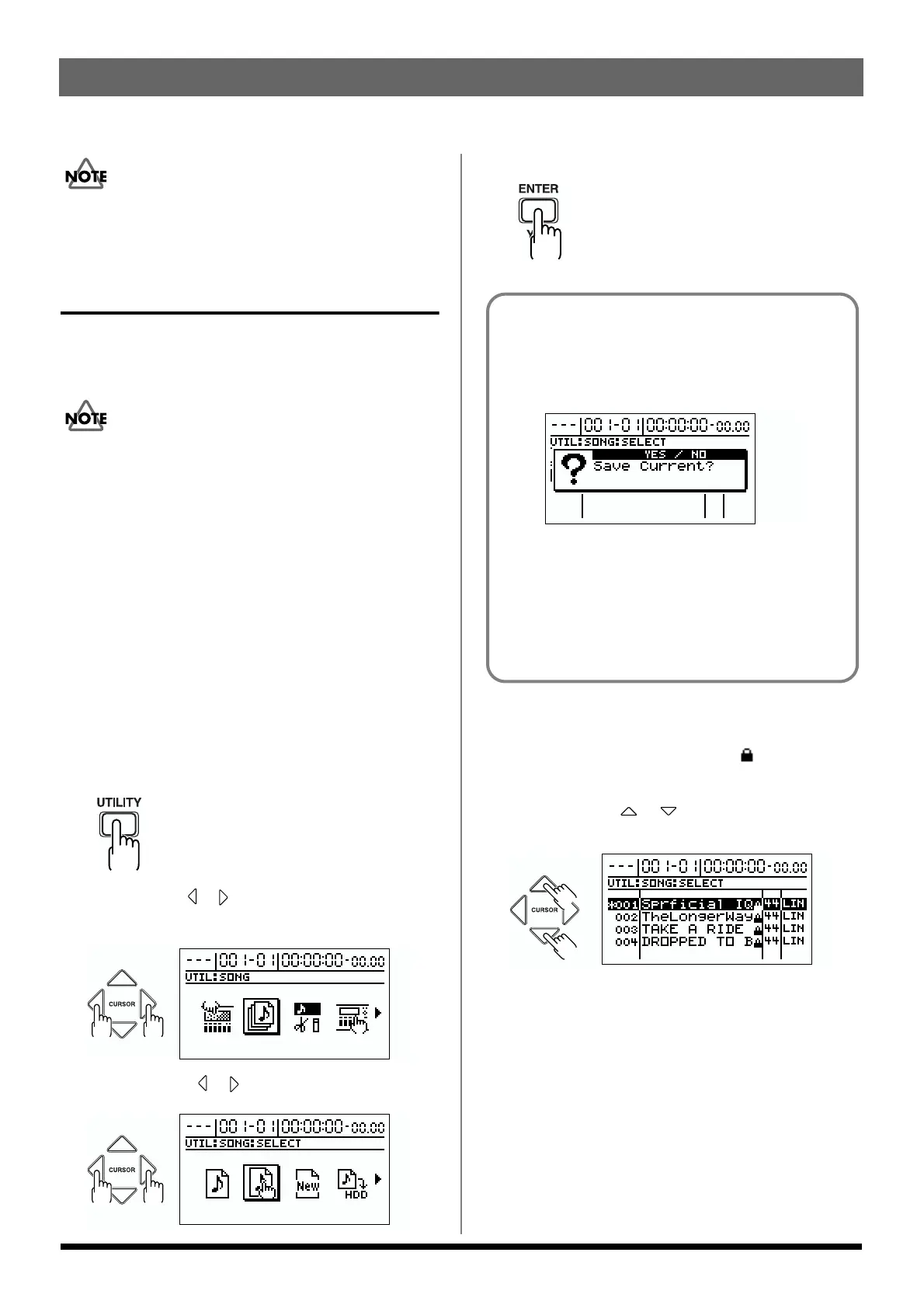
A list of songs is displayed.
Songs that are currently being used have a “*” before
their listing. A song protect symbol ( ) is displayed at
the right of a protected song (p. 78).
5. Press CURSOR [ ] [ ] to select the song you wish
to listen to.
fig.Q01-11
"Superficial Intelligence"
Music by Gary Lenaire and Echo Hollow
Copyright © 2002
"The Longer Way"
Music by CJ Jones, Alex Adams, and Dave Watkins
Copyright © 2002, Groovalotic Rhythm Records
"Take a Ride"
Music by Dave Watkins and Damon Wilson
Copyright © 2002, Groovalotic Rhythm Records
"DROPPED TO B"
Music by Gundy Keller
Copyright © 2002, A-TOWN recordings
If you recorded/edited, or modified the settings of
the mixer section, etc.
At this time, a screen will appear, asking you whether
you wish to save the recorded data, the results of your
work, and the current state of the mixer section.
fig.Q01-70
If you will want to reproduce the current state the next
time you play back, press [YES]. If you wish to return to
the original state, press [NO]. If you press [NO], all
recording and editing operations that you performed on
the current song, the current state of the mixer section,
and any changes to the song patch will not be saved.
Please make your choice carefully.



 To Next Page