EasyManua.ls Logo

Brady BMP 21-PLUS - User Manual

Brady BMP 21-PLUS
92 pages
Print Icon
To Next Page IconTo Next Page
Loading...
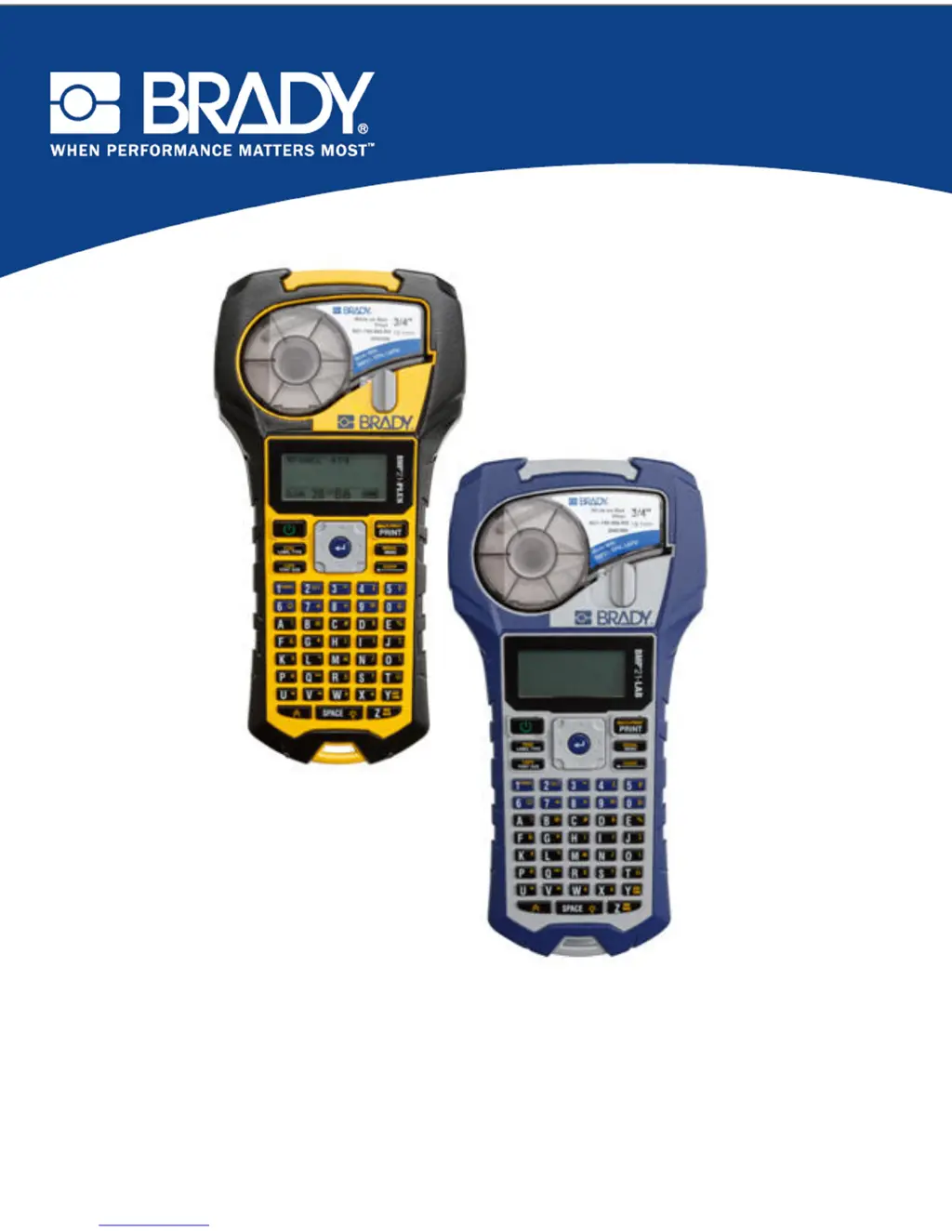
BMP
®
21-PLUS LABEL PRINTER
BMP
®
21-LAB LABEL PRINTER
USER’S MANUAL

Table of Contents

Other manuals for Brady BMP 21-PLUS

Questions and Answers

  • J
    James NicholsonAug 25, 2025
    Why does my Brady Label Maker printer frequently power off?
    • R
      Rachel SmithAug 25, 2025
      To resolve the 'Printer frequently powers OFF' issue with your Brady Label Maker, consider the following: The printer is designed to automatically shut off after 10 minutes of inactivity. Try installing 6 new AA batteries or attach the AC adapter to supply immediate power. If you're using a lithium-ion battery, remove it and recharge it with the AC adapter. You can also insert 6 AA alkaline batteries in the battery compartment while the lithium-ion battery is charging or purchase a second AC adapter to power the printer while the battery is charging.
  • R
    Robert SharpSep 1, 2025
    Why is my Brady Label Maker printing compressed with poor registration?
    • G
      Glenn PittsSep 1, 2025
      If your Brady Label Maker is producing compressed print with poor registration, the platen roller might be dirty. Ensure that the last cut label has been removed from the label tray, and then clean the platen roller.
  • W
    William PetersonSep 1, 2025
    Why does my Brady BMP 21-PLUS Label Maker display a black line on the first label?
    • C
      Claudia McgrathSep 1, 2025
      If your Brady Label Maker displays a black line on the first label, it is caused when the cartridge is left in the printed locked position (when not in use). The print head is pressed against the platen roller, causing a vertical pressure point line (or residual burn line) to appear on the tape. Unlock the cartridge as soon as you are done printing labels to prevent the warm print head from burning the ink from the ribbon onto the next label under the print head.
  • N
    Nathan HuffSep 2, 2025
    What does 'Insert labels' mean on my Brady BMP 21-PLUS Label Maker?
    • R
      rodriguezjanetSep 2, 2025
      If your Brady Label Maker shows the error 'Insert labels', it could be due to a damaged circuit board on the label or media roll. Replace the label/media roll and press the CLEAR/ESC key to clear the error.
  • D
    David SolisSep 3, 2025
    What does invalid terminal repeat value entered mean on my Brady BMP 21-PLUS?
    • R
      Robert FoleySep 3, 2025
      If you enter an invalid terminal repeat value on your Brady Label Maker, it means the value entered is out of the acceptable range. The acceptable range is between the minimum of 0.2 inch to the maximum of 40 inches.
  • J
    johnfrySep 4, 2025
    Why is the text not centered on my Brady BMP 21-PLUS?
    • S
      Shawna YuSep 4, 2025
      If the text is not centered on the label with your Brady Label Maker, you may have added blank spaces to the text. Press Clear, then re-enter the text.
  • J
    Jeffery GarrettSep 4, 2025
    Why does my Brady BMP 21-PLUS Label Maker print a large section of blank label after the text?
    • S
      sjonesSep 4, 2025
      If a large section of blank label prints after the text on your Brady Label Maker, you may have added blank lines after the text. Press Clear, then re-enter the text.
  • W
    Wendy SchmittSep 5, 2025
    How to change location of the human readable text in a barcode on my Brady BMP 21-PLUS Label Maker?
    • H
      hugheschristineSep 5, 2025
      The human readable text is automatically added below the label on the Brady Label Maker. This position is fixed and cannot be changed.
  • M
    Madeline BrightSep 6, 2025
    Why doesn't my Brady Label Maker menu display all label types?
    • T
      Theresa SmithSep 6, 2025
      The BMP21-PLUS/BMP21-LAB Brady Label Maker only displays the label types that will work with the installed label material (cartridge). Insert the proper label material (cartridge) for the labels you want to produce.
  • P
    Paula ElliottSep 7, 2025
    How to fix a Brady BMP 21-PLUS Label Maker that does not power up?
    • P
      Patricia PowellSep 7, 2025
      To resolve the issue of the Brady Label Maker not powering up, first, replace the batteries with six new AA batteries. Alternatively, if you're using a lithium-ion battery, remove it and recharge. You can also use the AC adapter for immediate power while the battery charges.

Summary

Introduction and Specifications

Hardware and Power

Power Source Options

Explanation of how to power the printer using AA batteries, a lithium-ion pack, or an AC adapter.

Printer Operation

Power On and Interface

Instructions on how to turn the printer on and use the editing screen and status information.

Printing Labels

Steps for printing a single label or multiple copies using the print and multi-print functions.

Label Creation and Formatting

Advanced Formatting Features

Applying symbols, international characters, barcodes, and serialization to labels.

Troubleshooting and Maintenance

Troubleshooting Common Problems

Diagnosing and resolving issues related to hardware, power, print quality, and software errors.

Printer Cleaning Procedures

Instructions for cleaning the printer's display screen and internal components for optimal performance.

Brady BMP 21-PLUS Specifications

General IconGeneral
Print TechnologyThermal Transfer
Resolution203 dpi
Keyboard TypeQWERTY
DisplayLCD
Cutter TypeManual
Max Print Width0.75 inches
Power Source6 AA Batteries or AC Power Adapter

Related product manuals