17
Loading the Config File
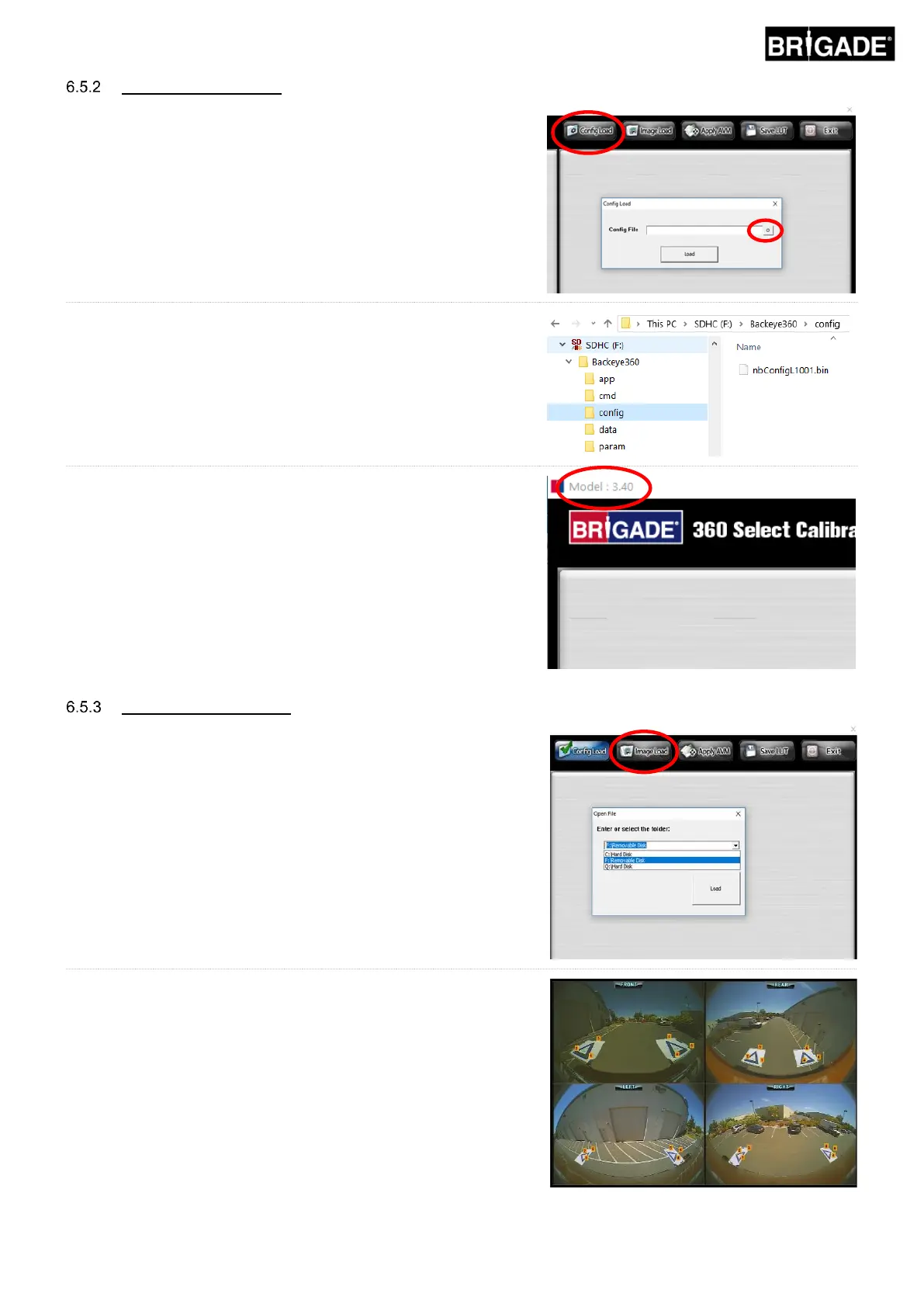
Click the “Config Load” button and when the Config Load window
opens, click the “o” icon to locate the Config file.
Navigate to the configuration file location, this can be found in in the
“Config” folder on the SD Card.
The Config file name contains the configuration type and the revision
number, e.g. Landscape 1 config file revision 1 will be named
nbConfigL1001.bin. Always ensure the latest revision is used by
downloading the latest software from Brigades website.
With the Config file loaded the system version status bar will update
to show the configuration that has been used, these versions are:
• 3.40 = Landscape 1
• 3.41 = Landscape 2
• 3.42 = Landscape 3
• 3.43 = Portrait
Ensure the correct Config file is used for the installation type. For
more information on the configuration types see section 2.4.
Click the “Image Load” icon on the calibration tool bar to open
the Image Load dialogue box.
Select the SD Card from the dropdown menu and select
“Load” to grab the camera images from the SD Card.
The camera images will automatically populate the empty
tiles.



 To Next Page