Once this is done, copy the “data” and/or “param” folders from the “Backeye360_backup” folder to the
“Backeye360” folder. This will leave the “data”, “param” and “cmd” folders in the “Backeye360” folder that will
make restoring from the back up much easier.
If only the calibration data is required, copy the “param” folder to the “Backeye360” folder. If only the OSD
configuration is required, copy the “data” folder.
The backup folder can now be deleted and the “backeye360” folder should be moved to a more secure storage
location (e.g. the installers/customers PC).
Restoring from a System Backup
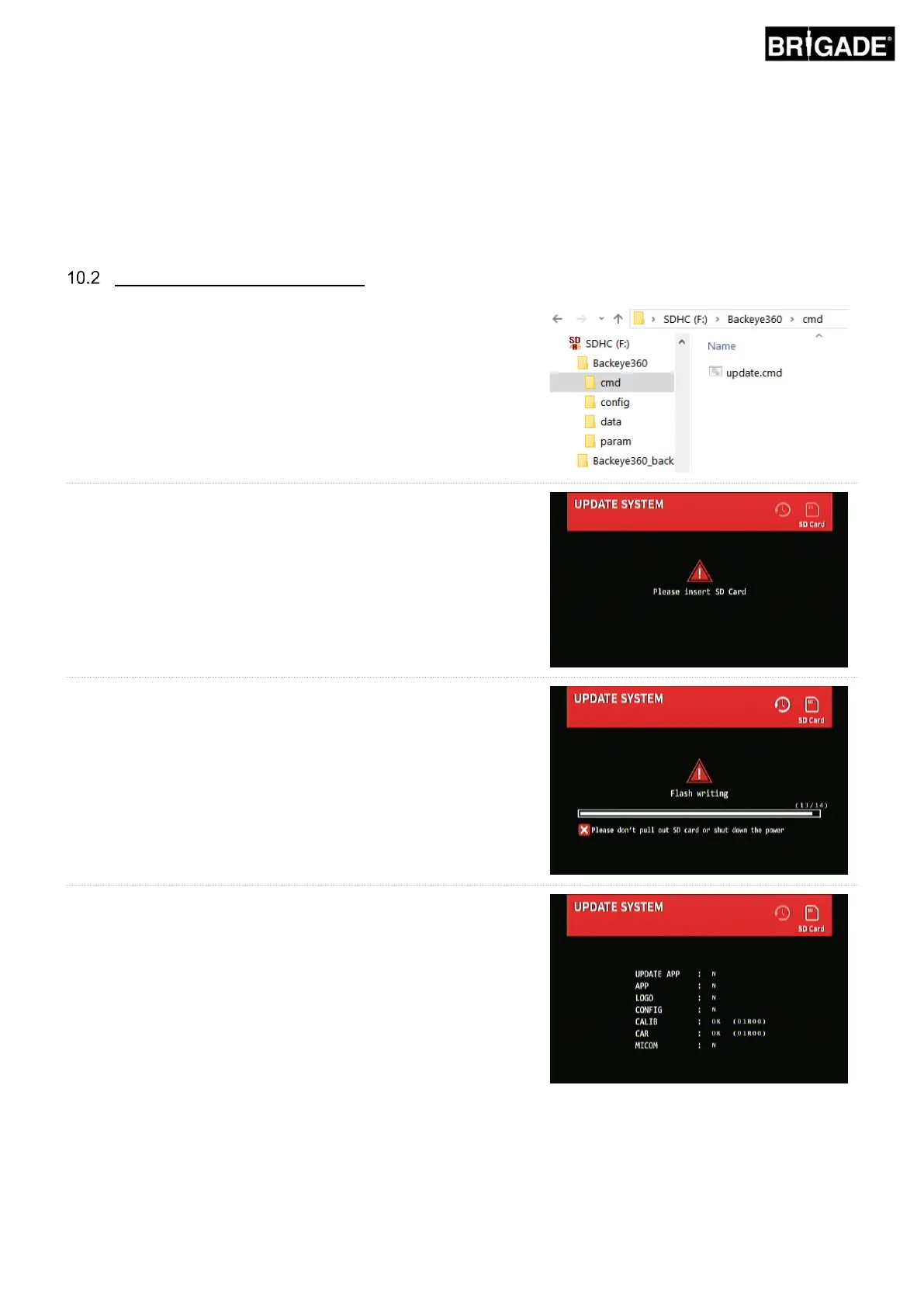
Ensure the file in the “cmd” folder is named as “update.cmd”.
With the Calibration Tool inserted to the BN360-200-ECU and the
system powered, the “Update System” screen should be
displayed prompting the user to insert an SD Card.
Insert the SD Card to begin the upload process. As long as the
“cmd” file has been renamed to “update.cmd” the system will
automatically upload the new data to the ECU.
Once the upload has completed the following screen will show.
Note: the items that have updated here will depend on what has
files have been used (i.e. only “CALIB.INFO” will show if only the
“param” file has been used to update the calibration data).



 To Next Page