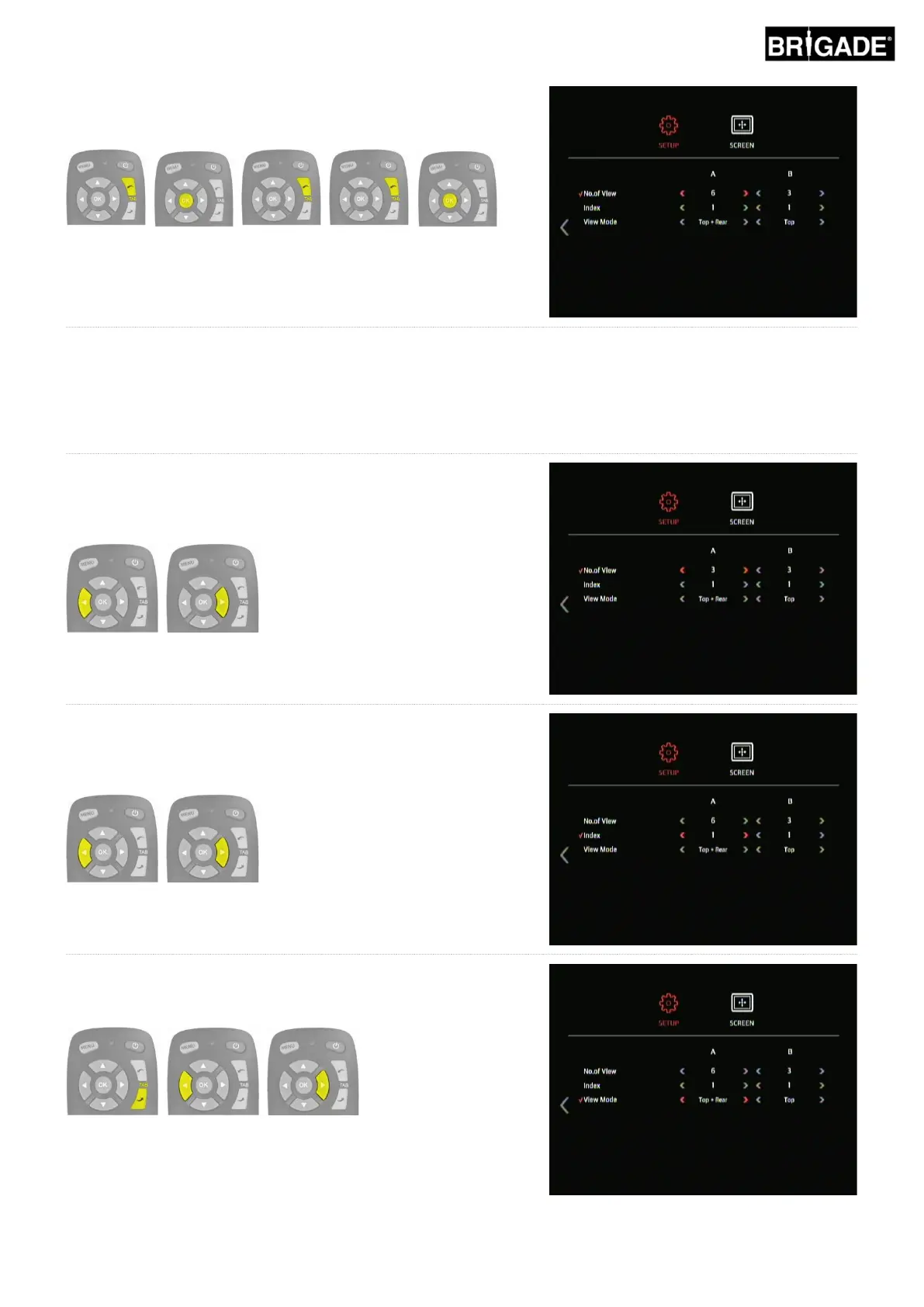
The View Groups settings are on the third page of the OSD SETUP
menu. Press the TAB up button to select the next page icon and
press the OK button, repeat to skip to the third page.
There are two View Groups, A and B. Holding the View Select Button switches between the View Groups. The
No. of View setting determines how many views are present in each View Group (maximum 9). Group A contains
all of the split screen views, Group B contains all the single screen views however the views present for each
group is determined by the configuration loaded, for more information see section 2.4Error! Reference source n
ot found.. It is possible to turn any of the views off or show the views more than once, e.g. have the same view
on different button presses.
Use the arrow buttons to select the desired number of views in
Group A. The number of views corresponds to the number of
button presses per group, this can be from 1 to 9, there needs to
be at least one button press view.
Press the TAB down button to select the Index, this option allows
the user to change which view to have on each button press, i.e. 3
button presses = index 3. Use the arrow buttons to change the
Index number.
With the desired Index selected, press the TAB down button to
select the View Mode for the given Index. Use the arrow buttons to
change the View Mode.
Repeat these steps to change the views for each Index.



 To Next Page