Troubleshooting and Maintenance
SMART KTF 2000 - 4.3 -
Updating the Software Version on SMART Terminals
The software updating on BTSR SMART terminals is a relatively easy operation.
However it must be carried out following scrupulously the instructions given in this
manual and using the indicated tools to avoid damaging the equipment and/or
microprocessor contacts.
Tools Needed:
- Small Philips screwdriver
- IC extractor
Operating Procedure:
1. Take note of the currently set parameters.
2. Disconnect the electrical supply of SMART system and check
that all the red Leds as well as the display are off.
3. Remove the SMART terminal from its support bracket.
4. Disconnect all the connectors from the rear side of terminal,
tacking note of their respective positions.
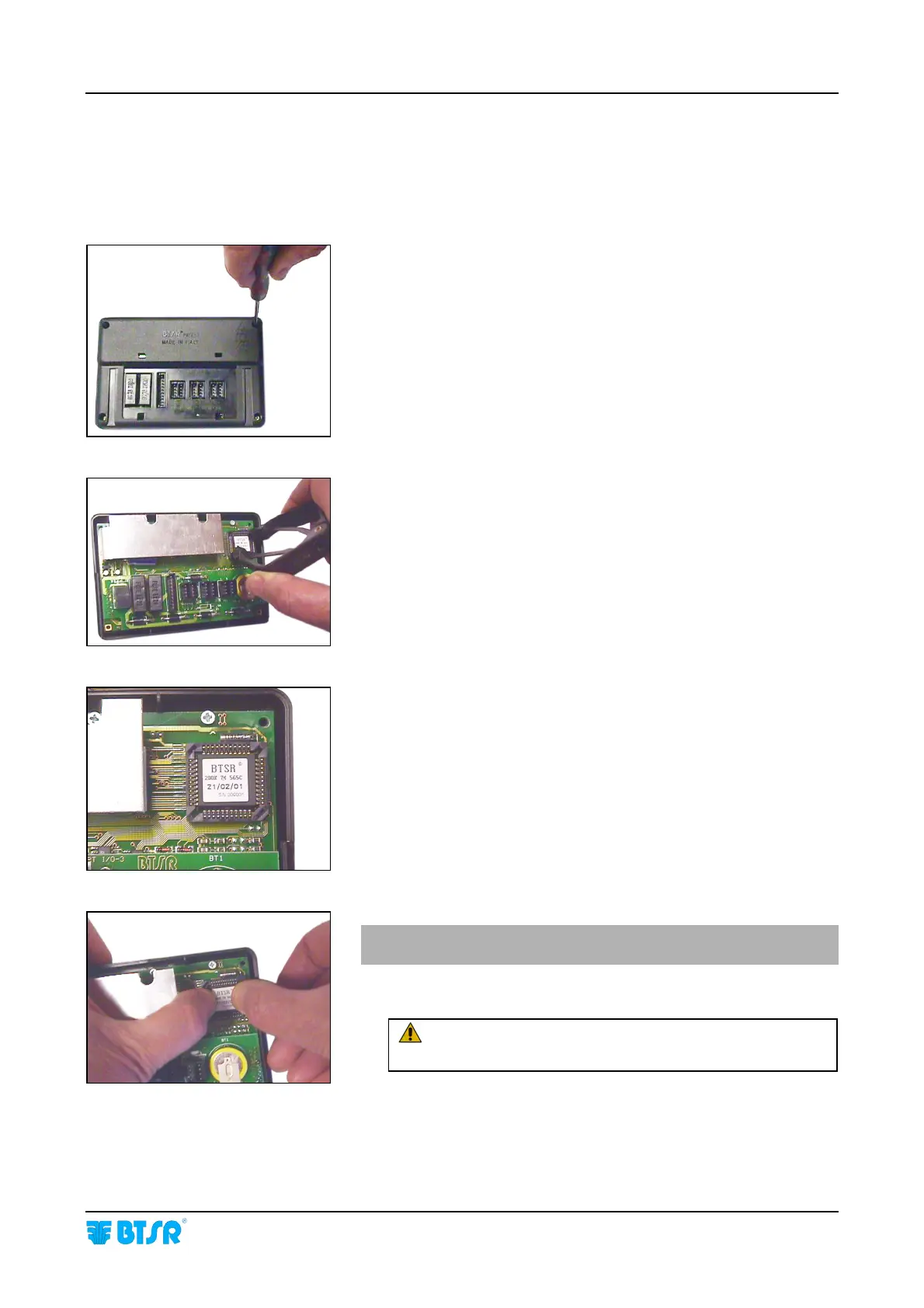
5. Unscrew the 4 locking screws and remove the rear cover
(Fig. 1).
6. Using the IC extractor, remove with care the Integrated Circuit
from the socket located on the right top corner of PCB (Fig. 2).
7. Place the Integrated Circuit, containing the new software
version, over the socket paying attention to its correct
orientation (Fig. 3).
8. Applying a moderate and progressive pressure with both
thumbs, push the integrated circuit down into the socket
(Fig. 4).
9. Reassembly the rear cover and lock it using the 4 locking
screws.
10. Reconnect all connectors to their respective position.
11. Fasten the SMART terminal on support bracket.
12. Power on the system and check that:
- All the Leds embedded inside the buttons are on.
- The display shows “BTSR Ver. n.n” (n.n = version of the
new installed software).
If the ERROR RAM message appears, press RESET and
reload the parameters, noted at the beginning.
During this operation, avoid the conditions that
could cause static discharge!
Fig. 1
Fig. 2
Fig. 3
Fig. 4










 To Next Page