SMART KTF 2000 – KTF/100HP Operation
SMART KTF 2000 3A-35 -
READ – Article Reading from KTF/100HP Devices
SETUP
READ
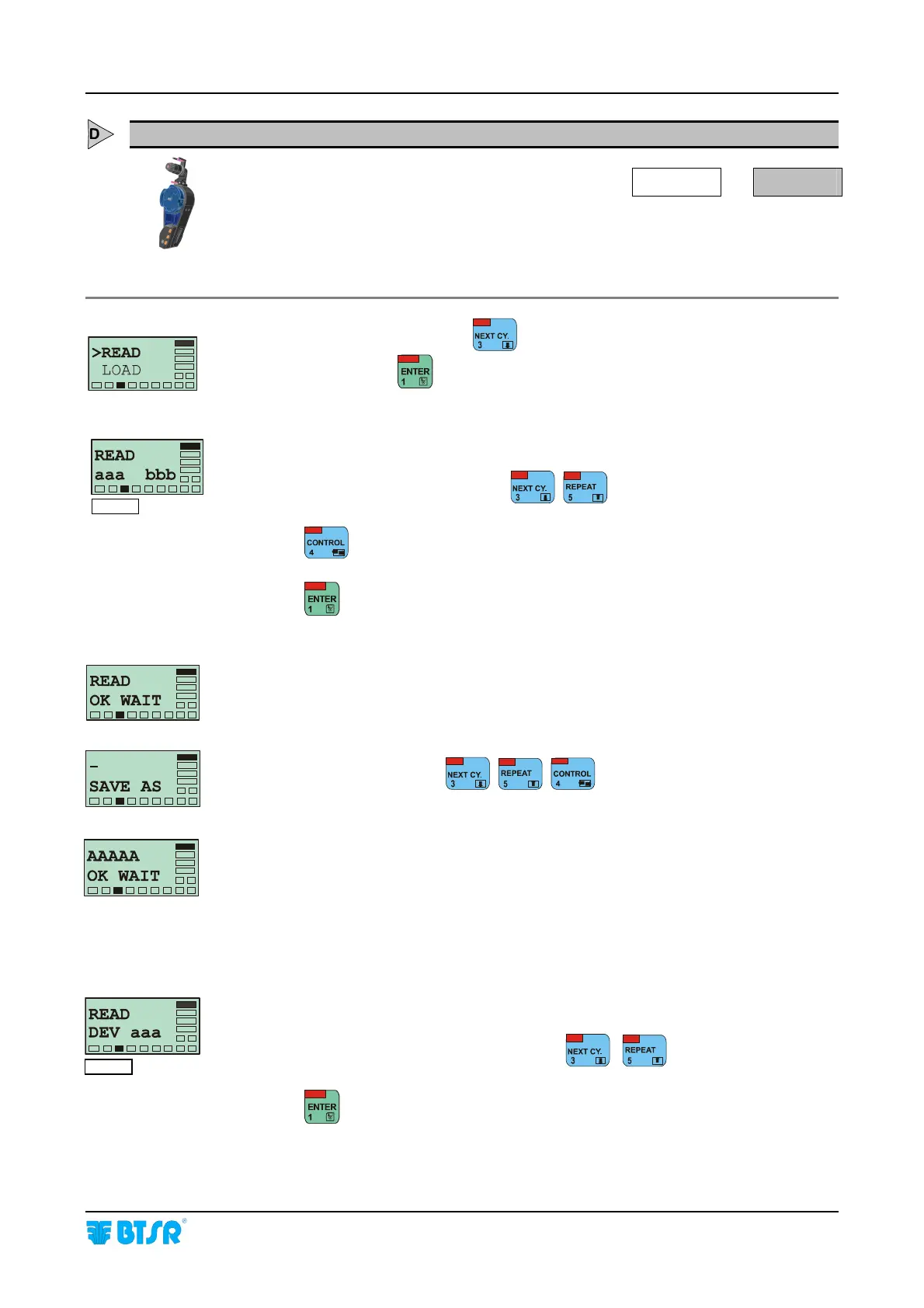
This function allows you to read the article currently loaded into KTF/100HP
devices, and to save it with a new name into the SMART KTF 2000 terminal.
From the SETUP menu, press
until the >READ menu option is selected.
At this point, press
to access the function.
This screen allows you to select the range of devices (aaa – bbb) which you want
to read the article from and save it into the database.
Select the desired interval, pressing
, .
Press
to move from aaa field to bbb field and vice-versa.
Press
to start the reading operation.
This screen displayed for a few seconds, indicates that the reading operation is in
progress. At the end of operation a new screen will appear, allowing you to save
the article into the database with a new name.
Enter the new name using
This screen displayed for a few second indicates that the saving to database
operation is in progress; then the > READ menu will re-appear.
NOTE:
If the WORK function was enabled, than this screen will allow you to select a
single device (aaa), rather than a range of devices, from which to read the article.
In this case choose the desired device using
, .
Press
to start the reading operation.
WOR
WOR
Disabled
Enabled










 To Next Page