16
Installation
Type ME43
7.3 Electrical connection
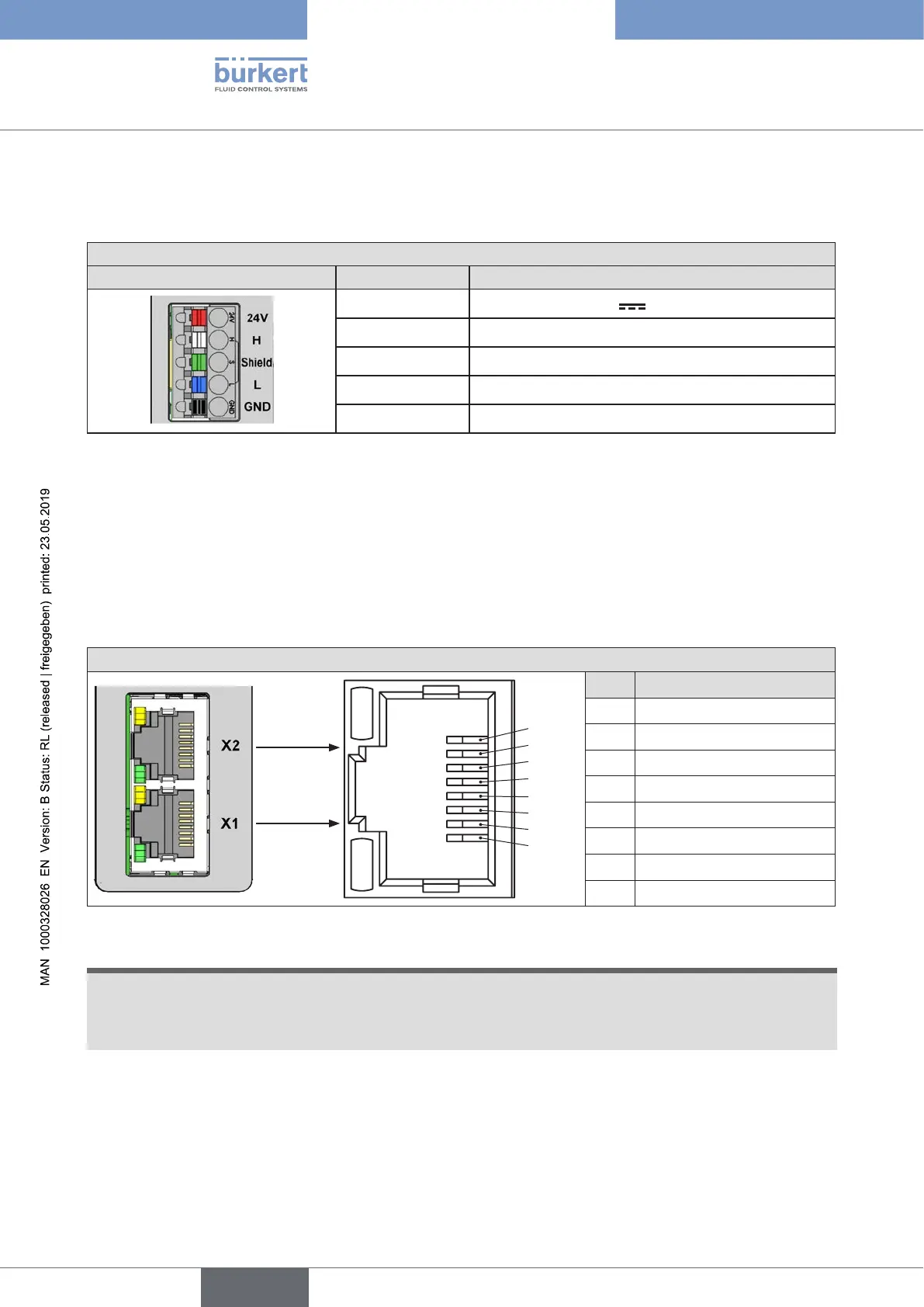
→ Connect5-pinspring-typeterminalinaccordancewithconguration.
Congurationof5-pinspring-typeterminal
Connectorview Colorofterminal Description
Red Supply voltage 24 V
White CAN H (büS connection)
Green Shielding
Blue CAN L (büS connection)
Black GND
Table 2: Conguration of 5-pin spring-type terminal
7.4 Establishing connection to eldbus
7.4.1 Industrial Ethernet
→ Insert the Ethernet cable into the sockets of the X1 and X2 interfaces.
The X1 and X2 interfaces for RJ45 plug-in connectors are equivalent.
CongurationofX1andX2interface
1
2
3
4
5
6
7
8
Pin PlugcongurationRJ45
1 TX+
2 TX–
3 RX+
4 Not used
5 Not used
6 RX–
7 Not used
8 Not used
Figure 3: Conguration of X1 and X2 interfaces; connection to eldbus
NOTE!
Toensureelectromagneticcompatibility(EMC)
▶ Only use shielded Ethernet cables.
▶ ConnecttheEthernetcablesofalleldbusparticipantstothestandardrailtogroundthecableshielding.
→ Apply supply voltage.
english



 To Next Page