35
Operation
Type ME43
9 OPERATION
9.1 Safety instructions for operation
WARNING!
Dangerduetoimproperoperation.
▶ The operating personnel must be aware of and have understood the contents of the operating
instructions.
▶ Note the safety instructions and intended use.
▶ Only adequately trained personnel may operate the system or device.
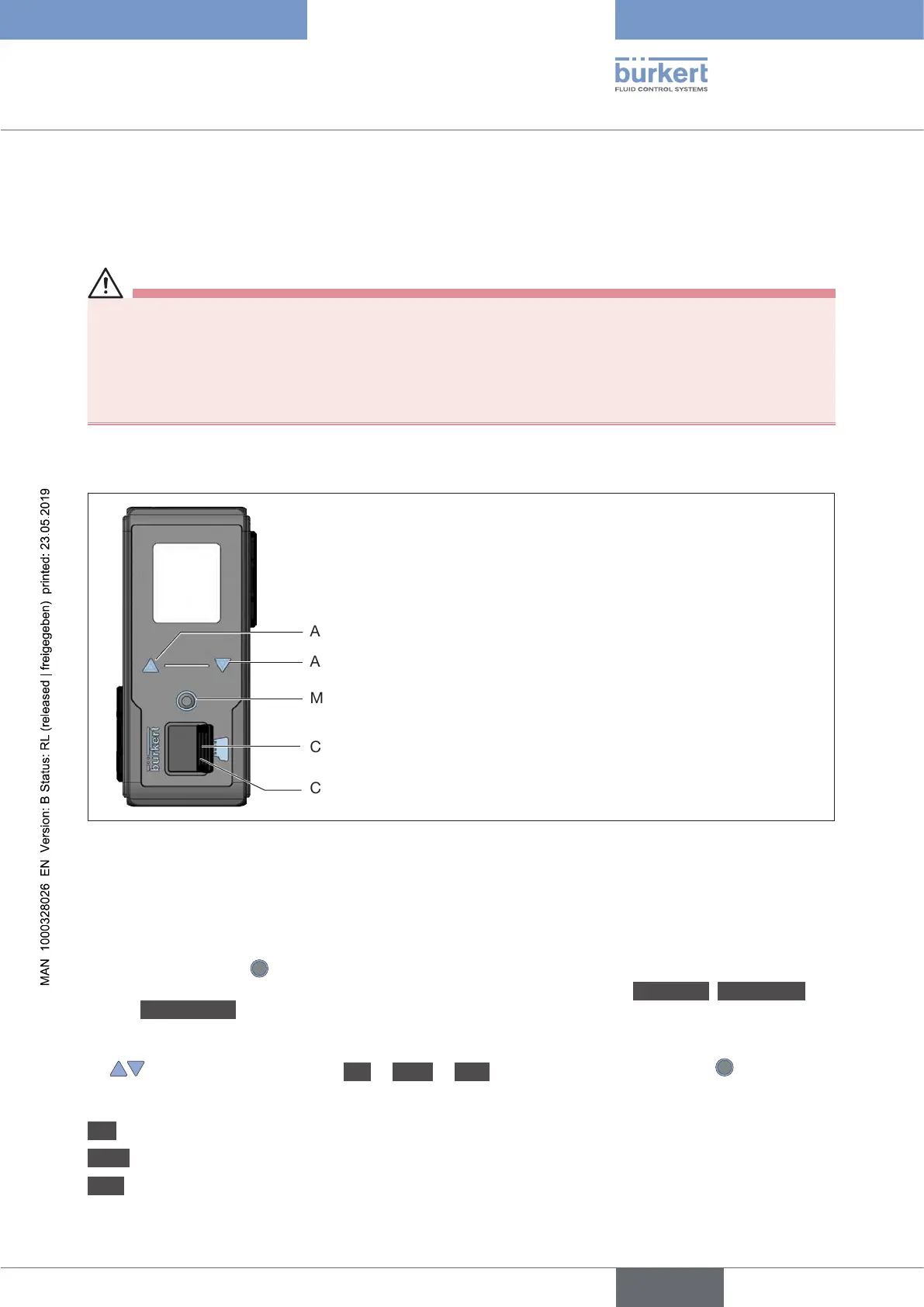
9.2 Operating elements of Type ME43
Arrow key, down arrow
Arrow key, up arrow
Menu key
Card holder for Micro SD card
Cover
Figure 17: Overview of the operating elements
9.3 Operation of Type ME43 using the display
Operation using the display is achieved by means of the two arrow keys and the round menu key.
Openingthemainmenu:
→ Press the menu key twice.
First the start screen appears, then the main menus with the detailed views Parameter, Diagnostics
and Maintenance.
Returningfromamenu:
→ Using the arrow keys, select Exit or Abort or Saveandconrmusingthemenukey .
Eectoftheselection:
Exit Returns to the next menu level up.
Abort
Rejects any unsaved settings and returns to the next menu level up.
Save Saves any changed settings and returns to the next menu level up.
english



 To Next Page