63
Troubleshooting
Type ME43
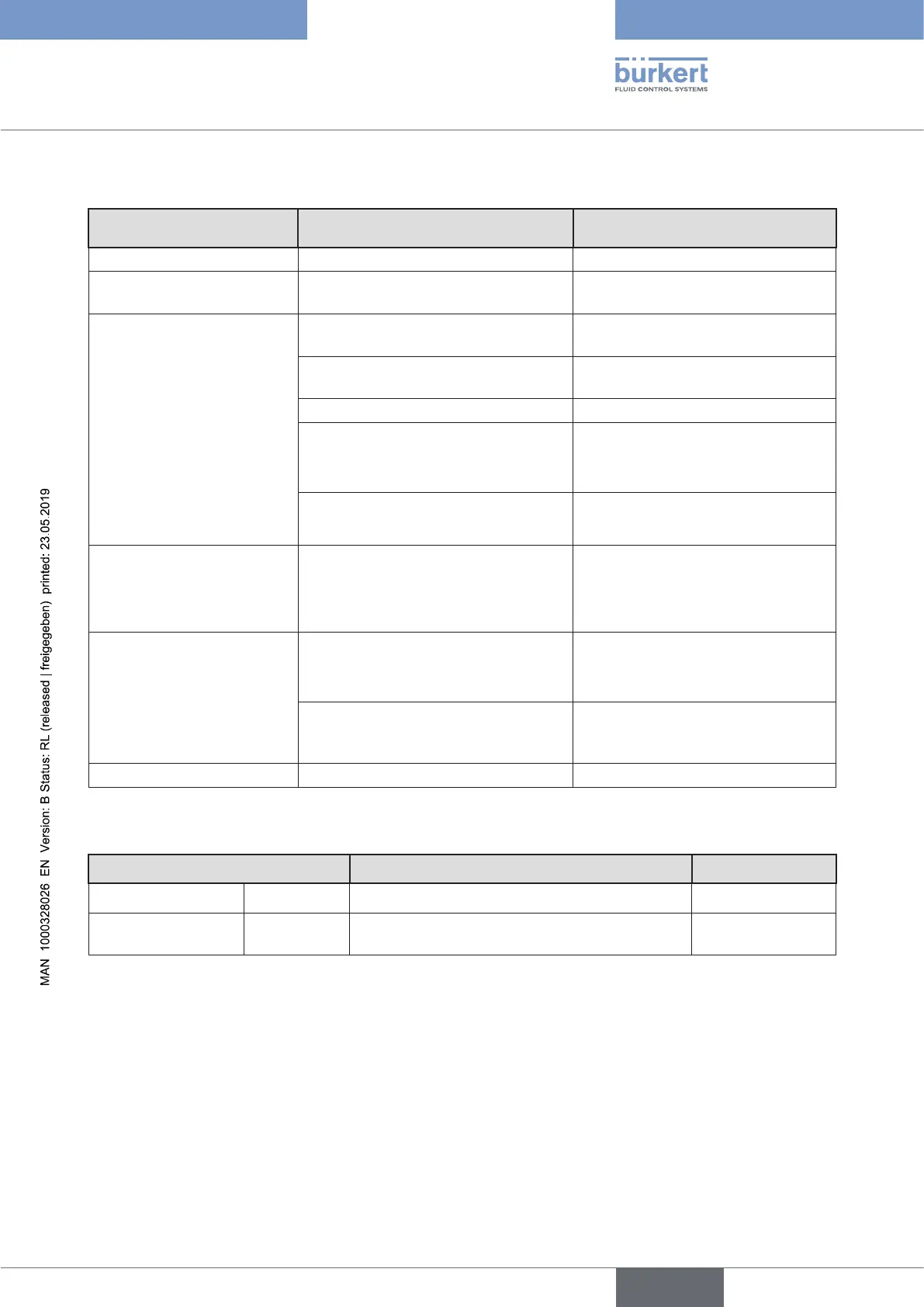
14.2 Status indicators and action to be taken
StatusLEDindicators
basedonNAMURNE107
Description Procedure
No color No power is supplied to the device. Connect device to power supply.
Flashing rapidly
(applies to all colors)
The device was selected using the
“Bürkert Communicator” software.
De-select the device using the
“Bürkert Communicator” software.
Red Device defective. Device requires maintenance –
Contact the manufacturer.
Communication with other büS
devices not possible.
Integrate device into a network with
other büS devices.
Bus error (e. g. short circuit). Check wiring.
The device is not connected to the
PLC.
Check wiring.
Check device description for con-
necting the device to the PLC.
DevicecannotndtheallocatedbüS
device.
Check whether the büS device is
allocated to the device.
Orange Search for büS devices active. Status
is terminated after a few seconds.
If the device status persists for more
than 4 minutes, perform a restart of
the network.
Yellow
Devicetemperatureoutofspeci-
cation, destruction of the device is a
possibility.
Operate the device inside the
specication.
Internal device diagnostics point to
problems in the device or the process
properties.
Take action based on logbook
messages.
Blue Maintenance required Service device.
Table 19: Action to be taken based on device status indicators
LEDstatus Descriptionandcauseoferror Procedure
LinkLED(yellow) Not active No connection to the network established Check cables.
Link/ActLED
(green)
Not active No connection to the network available. Check cables.
Table 20: LEDs for network connection and action to be taken
english



 To Next Page