59
Troubleshooting
Type ME43
14 TROUBLESHOOTING
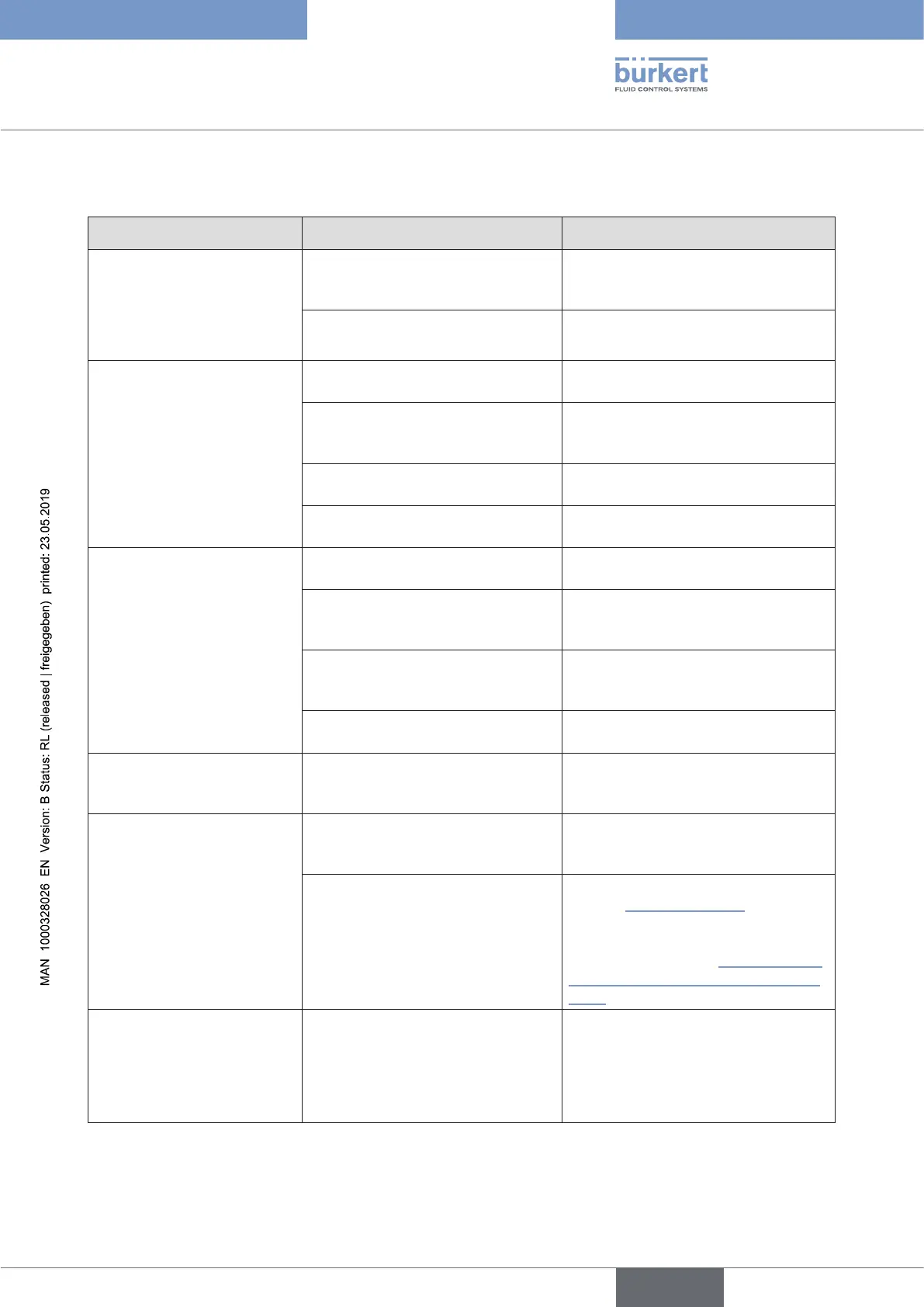
Problem Possiblecause Procedure
The NAMUR-LED goes out
periodically.
The power supply collapses peri-
odically – the device performs a
reset each time.
Use power supply with adequate
power.
The voltage drop in the connection
cable is too great.
Increase cable cross-section.
Reduce cable length.
No process values are trans-
ferred between Industrial
Ethernet and büS.
No cable connection. Check Ethernet and büS cable
connection.
Reading and writing of the values
has not been allowed by the PLC in
the control object of the device.
Allow reading and writing of the
values in the control object of the
device.
The process values have been con-
guredincorrectly.
Checkcongurationoftheprocess
values.
The process values have been allo-
cated incorrectly.
Check allocation of the process
values to the büS devices.
The process values cannot
be allocated to the büS
devices.
The process values have not been
congured.
Checkcongurationoftheprocess
values.
Theimportoftheconguration
must be completed by restarting
the device.
Restartthedeviceafterconguration.
The process values have been allo-
catedtodierentclasses.
Check allocation to ensure that büS
devices are working with process
values of the same class.
Observe input and output direction
as allocation.
Verify that direction of input and
output is correct.
An incorrect value is trans-
mitted or value is zero.
The process values have not been
allocated or have been allocated to
the wrong devices.
Check allocation of the process
values.
Replacement device fails to
take over values from Micro
SD card from the defective
device.
The device ID numbers of the
replacement device and the
defectivedevicedier.
Values can only be transmitted
between devices having the same
Ident number.
The Micro SD card is defective.
The device was unable to write any
values on the Micro SD card.
Replace the Micro SD card (refer to
chapter “15 Accessories”) and try
again to transmit the parameters of
the defective device to the Micro
SD card (see chapter “9.5 Importing
and saving data using the Micro SD
card”).
Replacement device fails
to take over all values from
Micro SD card from the
defective device.
The EDS device description
between the replacement device
andthedefectivedevicediers.
Only the existing values of the
defective device can be transferred to
the replacement device. New values
of the replacement device must be
parameterized using the “Bürkert
Communicator” software.
Table 17: Troubleshooting
english



 To Next Page