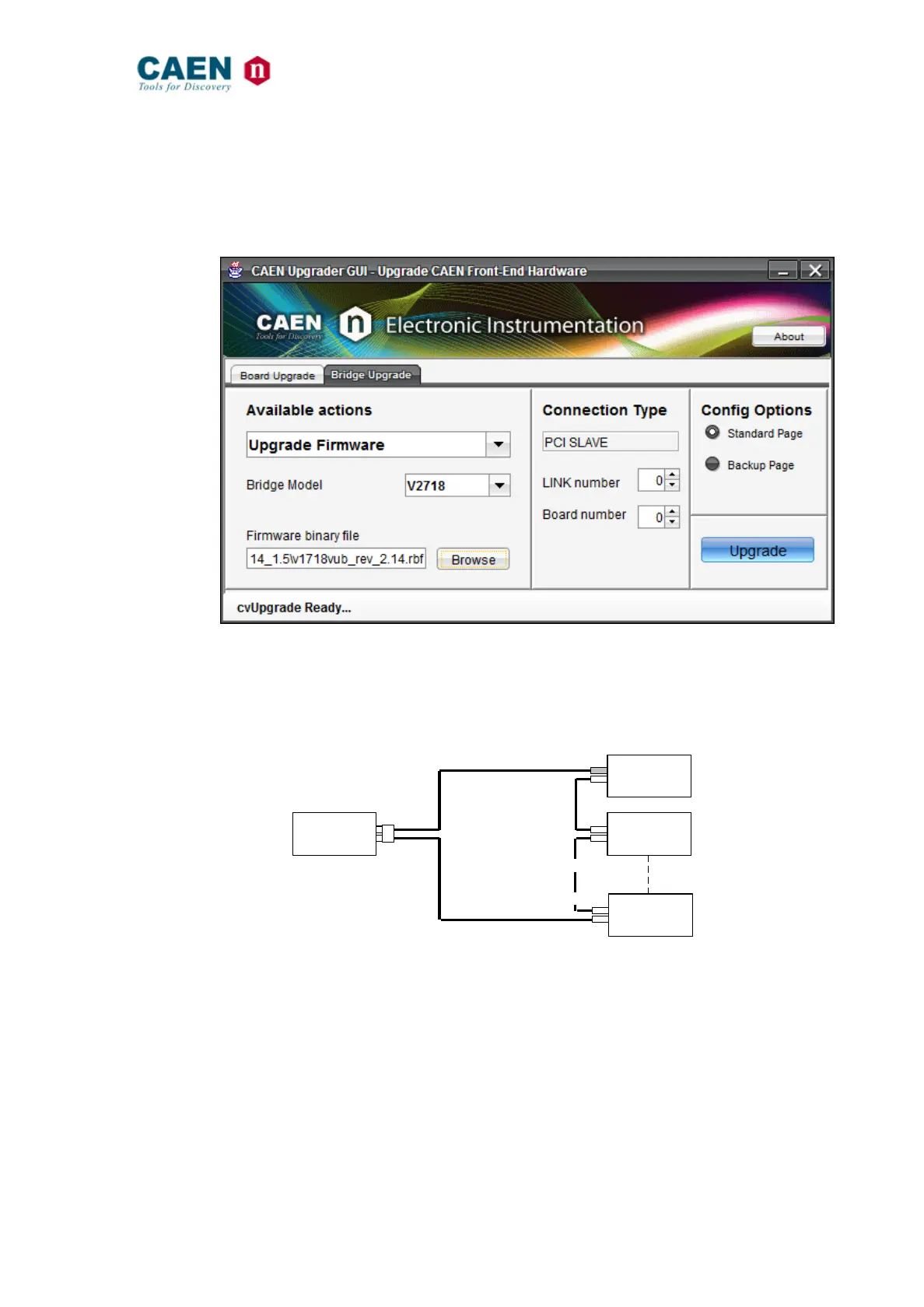
To upgrade the firmware of the boards, the user must select in the “Bridge Upgrade” tab
the “Upgrade Firmware” option, set the “Bridge Model”, configure the connection
parameters and point to the firmware file to be uploaded. The tab allows also to select
which FLASH page to be written.
Fig. 42: CAENUpgrader’s “Upgrade Firmware” view
The VME “Board number” parameter refers to the position of the V2718 in the CONET
network and ranges from 0 to 7, as shown the following picture:
Fig. 43: VME Index in the CONET network
the PCI/PCIe “Link number” parameters indicates which link of A2818 or A3818 is used;
the index starts from 0 (1
st
Optical link port in the 1
st
slot used). It is not known a priori
which is the first slot used (it depends on the motherboard of the PC used.).
IMPORTANT NOTE: if A2818 and A3818 are installed together, the A2818 have lower
index assigned.
It is suggested to upgrade the three devices in the following order: A2818 (or A3818),
A2719, V2718.



 To Next Page