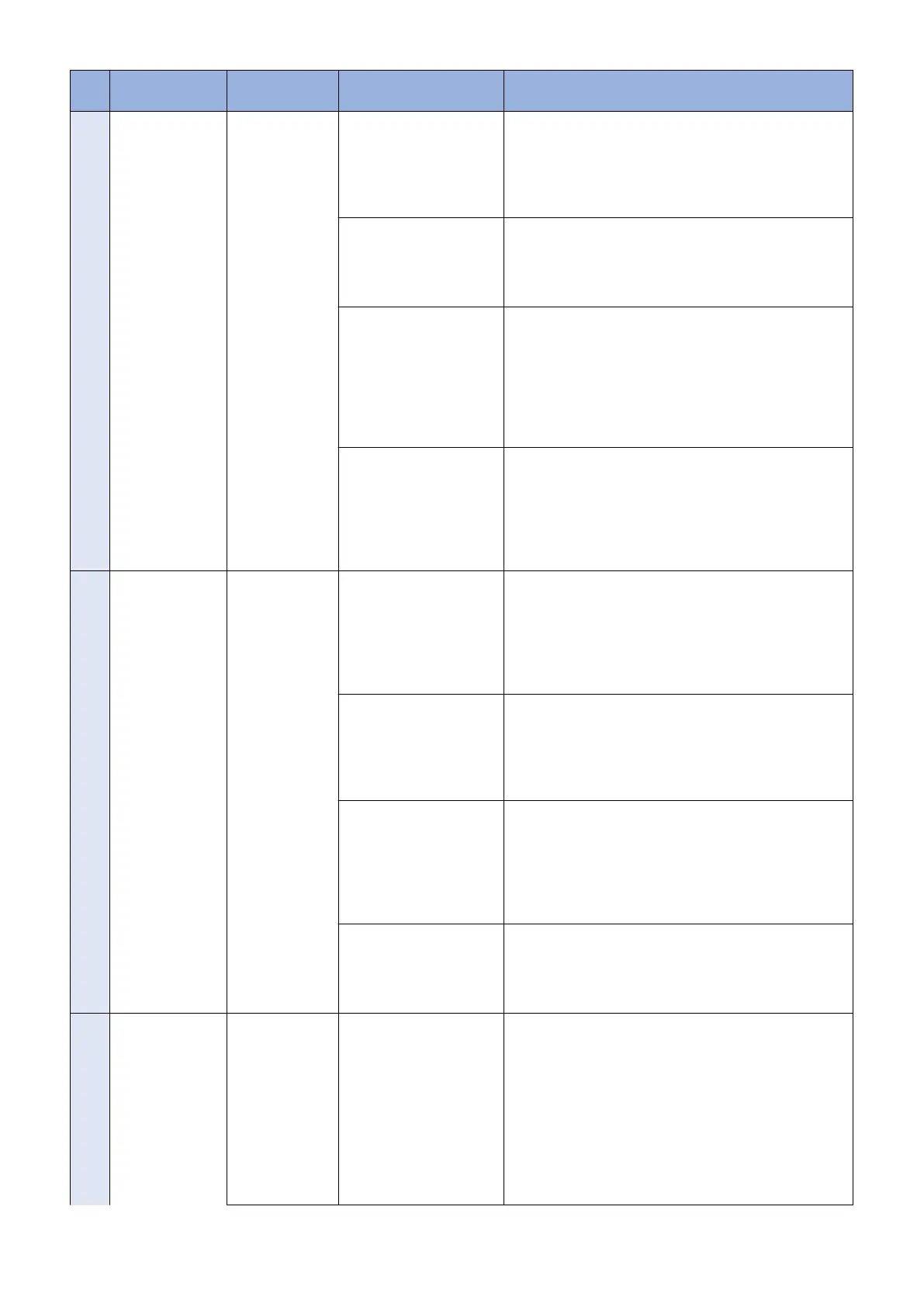
No. Messages Timing of dis-
play
Cause Remedy
9 Delivery Server :
Connect Failed
File Server : Re-
trieve Failed
Error Code: [xxxx]
Communication
test, etc. (commu-
nication test result
dialogue)
In the communication test,
failed to connect to the de-
livery server.
In SOAP communication,
failed to success after 1 min
retry.
Check the network environment of the device, and re-exe-
cute the job.
If it recurs, obtain the log etc. (Refer to "System Manage-
ment Operations" under “Version Upgrade”of "Updater" in
“Troubleshooting” of this manual.) and contact Support Div.
of the sales company.
ID and Password required
for proxy to connect to the
internet are not configured
in device.
Set proxy and restart the communication test.
If it recurs, obtain the log etc. (Refer to "System Manage-
ment Operations" under “Version Upgrade”of "Updater" in
“Troubleshooting” of this manual.) and contact Support Div.
of the sales company.
The access to the network
is limited.
Set the user environment to make the access to the follow-
ing domain available.
https://device.cdsknn.net/
http://cdsknn.net.edgesuite.net/
If it recurs, obtain the log etc. (Refer to "System Manage-
ment Operations" under “Version Upgrade”of "Updater" in
“Troubleshooting” of this manual.) and contact Support Div.
of the sales company.
Delivery server stopped. Contact Field Support Group in the sale company.
After confirmation that the delivery server has been re-
stored, restart the communication test.
If it recurs, obtain the log etc. (Refer to "System Manage-
ment Operations" under “Version Upgrade”of "Updater" in
“Troubleshooting” of this manual.) and contact Support Div.
of the sales company again.
10 Delivery Server :
Connect OK
File Server : Re-
trieve Failed
Error Code: [xxxx]
Delivery Server :
Connect OK
File Server : Re-
trieve Failed
Error Code:
[XXXX]
Due to no return of data for
the communication test,
time-out (in HTTP commu-
nication, no response for
1min) occurred. After that,
retried but failed to connect
to server.
Check the network environment of the device and re-exe-
cute the job.
If it recurs, obtain the log etc. (Refer to "System Manage-
ment Operations" under “Version Upgrade”of "Updater" in
“Troubleshooting” of this manual.) and contact Support Div.
of the sales company.
The network cable was dis-
connected during data
download in the communi-
cation test.
Reconnect the network cable and then restart the commu-
nication test.
If it recurs, obtain the log etc. (Refer to "System Manage-
ment Operations" under “Version Upgrade”of "Updater" in
“Troubleshooting” of this manual.) and contact Support Div.
of the sales company.
The file server stopped dur-
ing data download in the
communication test.
Contact the sales company's Support Department.
After confirmation that the delivery server has been re-
stored, restart the communication test.
If it recurs, obtain the log etc. (Refer to "System Manage-
ment Operations" under “Version Upgrade”of "Updater" in
“Troubleshooting” of this manual.) and contact Support Div.
of the sales company again.
Hash value in the commu-
nication test file is incorrect.
Check the network environment and re-execute the job.
If it recurs, obtain the log etc. (Refer to "System Manage-
ment Operations" under “Version Upgrade”of "Updater" in
“Troubleshooting” of this manual.) and contact Support Div.
of the sales company.
11 An error occurred.
Error Code: [xxx]
communication
test, etc. (main
screen)
The max value (space/file)
was exceeded and new log
was not accepted.
Normally an old log file is
deleted before the max val-
ue (space/file) is exceeded,
but error may occur due to
other element (e.g. I/O er-
ror).
Check if the log file exceeded the max value.
<Update log>
Max space: 128KB/file
Max file number: 4
<System log>
Max space: 512KB/file
Max file number: 4
If it recurs, obtain the log etc. (Refer to "System Manage-
ment Operations" under “Version Upgrade”of "Updater" in
“Troubleshooting” of this manual.) and contact Support Div.
of the sales company.
3. Technical Explanation (System)
63










 To Next Page