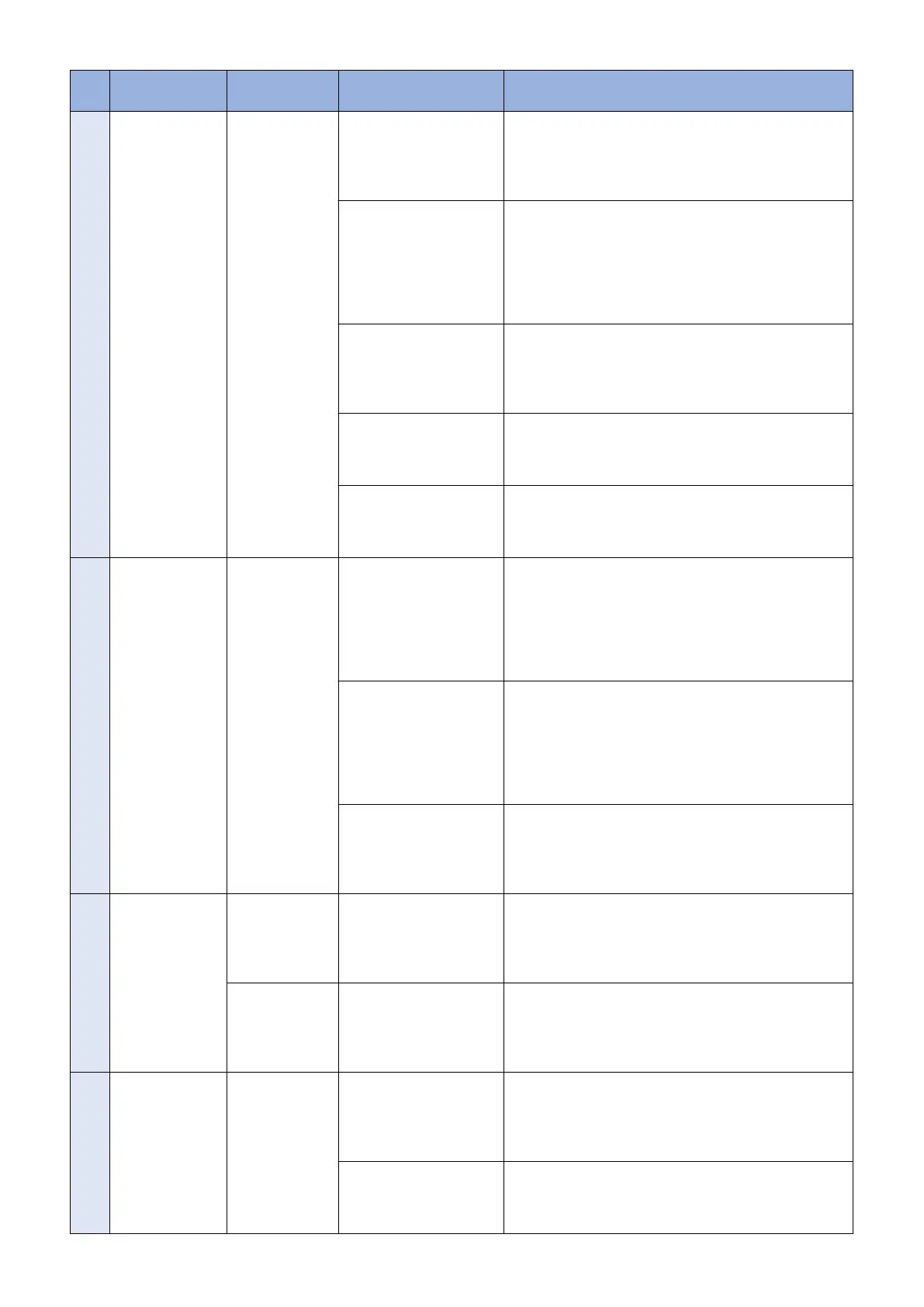
No. Messages Timing of dis-
play
Cause Remedy
12 An error occurred.
Check the Update
Firmware screen.
Manual update
(main screen) Au-
tomatic update
(main screen)
After the update, failed to
connect to the delivery
server.
Check the network environment and re-execute the job.
If it recurs, obtain the log etc. (Refer to "System Manage-
ment Operations" under “Version Upgrade”of "Updater" in
“Troubleshooting” of this manual.) and contact Support Div.
of the sales company.
After the update, delivery
server stopped.
Contact the sales company's Support Department. After
confirming restoration of the delivery server, re-execute the
job.
If it recurs, obtain the log etc. (Refer to "System Manage-
ment Operations" under “Version Upgrade”of "Updater" in
“Troubleshooting” of this manual.) and contact Support Div.
of the sales company.
After the update, the net-
work cable was disconnec-
ted.
Re-connect the network cable and re-execute the job.
If it recurs, obtain the log etc. (Refer to "System Manage-
ment Operations" under “Version Upgrade”of "Updater" in
“Troubleshooting” of this manual.) and contact Support Div.
of the sales company.
After the update, server re-
turned an error.
Obtain the log etc. (Refer to "System Management Opera-
tions" under "Version Upgrade"of "Updater" in "Trouble-
shooting" of this manual.) and contact Support Div. of the
sales company.
After the update, an internal
error occurred.
If it recurs, obtain the log etc. (Refer to "System Manage-
ment Operations" under "Version Upgrade"of "Updater" in
"Troubleshooting" of this manual.) and contact Support Div.
of the sales company.
13 Delivery Error
Error Code: [xxx]
UGW linkage
(Update Firmware
screen)
eRDS sent an order but Up-
dater failed to connect to
the server.
Conduct a communication test to analyze the cause of the
error. After solving the cause, resend the order from the
eRDS.
If it recurs, obtain the log etc. (Refer to "System Manage-
ment Operations" under “Version Upgrade”of "Updater" in
“Troubleshooting” of this manual.) and contact Support Div.
of the sales company.
The delivery server stop-
ped.
Contact the sales company's Support Department. After
confirming restoration of the delivery server, re-execute the
job.
If it recurs, obtain the log etc. (Refer to "System Manage-
ment Operations" under “Version Upgrade”of "Updater" in
“Troubleshooting” of this manual.) and contact Support Div.
of the sales company.
The scheduled data and
time acquired from delivery
server does not exist.
Do the delivery setting from UGW again.
If it recurs, obtain the log etc. (Refer to "System Manage-
ment Operations" under “Version Upgrade”of "Updater" in
“Troubleshooting” of this manual.) and contact Support Div.
of the sales company.
14 Delivery Error
Delivery Time
Delivery Firmware
Label
Delivery Firmware
version
Error Code: [ xxx ]
UGW linkage
(Update Firmware
screen)
The scheduled date and
time acquired from delivery
server was before current
time (15 or more min had
passed).
Do the delivery setting from UGW again.
If it recurs, obtain the log etc. (Refer to "System Manage-
ment Operations" under “Version Upgrade”of "Updater" in
“Troubleshooting” of this manual.) and contact Support Div.
of the sales company.
Immediate down-
load (Update
Firmware screen)
At the time of immediate
download, turned OFF and
then ON the power of de-
vice main body.
Re-execute the job.
If it recurs, obtain the log etc. (Refer to "System Manage-
ment Operations" under “Version Upgrade”of "Updater" in
“Troubleshooting” of this manual.) and contact Support Div.
of the sales company.
15 Applicable firm-
ware is not regis-
tered.
On-site (error dia-
logue)
At the user site, no latest
firmware exists.
This means the current firmware is the latest, so this error
has no impact.
But when the latest firmware to be retrieved must exist e.g.
released new firmware information has been notified, con-
tact Field Support Group in the sales company.
No applicable firmware ex-
ists on CDS, so the service
person can't select any ap-
plicable firmware.
Contact the sales company's Support Department.
3. Technical Explanation (System)
66










 To Next Page