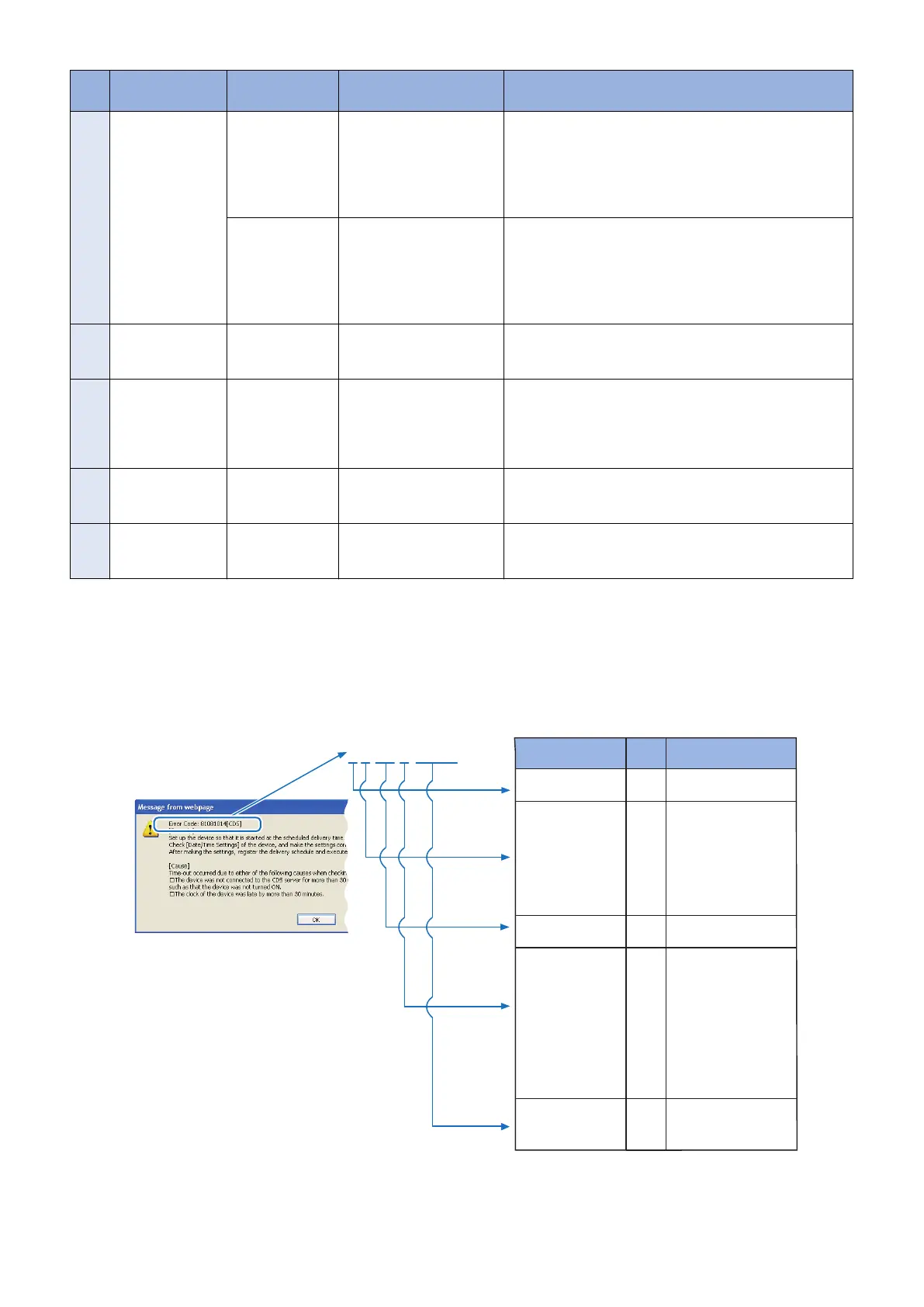
No. Messages Timing of dis-
play
Cause Remedy
16 Restart failed.
Turn the main pow-
er OFF and ON.
Manual update
(error dialogue)
An error occurred at the
time of the device restart.
After turning OFF and then ON the main power of the device,
re-execute the job.
If it recurs, obtain the log etc. (Refer to "System Manage-
ment Operations" under “Version Upgrade”of "Updater" in
“Troubleshooting” of this manual.) and contact Support Div.
of the sales company.
Automatic update
(error dialogue)
An error occurred at the
time of the device restart.
After turning OFF and then ON the main power of the device,
re-execute the job.
If it recurs, obtain the log etc. (Refer to "System Manage-
ment Operations" under “Version Upgrade”of "Updater" in
“Troubleshooting” of this manual.) and contact Support Div.
of the sales company.
17 Specify [E-Mail Ad-
dress] with up to 64
characters.
At the time of pe-
riodical update
setting
The specified E-mail ad-
dress exceeded 64 charac-
ters.
Specify E-mail address within 64 characters.
18 The following char-
acters cannot be
used for the [E-Mail
Address]:
, : ; “ ( ) [ ] < > \
At the time of pe-
riodical update
setting
The E-mail address was in-
cluding the characters
which could not be used.
Do not specify E-mail address with characters which cannot
be used.
19 Specify [Com-
ments] with up to
128 characters.
At the time of pe-
riodical update
setting
Comments exceeded 128
characters.
Specify comments within 128 characters.
20 The [Delivery Serv-
er URL] is incor-
rect.
In setting with the
deliver server
URL.
The specified deliver server
URL is wrong.
Enter the right URL(https://device.c-cdsknn.net/cds_soap/
updaterif)
● Explanation on Error Codes and Their Remedies
The following shows the error codes displayed on CDS error dialogs and the Control Panel of the device (local UI) and explanation
of those error codes.
How to read an error code
An error code consists of a number of eight digits (hexadecimal number) displayed on the UI.
84014 206
Code Value Contents
The first digit
Error field
8 Error
The second digit
Operator
0
1
2
3
4
5
6
Not defined.
CDS server
Updater
UGW
Service person
IT administrator (User)
Scheduled Update
The 3rd - 4th digits
Method category
xx Method
The 5th digit
Category code
0
1
2
3
3
5
6
7
A/B
F
Not categorized
Operation
I/O
Device
SOAP communication
HTTP communication
Socket communication
Other internal doces
Internal module
Local CDS
The 6 - 8th digits
Description code
000- See Error code list
Error Message dialogue
3. Technical Explanation (System)
67










 To Next Page