Remedy by Error Code
Remedy to Be Taken When an Error Code Starting with [81------] Is Displayed
The remedy for an error code whose first two digits are "81" is shown below.
1. Refer to “List of Error Codes Starting with 81” on page 68 / “List of Error Codes Related to Local CDS” on page
77, and try the remedy.
2. If the symptom is not resolved by performing the remedy shown in the error code list, report it to the support
department of the sales company with the following information.
• Time of occurrence
• Serial number of the device
Remedy to Be Taken When an Error Code Starting with a Number Other than [81------] Is Displayed
The remedy for an error code whose first two digits are not "81" is shown below.
1. Check the last four digits of the code, and try the remedy shown in “List of Error Codes Starting with a Number
Other than 81” on page 72/“Error Codes When Using the UGW-linked Function” on page 77.
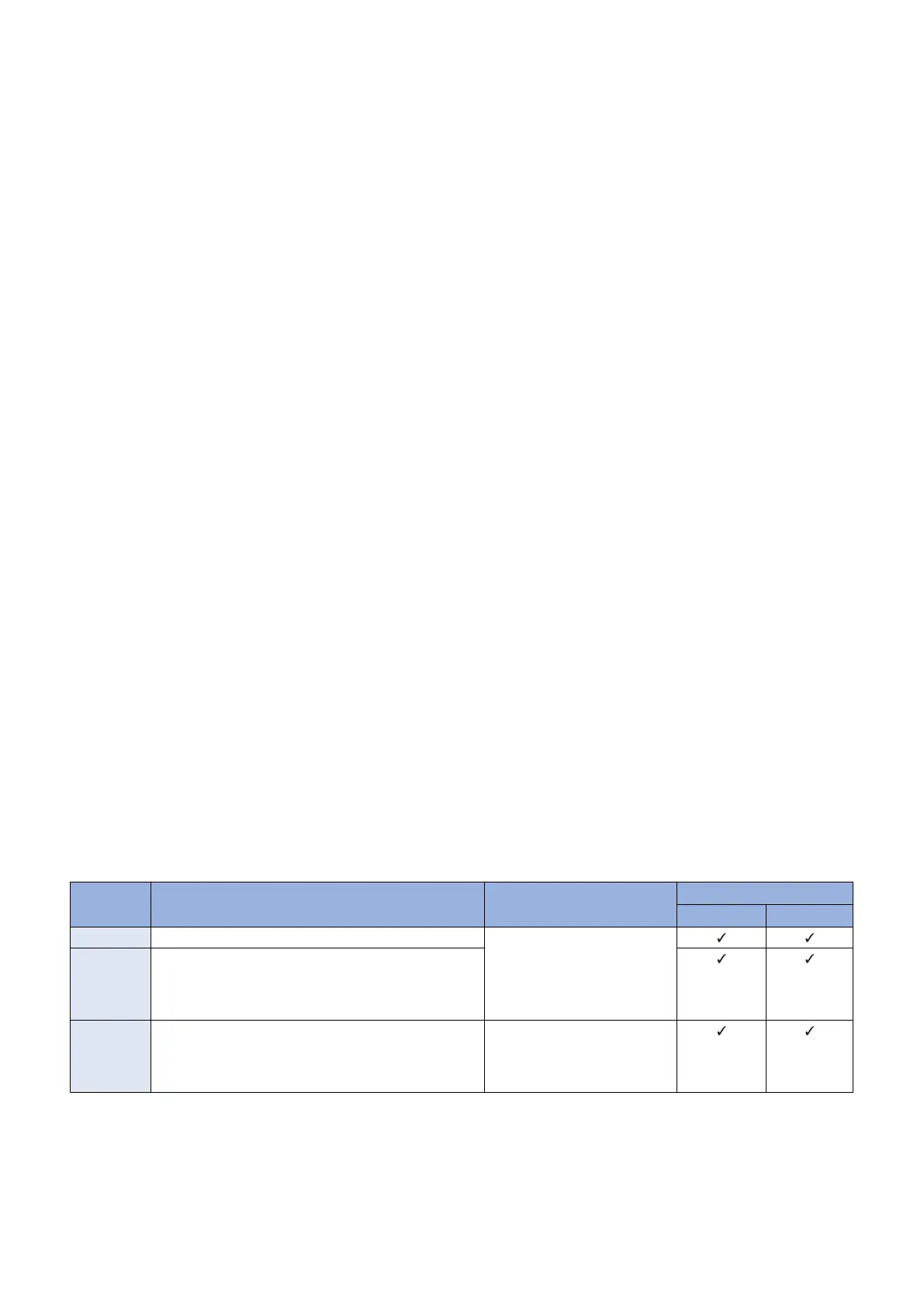
2. In the case of an error message with a check mark on the "Network" column of "Cause of error" in the error code
list, try the remedy shown below.
• Execute the operation again.
• Perform a communication test on the Touch Panel of the device.
• Check the status of the network equipment (disconnection of the LAN cable, etc.).
• Check the network settings of the device.
• Check that there is no restriction on the network environment of the site (e.g. restriction on communication at night).
• Check the proxy server of the customer. If it does not work properly, perform the remedy. If the problem still persists,
clear the cache of the proxy server.
3. If the symptom is not resolved by performing the foregoing remedy, report it to the support department of the sales
company with the following information.
• The generated error code
• The Debug log of the device
• The update log of the device (Set the log level to 4, and then collect the log.)
When an Error Code Not Included in the List of Error Codes Is Displayed
When an error code not included in the list of error codes is displayed, see “Error Codes Not Included in the Error Code List and
Remedy for Them” on page 78.
● Error Code List
List of Error Codes Starting with 81
The list of error codes starting with 81 is shown below. This error is related to the CDS server.
Report the error to the support department of the sales company with the time of occurrence and the serial number of the device.
Error Code Description Remedy Cause of error
CDS server UPDATER
81xx0001 No value is set in a mandatory data entry item Contact the support department
of the sales company.
(Attach information on the time
of occurrence and the serial
number of the device.)
81xx0002 In the case of [81xx0002] except follows. In a string type
of a data entry item, digit number and/or character type
is/are set against the regulations is displayed in the fol-
lowing cases:
81040002 • The number of digits of the registration ID or pass-
word is not 8.
• The registration ID or password includes characters
other than single-byte numeric characters.
Enter the correct ID and pass-
word for Special Firmware.
(User)
3. Technical Explanation (System)
68










 To Next Page