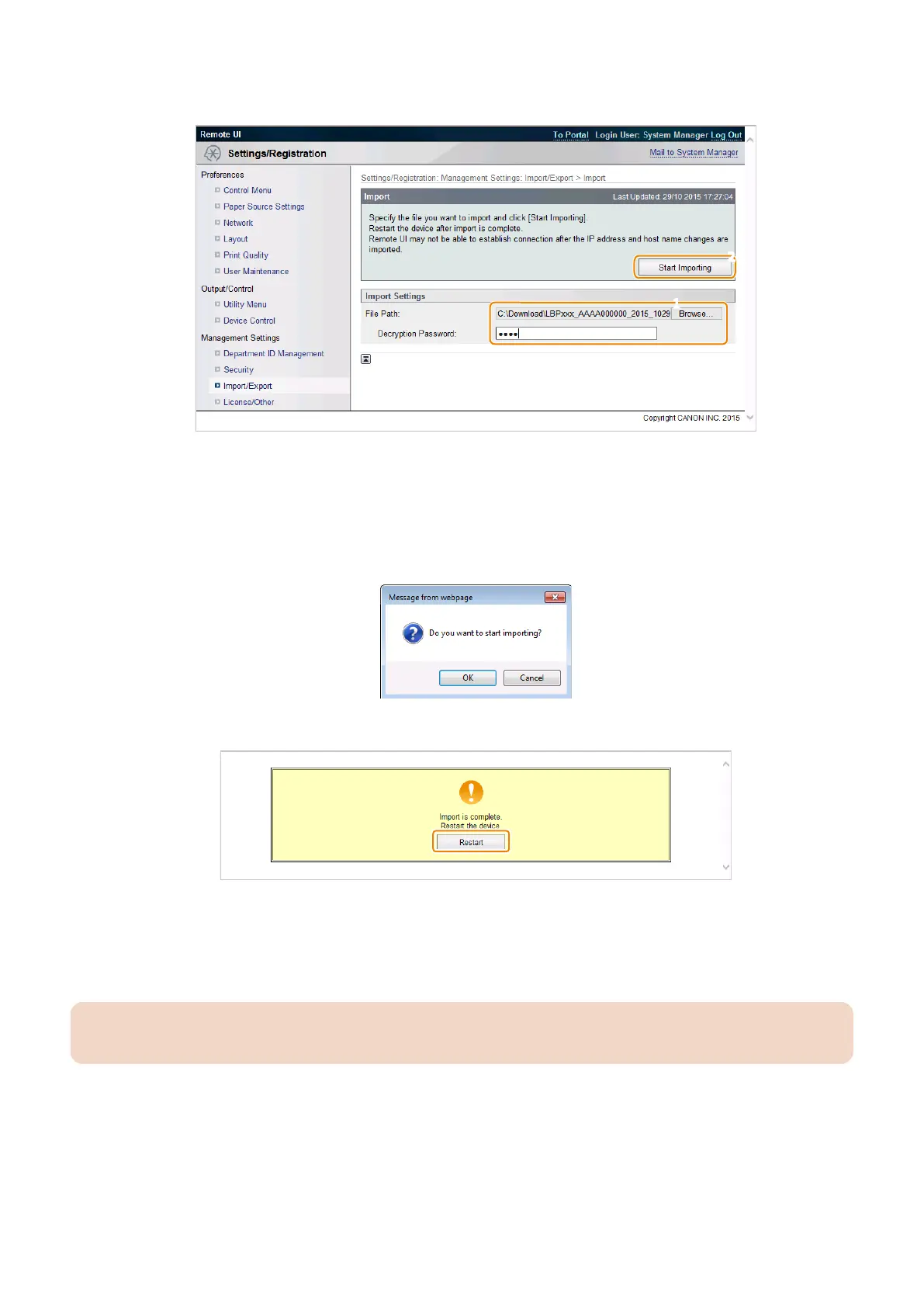
3. Configure the import setting, and click [Start Importing].
Entering the encryption password and clicking [Start Importing] imports the menu option data.
[Browse..]button
Click to select the file to import.
Decryption Password
Enter up to 32 alphanumeric characters for the password that was set when the file was exported.
4. A dialog box asking whether the user wants to execute import will appear. Click [OK].
5. A message will appear to indicate that the process has been completed. Click the [OK] button.
6. Restart the host machine, enter service mode, and then check that the setting information is reflected. This
completes the procedure for importing a setting information file.
7. Enter service mode, and set the following item to "0".
• SERVICE MODE > FUNCTION GR. > SMD-EXPT
CAUTION:
The [SMD-EXPT] setting can be specified either from the Control Panel or from the remote UI.
■ Backup/Restoration Procedure Using Service Mode
Service mode setting information can be backed up and restored by using the [Import/Export] function in service mode.
● Procedure for Exporting to a USB Flash Drive
Use the service mode function to save the service mode setting information to a USB flash drive.
With this model, service mode can be used from the Remote UI.
3. Technical Explanation (System)
84














 To Next Page