6
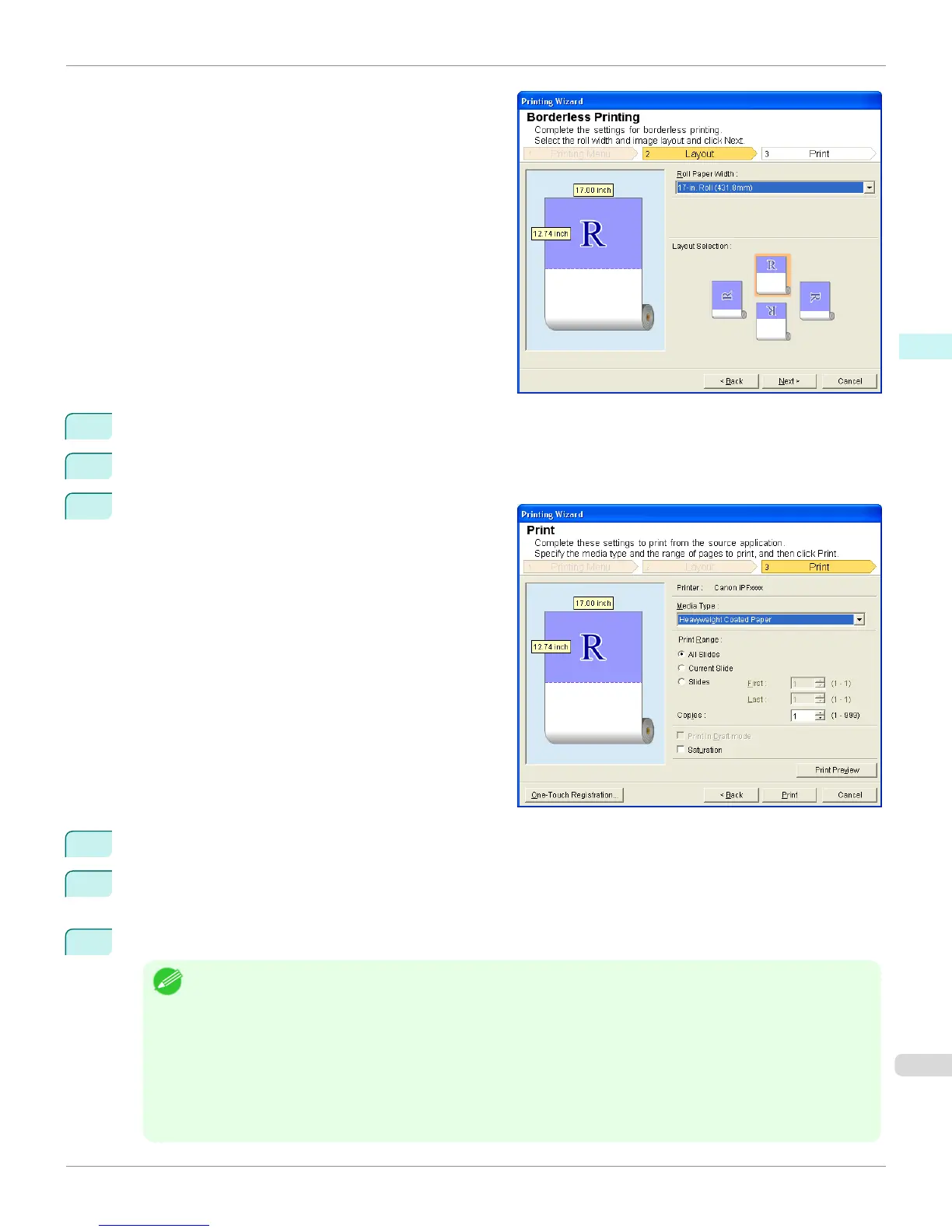
Select Roll Paper Width that is set in the printer.
7
Select Layout.
8
Select Next.
9
Select Media Type.
10
Select Print Range from All Slides, Current Slide, and Slides.
If Slides is selected, enter the slide number.
11
Enter Copies.
Note
• When Print in Draft mode is selected, printing is fast but the print quality is poor.
• When Saturation is selected, you can print posters, etc., vividly.
• Press the One-Touch Registration button to register the settings. This is useful for multiple printing using the same
settings.
•
Press the Print Preview button to display the preview screen. You can confirm and make changes to the layout in
the preview screen.
• The maximum length for Borderless Printing is the lesser of 14.22 times the roll paper width, or 18.0m.
iPF9400
Borderless Printing (PowerPoint) (Windows)
User's Guide
Windows Software Print Plug-In for Office
341


 To Next Page
 Loading...











