MV750i E, MV730i E, MV700i E, MV700 E, MV690 E
DISASSEMBLING
7
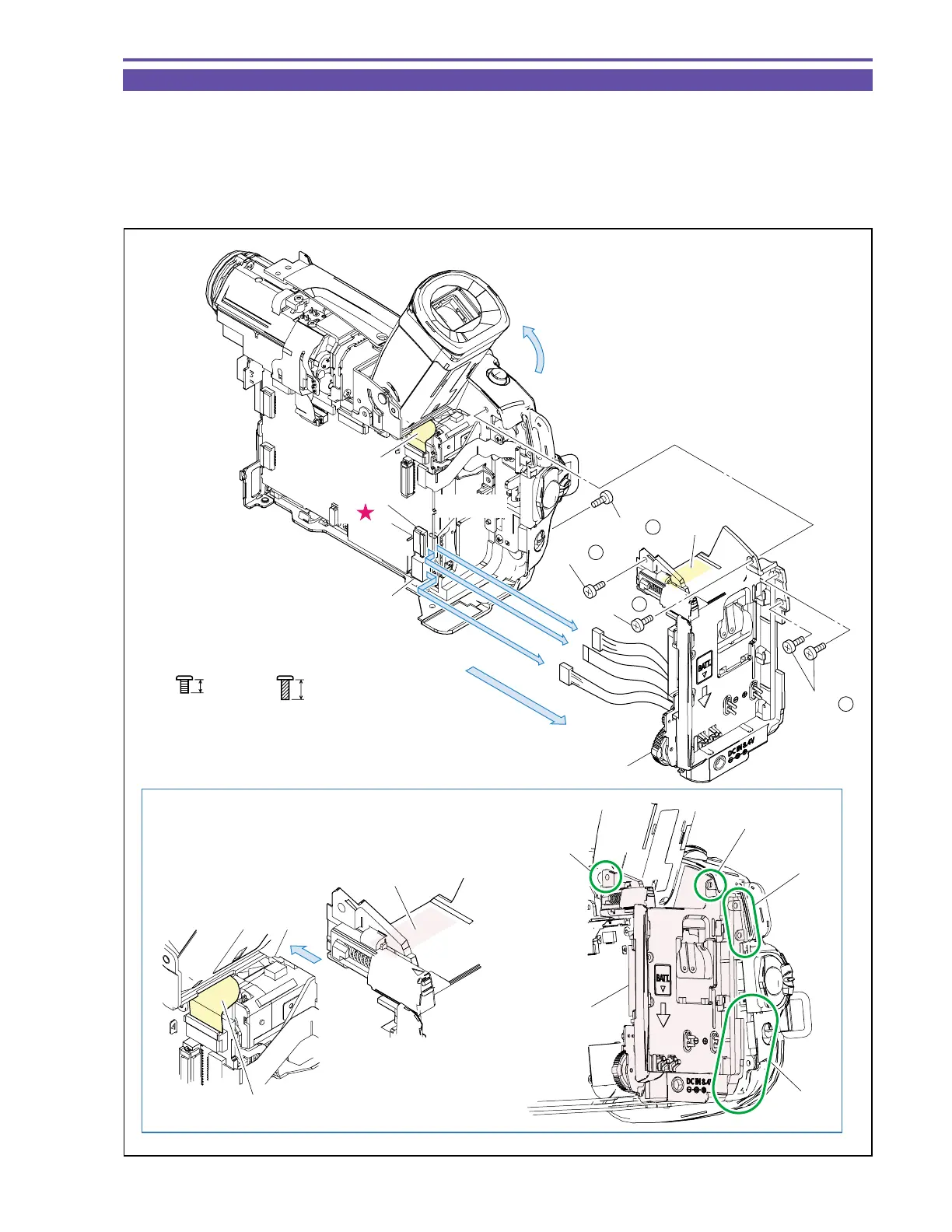
1-5 Separation of Rear Cover Unit
(1) Raise the CVF Unit, remove five screws (b × 2, c × 3), disconnect the CN100, CN3201 and CN3202, and detach the Rear Cover
Unit.
<Note on Reassembling>
(1) When mounting the Rear Cover Unit, put the part A on the CVF-MAIN FPC, and attach the parts B, C and D. Then, pressing the
part E gently toward the Recorder, mount the Left Cover. Pay attention not to break the FPC.
Fig. 4
3mm
Metal
M1.7
Metal
M1.7
(self tap)
4.5mm
b
c
Note on Reassembling (1)
CVF MAIN FPC
CVF-MAIN FPC
Rear Cover Unit
(1)
(1)
(1)
CN3201
CN3202
CN100
(1) - c
(1) - b
(1) - b
(1) - c
Part A
Part A
Part B
Part C
Part D
Part E
Rear Cover Unit
Rear Cover Unit



 To Next Page