MV750i E, MV730i E, MV700i E, MV700 E, MV690 E
DISASSEMBLING
28
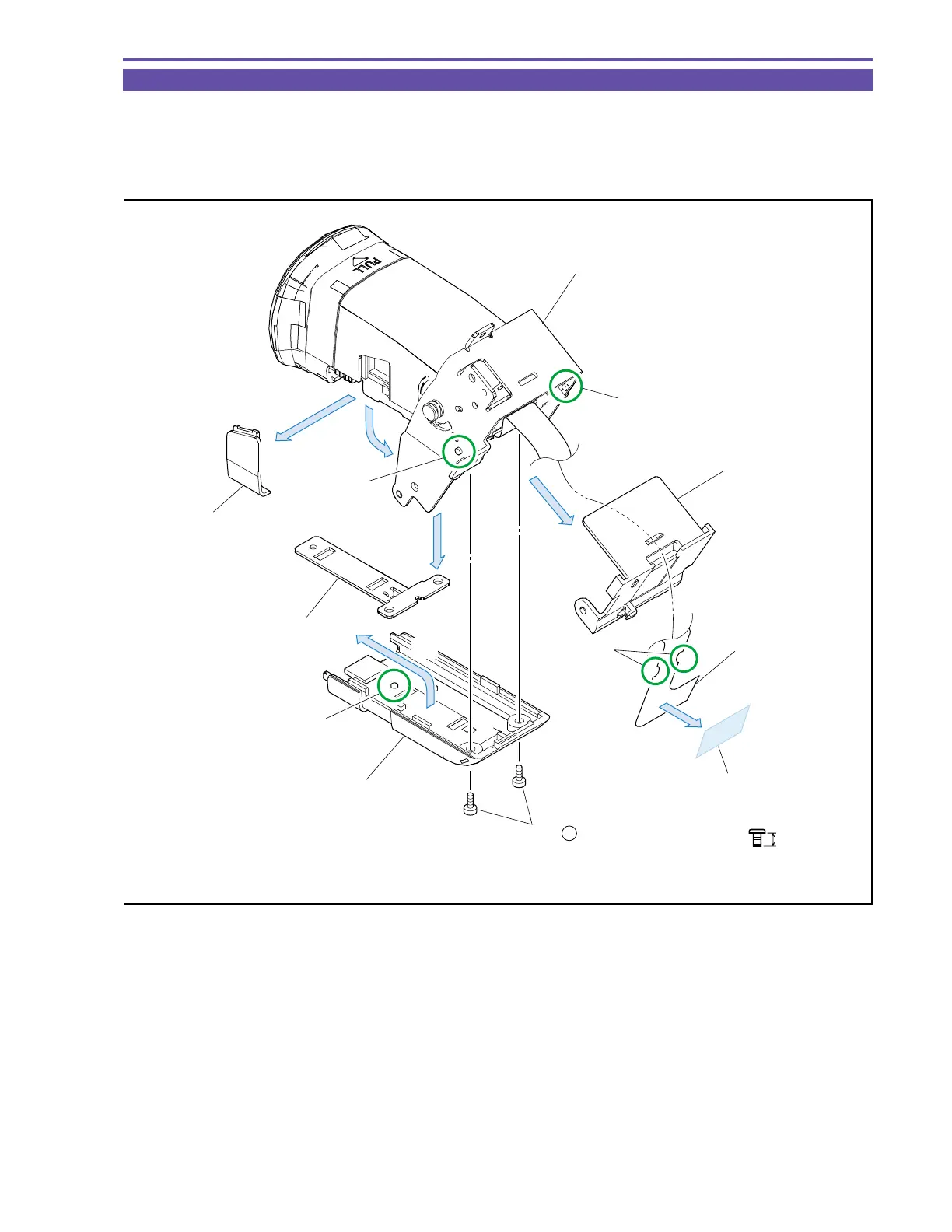
1-24 Disassembly of CVF Unit - 1
(1) Raise the CVF Hinge Ass’y in the arrow direction, and detach the Dust Cover.
(2) Remove the UL Tape, disengage the dowels A and B, separate the groove part C of CVF FPC, and detach the FPC Holder.
(3) Remove two screws (b × 2), and detach the CVF Bottom Cover.
(4) Disengage the dowel D and, while sliding, detach the CVF Click Plate.
Fig. 25
3mm
Metal
M1.7
b
(1)
(1)
(2)
(2)
(4)
(3)
CVF FPC
UL Tape (9 × 20)
FPC Holder
CVF Bottom Cover
Dowel B
Dust Cover
(3) - b
CVF Click Plate
Part C
Dowel A
Dowel D
CVF Hinge Ass'y



 To Next Page