MV750i E, MV730i E, MV700i E, MV700 E, MV690 E
DISASSEMBLING
27
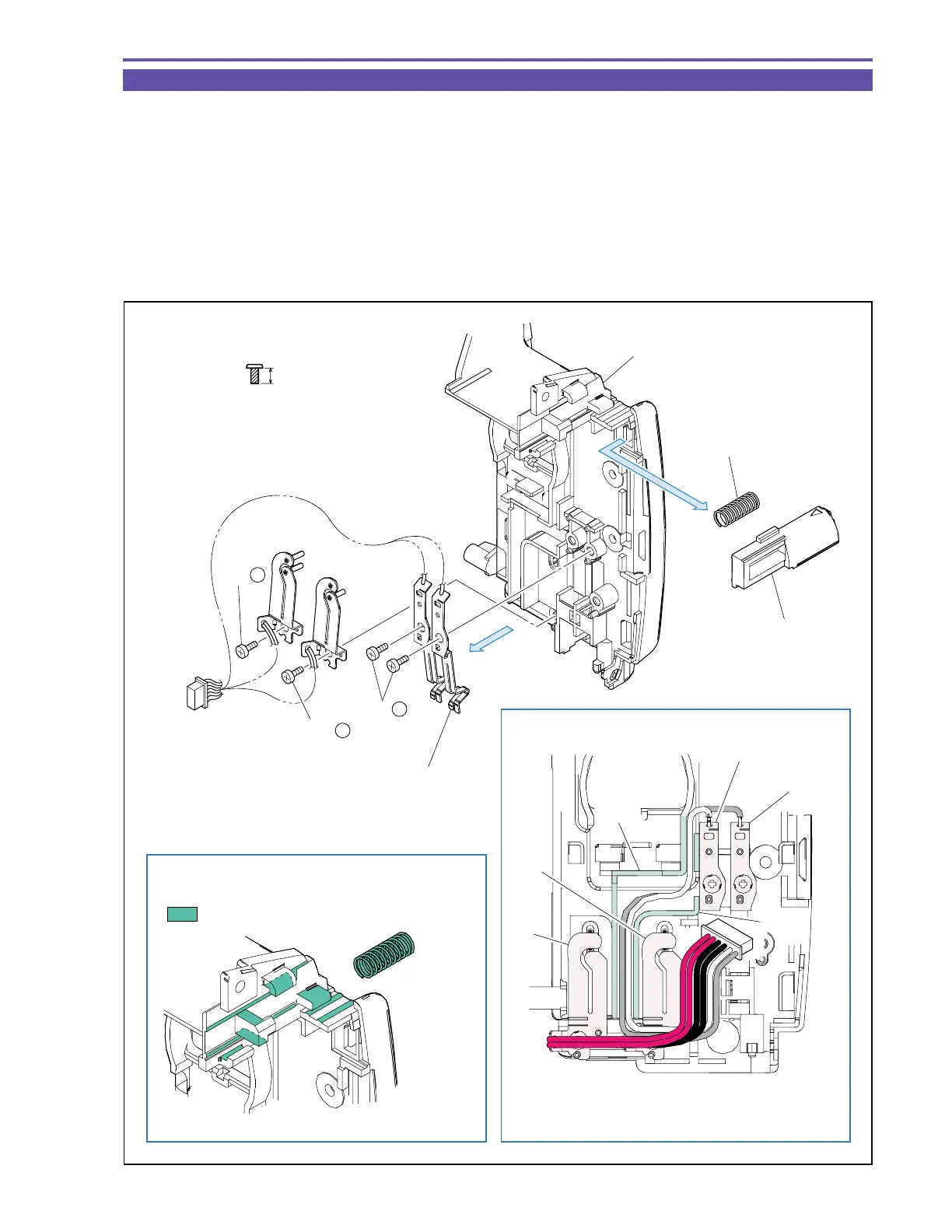
1-23 Disassembly of Rear Cover Unit - 2
(1) Remove four screws (l × 4), and detach the Batt Terminal Ass’y.
(2) Detach the Batt Eject Lever and Spring.
Note : Do not lose the Spring.
<Note on Reassembling>
(1) Mount the Batt Terminal Ass’y as illustrated.
<Instruction for Supply>
Sliding part of rail of Batt Eject Lever : Hanarl FL-778 (DY9-3026-010)
Spring : Hanarl FL-778 (DY9-3026-010)
Fig. 24
l
3.5mm
Metal
M1.7
(self tap)
Hanarl FL-778
Black
Red
Groove
(1)
(2)
(1) - l
(1) - l
(1) - l
Spring
Batt Terminal Ass'y
Batt Eject Lever
Rear Cover
Note on Reassembling (1)
Groove
Pass the white and gray wires through
groove of Rear Cover.
Instruction for Supply
White
Gray



 To Next Page