MV750i E, MV730i E, MV700i E, MV700 E, MV690 E
DISASSEMBLING
8
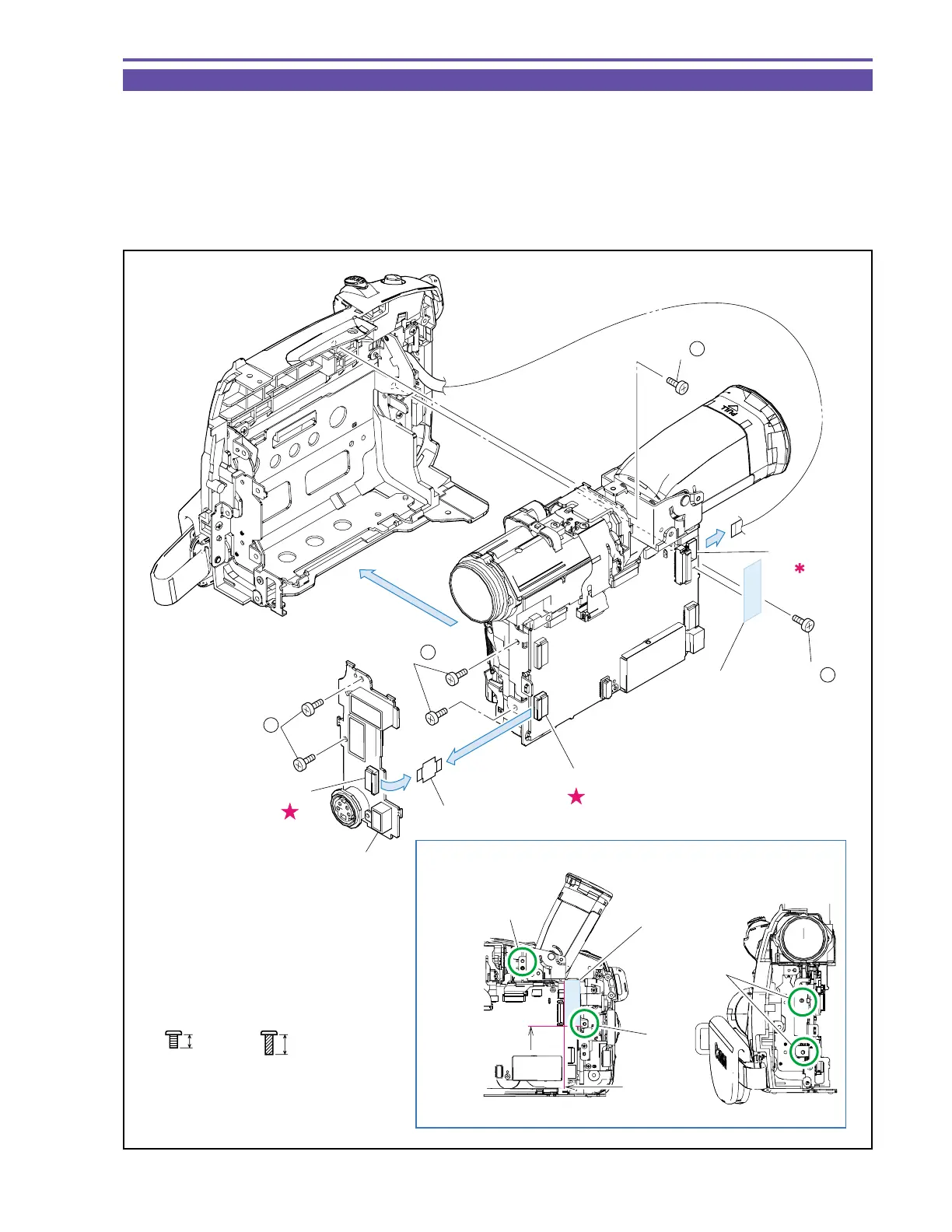
1-6 Separation of Left Cover Unit and JACK 2 P.C.B.
(1) Remove two screws (b × 2), disconnect the CN2102, and detach the JACK 2 P.C.B.
(2) Disconnect the CN91, and detach the JACK 2-MAIN FPC from the JACK 2 P.C.B.
(3) Remove four screws (b × 3, c × 1), disconnect the UL Tape and CN101, and detach the Left Cover Unit.
<Note on Reassembling>
(1) When mounting the Left Cover Unit, tighten four screws (b × 3, c × 1) in the illustrated order with the CVF Unit kept raised.
(2) Attach the UL Tape to the position indicated in the figure.
Fig. 5
3mm
Metal
M1.7
Metal
M1.7
(self tap)
4.5mm
b
c
Note on Reassembling (1),(2)
3
CN2102
CN91
(3) - c
(3) - b
(1) - b
(3)
(3)
(1)
(2)
JACK 2-MAIN FPC
Left Cover Unit
JACK 2 P.C.B.
Reference for
attachment
: ±1mm
Press until
held back
connector.
CN101
(3) - b
UL Tape
1
2
UL Tape(9 × 30)



 To Next Page