MV750i E, MV730i E, MV700i E, MV700 E, MV690 E
DISASSEMBLING
24
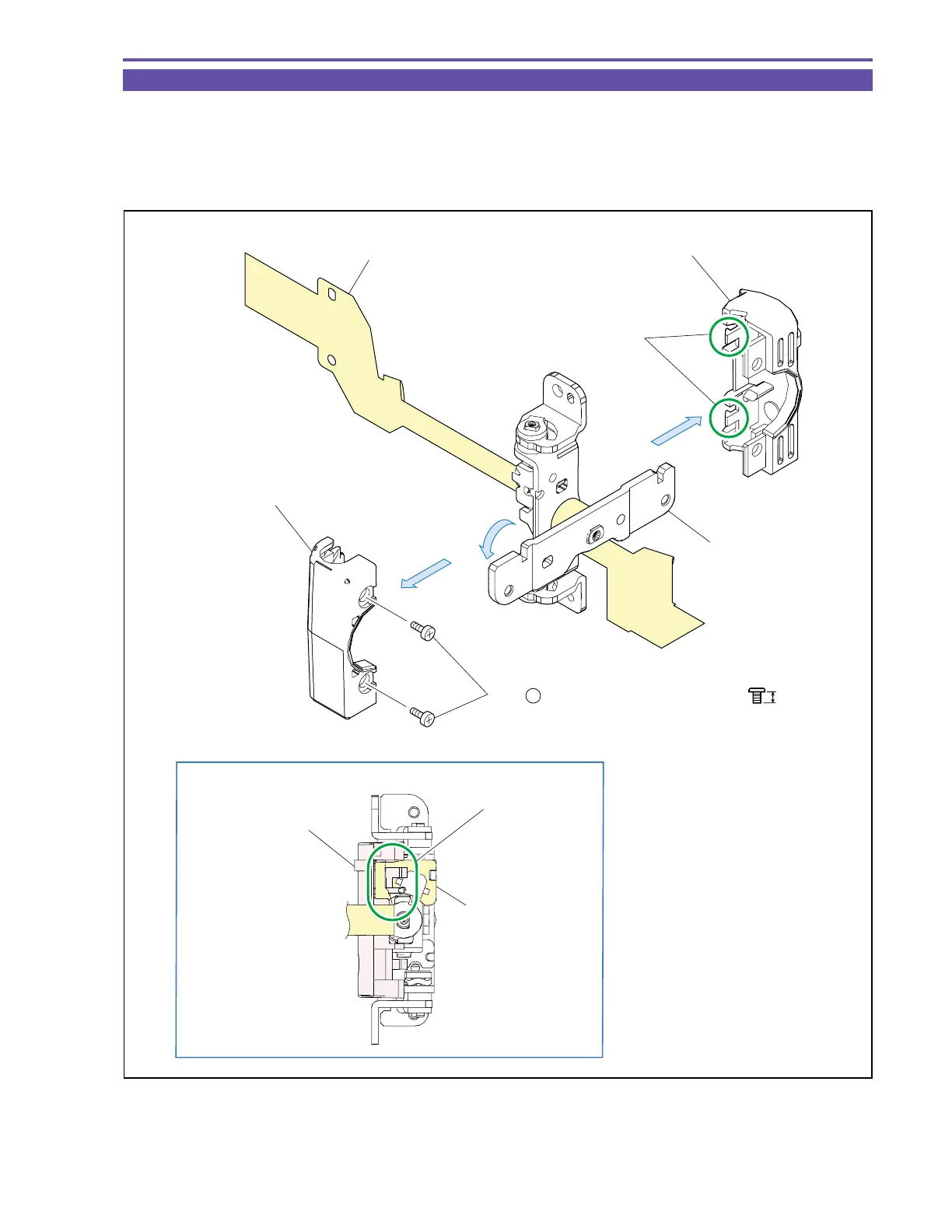
1-20 Disassembly of LCD Hinge Unit - 1
(1) Rotate the Hinge Bracket 90º, and remove two screws (f × 2).
(2) Disengage the claw A, and detach the Hinge Top Cover and Hinge Bottom Cover.
<Note on Reassembling>
(1) When mounting the Hinge Bottom Cover, pass the LCD FPC above the rib as illustrated.
Fig. 21
f
2.5mm
Metal
M1.7
(1) - f
LCD FPC Ass'y
Hinge Top Cover
Hinge Bracket
(2)
(1)
(2)
Hinge Bottom Cover
Craw A
LCD Bottom Cover
LCD FPC Ass'y
Rib
Note on Reassembling (1)



 To Next Page