MV750i E, MV730i E, MV700i E, MV700 E, MV690 E
DISASSEMBLING
19
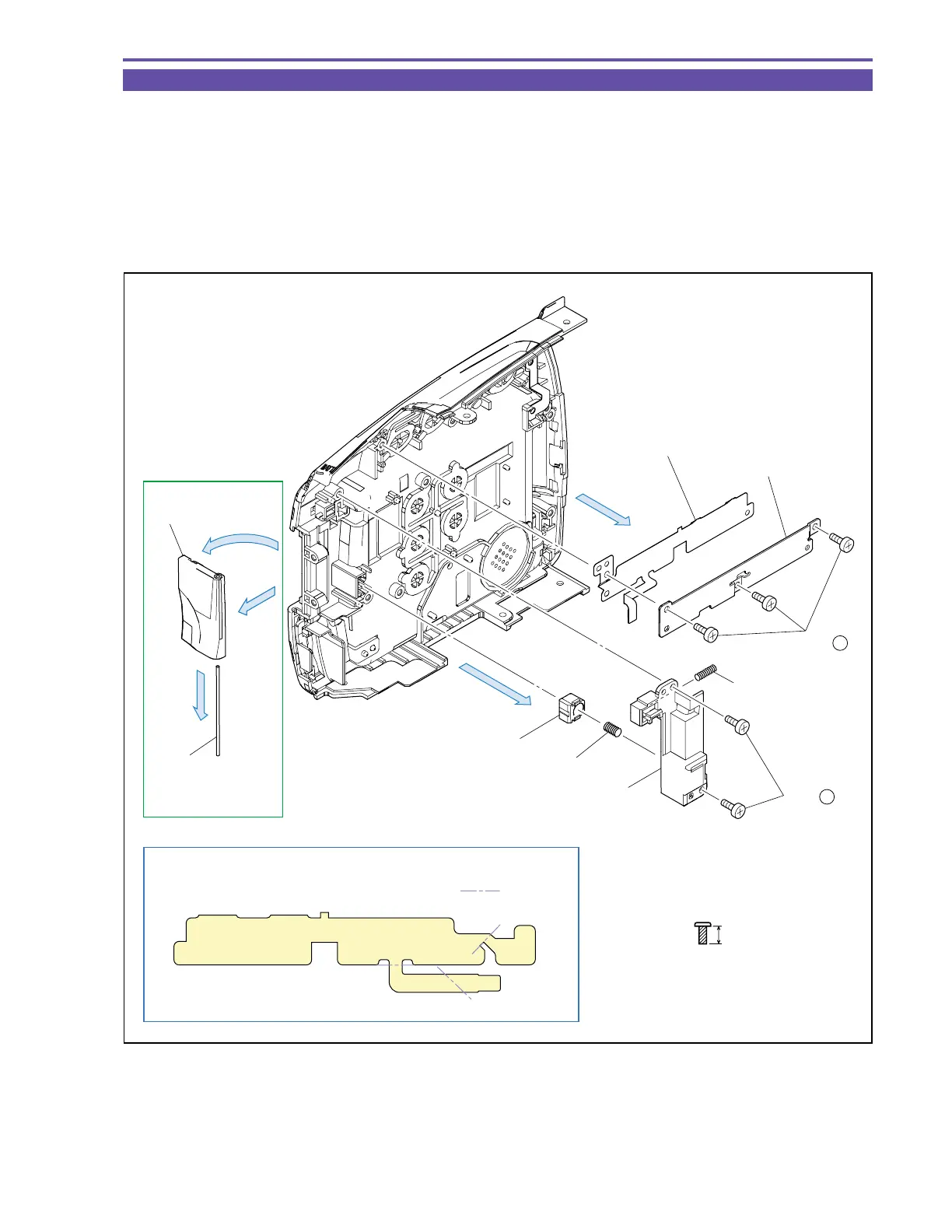
1-16 Disassembly of Right Cover Unit - 1
(1) Open the Card Cover, and detach the Card Cover and Shaft (MV750i E, MV730i E only).
(2) Remove three screws (g × 3), and detach the RR FPC Holder and RR KEY FPC.
(3) Remove two screws (g × 2), and detach the LCD Lock Holder, Spring A (Large), LCD Lifter and Spring B (Small).
Note : Do not lose the Spring.
<Note on Reassembling>
(1) Before using a service part of RR KEY FPC, process it so as to bend permanently at the illustrated position.
(2) After mounting the Card Cover, close it.
Fig. 16
g
4mm
Metal
M1.7
(self tap)
(2) - g
(3) - g
Open
(1)
(3)
(2)
RR KEY FPC
RR FPC Holder
Spring B (Small)
LCD Lifter
Spring A (Large)
LCD Lock Holder
Outer fold
Note on Reassembling (1)
Card Cover
Open
Shaft
(1)
(1)
MV750i E,
MV730i E only



 To Next Page