MV750i E, MV730i E, MV700i E, MV700 E, MV690 E
GENERAL DESCRIPTION OF PRODUCT
25
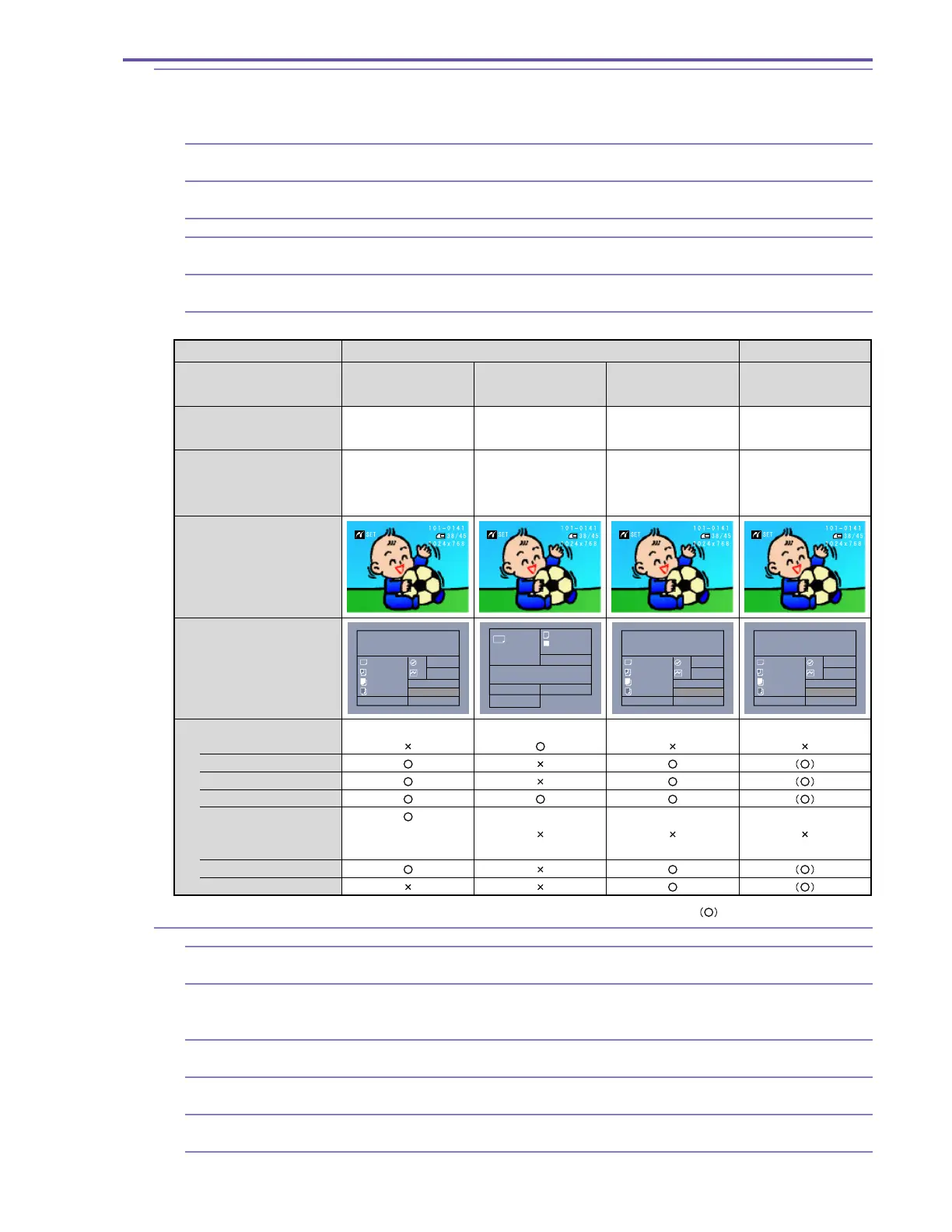
6-11 Direct print (MV750i E, MV730i E only)
Still images recorded on memory cards can be easily printed by connecting to (sold separately)
card photo printers CP-200/300, Camera Direct Printer compatible BJ printers BJ-i470D/i450
with supplied IFC-300PCU interface cable. DPOF print setup support (max. 200 images)
6-11-1 Printable images Only the still images which have been recorded on the SD memory cards or MultiMediaCards by
the MV750i E, MV730i E.
6-11-2 Print format Single image/8-image print (layout of 8 pictures of same image: only when the card size paper
tray has been installed in the CP200/300). Printing not available from index screen.
6-11-3 Trimming Not possible
6-11-4 Date printing Possible (when connected to PictBridge compatible printer. However, except the CP-200 and
CP-300.)
6-11-5 Number of print copies Easy Print : 1 to 99 sheets
DPOF printing : Max. 200 images, 1 to 99 each
6-11-6 Print systems
6-12 Other
6-12-1
Consecutive shooting mechanism
Can be used starting in Recording Pause or Stop mode, or starting with the power off. This does
not apply to cases where the cassette has been removed.
6-12-2 Automatic stop function When forward still image playback is continued for approx. 5 minutes, or reverse still image
playback is continued for approx. 5 minutes. When a condensation warning is displayed. When
the tape end or beginning is reached.
6-12-3 Power automatic stop function When Recording Pause continues for approx. 5 min. When the battery voltage falls below a
specified value.
6-12-4 Time code Automatically written during recording. Time code values range from 0:00:00:00 to 7:59:59:24
(hours:minutes:seconds:frames).
6-12-5 World clock display Set reference city (city of time clock setting) and select name of city when shooting. Date and
time are automatically adjusted to local date and time, and recorded in data code.
6-12-6 Speaker Built-in, volume control provided
(When card size paper
is used)
: When the printer is supported
Print manufacturer
Printer specifications
Suitable printer
When the printer is
connected
DPOF printing screen
Printer specifications when
connected to MV750i E, MV730i E,
MV700i E, MV700 E, MV690 E
(Controlled at printer side)
Canon Other manufacturer
CP specifications
+
PictBridge specifications
CP-200 / 300
PictBridge specifications
BJ Photo
specifications only
BJ-S830D / S530D /
S820D / i70
BJ camera direct
specifications
BJ Photo specifications
+
PictBridge specifications
BJ-i470D / i450
PictBridge specifications
PictBridge specifications
only
PictBridge specifications
Printing functions
Paper setting
Paper size
Paper type
Borders/no borders
8-of-1 screen layout
Image optimizing
Date printing
PRINT ALL MARKED IMAGE
CARD#1
CARD
BORDER
LESS
STYLE
CANCELOK
RESUME
98
DEFAULT
DEFAULT
PAPER
DEFAULT
RESUME
CANCEL
PRINT
PRINT ALL MARKED IMAGE
OFF
OFF
98
DEFAULT
DEFAULT
PAPER
DEFAULT
RESUME
CANCEL
PRINT
PRINT ALL MARKED IMAGE
OFF
OFF
98
DEFAULT
DEFAULT
PAPER
DEFAULT
RESUME
CANCEL
PRINT
PRINT ALL MARKED IMAGE
OFF
OFF



 To Next Page