MV750i E, MV730i E, MV700i E, MV700 E, MV690 E
GENERAL DESCRIPTION OF PRODUCT
30
MENU INDICATION PAL MODEL REMARKS
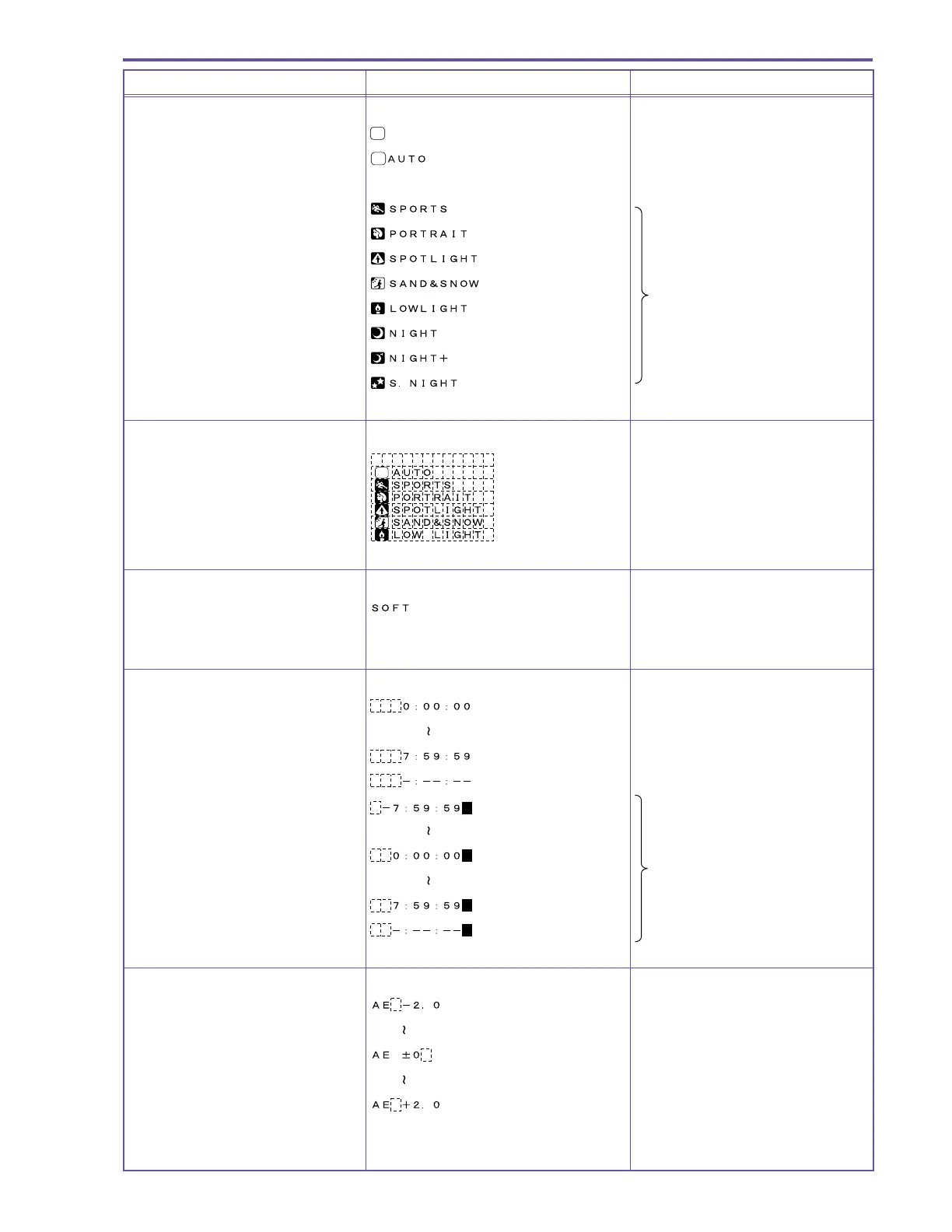
Program AE mode display
Full Auto mode is selected
Always displayed
Auto mode is selected
A
Displayed for approx.
4 seconds and then turns OFF.
Sports mode is selected
Portrait mode is selected
Spotlight mode is selected
Surf & Snow mode is selected After displayed for 4 seconds,
Low Light mode is selected
only characters are displayed.
Night mode is selected
When the Night+ mode is selected* MV750i E only
Super Night mode is selected*
MV750i E only
Program AE mode menu
A
Skin detail mode display
Skin detail mode is selected
Skin detail mode is not selected No display
Tape counter display
Time code display
Not entered
Zero Set Memory
M
M
MV750i E, MV730i E only
M
Not entered
M
AE shift compensation display
Minimum exposure
compensation value
Default setting
Maximum exposure value
During Full Auto No display



 To Next Page